
What is the best way to keep your cryptocurrency safe? In short, keep long-term coins in a wallet you control, guard the recovery phrase offline, lock every account with strong 2FA, and check each payment before you send it. This guide walks through those steps one by one, in the order that protects the most money first.
You will also see where crypto really got lost in 2025, which is mostly through scams rather than clever hacks. By the end, you will have a simple plan for where each part of your crypto should live and what to do if something goes wrong.
In this guide:
- The 10 best ways to keep your cryptocurrency safe, from wallet choice to privacy
- Where to keep each amount: exchange, hot wallet, hardware wallet or multisig
- How to protect a seed phrase and why SMS codes are a weak spot
- The scams that took the most money in 2025, with real figures
- What to do in the first hour if your wallet or account is hacked
10 Best Ways to Keep Your Cryptocurrency Safe in 2026
Crypto works like cash in your hand. There is no bank to call and no chargeback, so a payment you send by mistake usually cannot be reversed. Whoever holds the private key controls the coins. That is why safety rests on you, and the good news is that a few habits cover most of the risk.
Here are the 10 steps, starting with the ones that matter most.
1. Choose the Right Crypto Wallet for Each Amount
The majority of crypto holders use a crypto wallet to store their coins in a safe way. When you plan to invest in Bitcoin or any other coin, you usually start by opening an account on a crypto exchange. However, buying is only the first step. You then need to keep your coins in the safest place, and that is where a crypto wallet comes in.
A wallet does not hold coins. It holds the private keys that let you move them. Every wallet falls into one of two groups:
- Hot wallet: Hot wallets work with the internet, so they act as online storage. Payments are quick and easy. Since they are always connected, there is a higher chance of threats such as malware and phishing.
- Cold wallet: Cold wallets keep the keys offline. Most large holders and businesses prefer cold wallets for long-term savings, because hackers cannot reach a key that never touches the internet. You still need to protect the device and its backup.
Wallets also come in different forms. Each one has a different risk and a different best use:
| Wallet form | Hot or cold | Main risk | Best for |
| Mobile wallet | Hot | Lost phone, fake apps, phishing links | Daily spending and small amounts |
| Desktop wallet | Hot | Malware and keyloggers on the computer | Regular users on a clean, updated PC |
| Web or browser wallet | Hot | Fake sites, bad browser add-ons, drainer approvals | Using DeFi and Web3 apps |
| Hardware wallet | Cold | Buying a tampered device, losing the seed phrase | Long-term savings |
| Paper wallet | Cold | Paper lost, damaged or copied | Mostly outdated; a seed phrase backup on paper or metal is the modern use |
A desktop wallet is an app installed on a PC or laptop running Windows, Mac or Linux. As a must, keep the system updated and run trusted anti-virus and anti-malware software. A web wallet runs in your browser, so add security features such as two-step login and alerts to your email or phone. Only install wallet add-ons from the official store link on the maker’s own site. In December 2025, a hacked update of the Trust Wallet Chrome extension drained about $8.5 million from 2,520 wallets before a clean version replaced it.
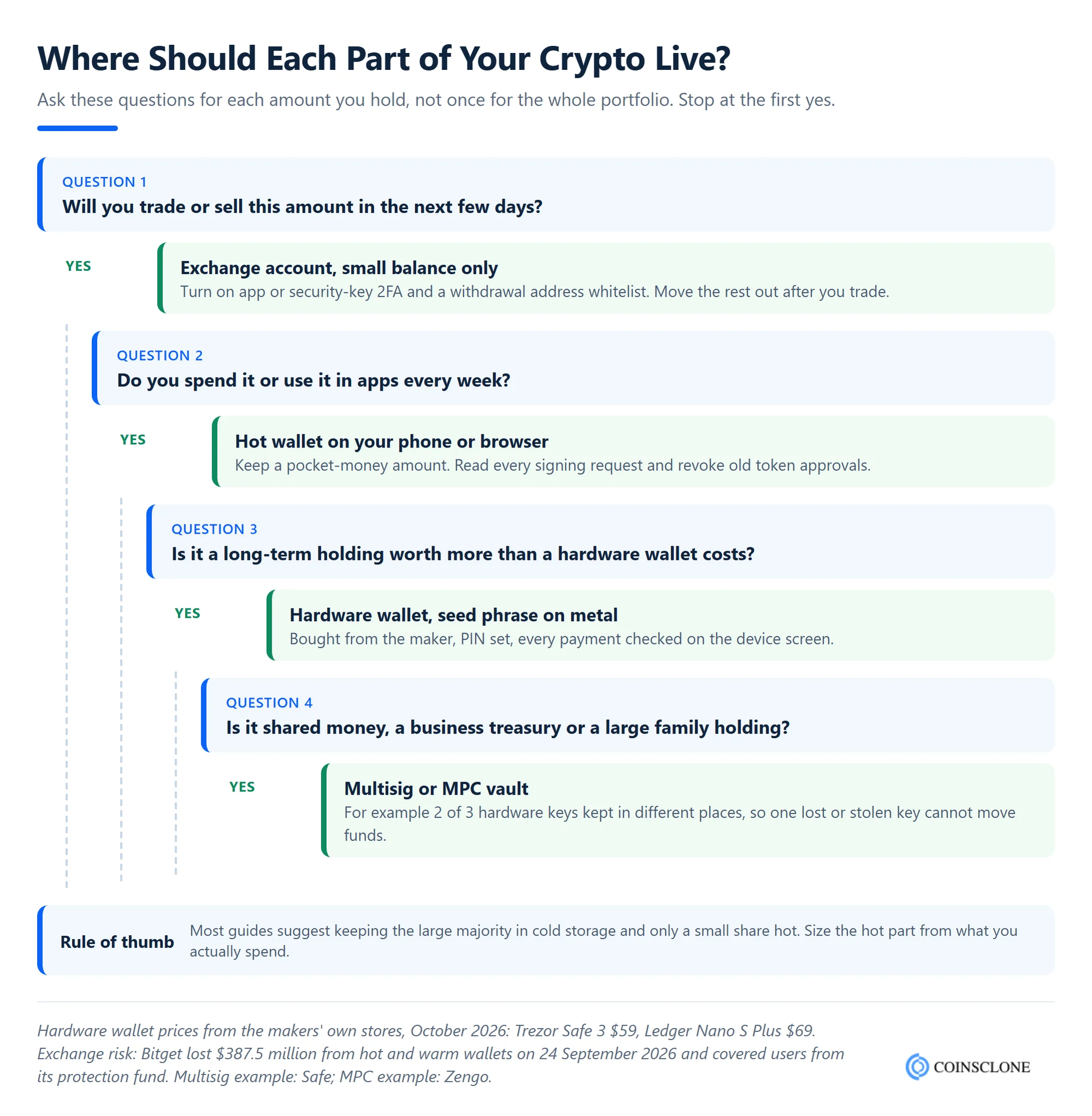
The best setup is not one wallet but a split. The decision tree below shows where each part of your crypto should live.
For a full side-by-side of every wallet design, including MPC, multisig and smart wallets, see our guide to the types of crypto wallets.
2. Keep Long-Term Holdings in a Hardware Wallet
A hardware wallet is a small device, about the size of a USB stick or a phone, that keeps your private keys offline. You connect it to a phone or computer only to approve a payment. Even if that computer has malware, the key never leaves the device. This makes it the best choice for coins you plan to hold for months or years.
Hardware wallets are not expensive. On their makers’ own stores in October 2026, the Trezor Safe 3 costs $59 and the Ledger Nano S Plus costs $69, while touchscreen models such as the Ledger Stax reach $399. If you hold more than a few hundred dollars for the long term, one device pays for itself.
To use one safely:
- Buy from the maker: Order from the official store or a listed reseller. Never buy a used device or one with a seed phrase already filled in.
- Set a strong PIN: If someone steals the device, the PIN stops them from using it.
- Check on the device screen: Always confirm the address and amount on the wallet’s own screen, not only on your computer. A hacked app can show one address while sending to another.
- Update the firmware: Use the maker’s own app for updates, and only after checking the release on its site.
3. Protect Your Seed Phrase Offline
When you set up a wallet, it shows you a recovery phrase (also called a seed phrase) of 12 to 24 words. These words can rebuild your whole wallet on any device. So anyone who sees them can take your coins, and if you lose them along with your device, your funds are gone for good.
Treat the seed phrase like the key to a safe:
- Never store it digitally: No photos, no notes app, no cloud drive, no email to yourself. Malware and cloud breaches look for exactly these files.
- Write it on paper or metal: A steel backup plate survives fire and water far better than paper. Keep it somewhere private and secure.
- Keep it apart from the device: If a thief finds both the hardware wallet and the phrase in one drawer, the PIN no longer helps.
- Never type it into a website: No real support team, exchange or wallet maker will ever ask for it. Anyone who does is a scammer.
For extra safety, many hardware wallets let you add a passphrase, often called a 25th word. It creates a hidden wallet that the seed phrase alone cannot open. Store the passphrase separately, and test your recovery before you rely on it, because losing it also means losing the funds.
This is also the right way to think about the old paper wallet. Paper wallets printed a private key as a QR code. They are offline and cannot be hacked remotely, but they are hard to spend from and easy to lose. Today, the paper (or metal) backup of a seed phrase does the same job far better.
4. Keep Only What You Trade on an Exchange
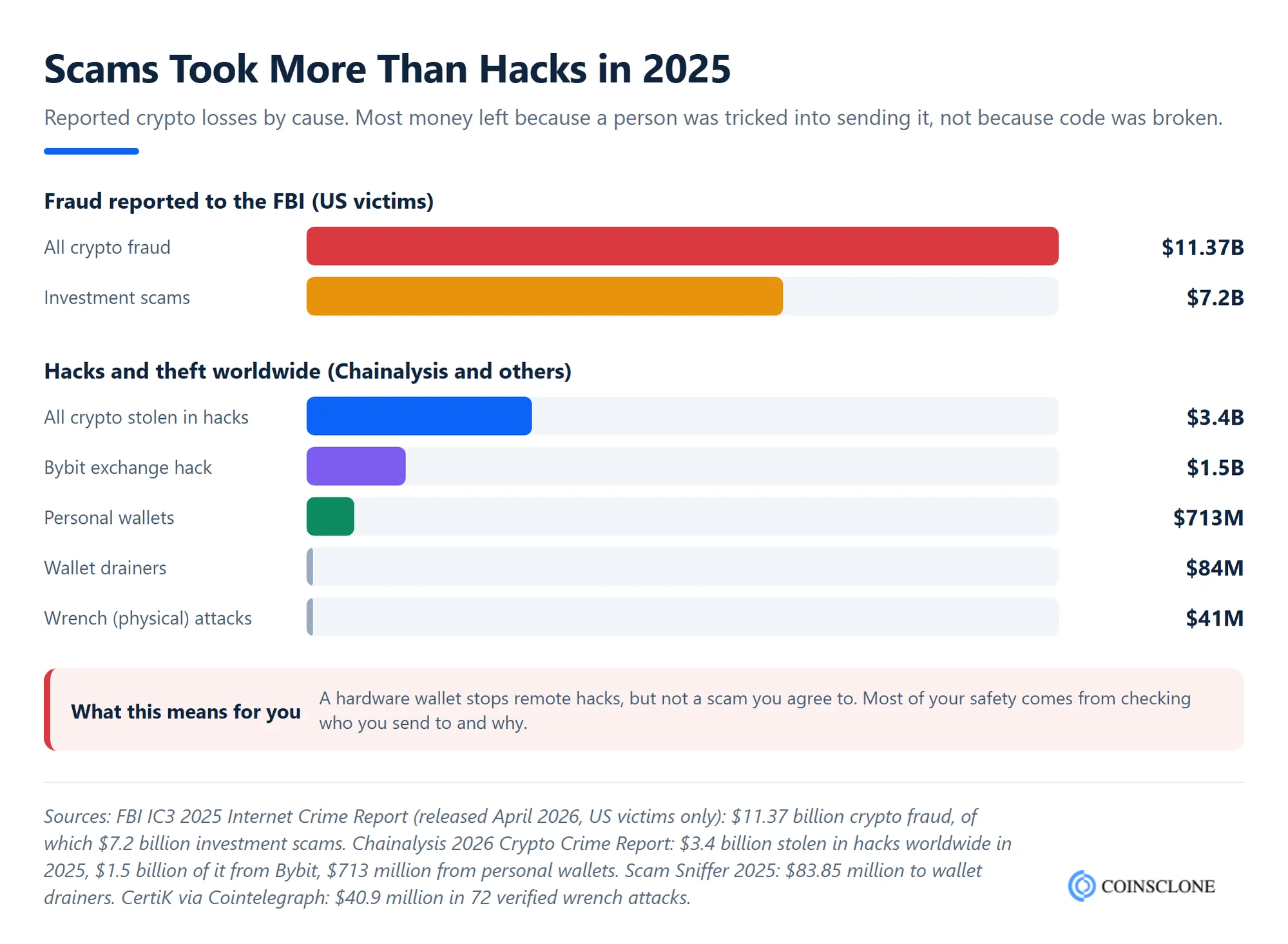
Exchanges are useful for buying and selling, but when your coins sit on one, the exchange holds the keys. If it is hacked or fails, your balance is at risk. In February 2025, Bybit lost about $1.5 billion from a cold wallet when signers approved a transfer on a tampered screen. In September 2026, Bitget lost $387.5 million from its hot and warm wallets. Both covered users, but weaker exchanges have frozen withdrawals for months or shut down.
So use exchanges for trading, then move long-term coins to your own wallet. When you choose an exchange, look for:
- Proof of reserves: A regular public check that the exchange holds enough assets to back user balances.
- Licences: For example, a MiCA licence in the EU, where transition periods ended by 1 July 2026.
- Withdrawal whitelist: A list of approved addresses, so a hacker who gets into your account cannot send coins to a new one.
- Anti-phishing code: A word you choose that appears in every real email from the exchange.
5. Enable Two-Factor Authentication (2FA)
Most online and digital platforms have a two-factor authentication feature for security. It protects your account with an extra passcode on top of your password. Even if a hacker gets your username and password, they still need that second code to get in.
Turn on 2FA for every crypto account, and also for the email account linked to it. Your email is the master key, since password resets go there. Ask for 2FA on withdrawals and security changes too, not only at login.
6. Don’t Use Your Mobile Number for 2FA
Not all 2FA methods are equally safe. If you use SMS codes, a criminal can talk your phone company into moving your number to their SIM card. This is called a SIM swap, and from then on, your codes go straight to them.
A better order of choice is:
- Hardware security key or passkey: The strongest option. It cannot be phished, because it only works on the real website.
- Authenticator app: Apps such as Google Authenticator or Authy create codes on your phone, not over the phone network.
- SMS: Use it only if nothing else is offered, and ask your phone company for a port-out PIN or SIM lock.
Save the backup codes for your authenticator in the same safe place as your seed phrase, so a lost phone does not lock you out.
7. Check Every Address and Signing Request
A large share of personal losses now happens in a single click. Two tricks are common:
- Address poisoning: The attacker sends you a tiny transfer from an address that looks like one you use, with the same first and last few characters. Later, you copy the wrong address from your history. On 20 December 2025, one trader lost almost $50 million in USDT this way, minutes after sending a test amount to the right address.
- Wallet drainers: A fake site asks you to sign one “harmless” approval. That approval lets the attacker’s contract spend your tokens later. Scam Sniffer counted $83.85 million lost to drainers from 106,000 victims in 2025.
To stay safe, check the full address every time, use your wallet’s address book, and send a test amount only to an address you saved yourself. Read every signing request in plain words, and if your wallet cannot explain what you are signing, do not sign it. Every few months, review and remove old token approvals with a tool such as Revoke.cash.
8. Use Strong Passwords and a Clean Device
Your wallet is only as safe as the device it runs on. A few habits close most of the gaps:
- Strong, unique passwords: Use a password manager, and never reuse a password from another site.
- Official downloads only: Get wallet apps from the maker’s site or the official app store link it gives. Fake apps often copy real names and logos.
- Updates on: Keep your phone, computer, browser and wallet app updated, since most updates fix known security holes.
- Safe networks: Avoid public Wi-Fi for crypto. If you must use it, turn on a trusted VPN.
- A separate browser profile: Keep one clean profile only for crypto, with no extra add-ons.
For a full list of wallet threats such as clipboard hijackers and supply chain attacks, read our guide to crypto wallet security.
9. Learn the Scams That Take the Most Money
Most crypto is not lost to hackers breaking code. It is lost when someone is tricked into sending it. The FBI’s 2025 Internet Crime Report found that Americans lost a record $11.37 billion to crypto fraud, The Block reported. Investment scams alone took $7.2 billion, and people aged 60 and over lost $4.4 billion.
Watch for these patterns:
- Investment and romance scams: A friendly contact, often met online, shows you a trading site with fake profits. The money never comes back.
- Fake support: Someone posing as your exchange or wallet asks you to “verify” or “move funds to a safe wallet”. Real support never does this.
- Fees to unlock funds: If a site asks you to pay more to withdraw your own money, it is a scam.
- Giveaways and airdrops: “Send 1 ETH, get 2 back” offers and surprise tokens with a link are traps.
- Urgency: Any message that rushes you, such as “your account closes in 1 hour”, is a warning sign.
When in doubt, stop, close the message and reach the company through its official site or app that you open yourself.
10. Keep Your Holdings Private and Plan for the Worst
Some criminals now use force instead of code. CertiK counted 72 verified “wrench” attacks on crypto holders in 2025, with $40.9 million in confirmed losses, about 75% more incidents than in 2024. The best defence is a low profile. Do not post your balance, portfolio screenshots or wallet addresses linked to your name.
Planning ahead also means thinking about the people you trust. If something happened to you, could your family reach your crypto? Write a short, sealed note that explains which wallets you use and where the backup is kept, without writing the seed phrase in it. Then test your own recovery once a year on a spare device, so you know the backup really works.
How to Set Up Crypto Safety by Portfolio Size
The right setup grows with what you hold. Use this as a starting point and adjust to how often you trade.
| Your holdings | Simple safe setup |
| Under $500 | A trusted mobile wallet or a licensed exchange, authenticator app 2FA, seed phrase written on paper and kept private |
| $500 to $50,000 | A hardware wallet for long-term coins, a small hot wallet for spending, seed phrase on metal, password manager, security key on your exchange and email |
| Above $50,000 | Two hardware wallets or a 2 of 3 multisig, backups in two separate places, a passphrase, a withdrawal whitelist on every exchange, and an inheritance plan |
| Business or shared funds | Multisig or MPC custody, no single person able to move funds, written approval rules and an independent check of large transfers |
A common rule of thumb in many security guides is to keep the large majority of your holdings in cold storage and only a small share in hot wallets or on exchanges. In practice, size the hot part from what you actually spend in a month.
What to Do If Your Crypto Wallet or Account Is Hacked
Speed matters most. If you think a wallet or account is at risk, act in this order:
- Move what is left: If a wallet’s seed phrase may be exposed, create a new wallet on a clean device with a new phrase, then send the remaining funds there. Never reuse the old phrase.
- Revoke approvals: If you signed a bad approval, revoke it at once so the attacker cannot take more tokens.
- Lock your accounts: Change your email and exchange passwords from a clean device, end other sessions and reset 2FA.
- Contact the exchange: If stolen funds went to an exchange, tell its support team with the transaction ID. Exchanges can sometimes freeze funds that arrive quickly.
- Report it: File a report with your national cybercrime unit, such as the FBI’s IC3 in the US, and with local police. Keep the transaction IDs, addresses and messages.
- Beware of “recovery” offers: People who promise to get your crypto back for a fee are almost always running a second scam.
How Exchanges Keep Users’ Crypto Safe
Many investors also choose to own a cryptocurrency exchange instead of only trading on one. A crypto exchange is a trading platform where many users buy and sell Bitcoin and other coins. It can include a built-in wallet that you shape to fit your business needs.
However, when you run an exchange, you hold your users’ crypto, so their safety becomes your job. You need strong security from day one. The top features to build in are:
- HTTPS and data encryption: Protect every connection and all stored data.
- Hot, warm and cold wallet tiers: Keep most funds offline and only a small float online.
- Multisig or MPC signing: No single person or server can move funds alone.
- Two-factor authentication: On login, withdrawals and every security change.
- Withdrawal checks: Whitelists, time locks, limits and an independent check of each transfer.
- Anti-DDoS protection: Keep the platform online during traffic attacks.
- SQL injection, SSRF and CSRF protection: Block the most common web attacks.
- Jail login: Lock accounts after repeated failed logins.
The 2025 and 2026 exchange hacks show that the costliest failures happen in the signing process and in the human layer. Our guide on how to build a non-hackable crypto exchange explains each control in depth.
How Coinsclone Helps You Build Secure Crypto Platforms
Coinsclone is a crypto wallet development company and exchange software provider that has built blockchain products since 2018. We have delivered 350+ platforms for 200+ clients across 20 industries. Our white label exchange software comes with trading features and layered security built in, from cold and hot wallet tiers to 2FA, withdrawal checks and admin roles.
A white label exchange typically launches in 4 to 6 weeks, or 7 to 10 weeks with fiat rails. A white label crypto wallet takes 3 to 5 weeks, and a custom wallet 8 to 12 weeks. If you want to launch a safe trading platform for your users, our cryptocurrency exchange development services can help you plan and build it.
Conclusion
The best way to keep your cryptocurrency safe is to layer simple habits. Keep long-term coins in a hardware wallet, store the seed phrase offline on metal, leave only trading money on exchanges, and use an app or security key for 2FA instead of SMS. Above all, check every address and every request before you act, because scams take far more money than hacks. Do these well, and you protect yourself from most of the risks that cost holders billions in 2025.
Frequently Asked Questions
What is the safest way to store cryptocurrency?
For most people, the safest way is a hardware wallet bought from the maker, with the seed phrase stored offline on paper or metal. For large or shared holdings, a multisig setup that needs two or more keys to approve a payment adds a second layer.
Can a crypto wallet be hacked?
Yes. Hot wallets can be hit by malware, fake apps, phishing sites and bad approvals. Hardware wallets are much harder to hack remotely, but you can still lose funds if someone gets your seed phrase or tricks you into signing a bad transaction.
Is SMS-based two-factor authentication safe for crypto?
It is better than no 2FA, but it is the weakest option. Criminals can take over your phone number through a SIM swap and receive your codes. Use an authenticator app, a passkey or a hardware security key instead.
What do I do if I think my crypto wallet has been compromised?
Act fast. Create a new wallet with a new seed phrase on a clean device, move the remaining funds there, revoke any token approvals, change your passwords and report the theft to the exchange that received the funds and to your cybercrime authority.
How do I protect my seed phrase?
Write it on paper or a steel plate, never in a photo, file or cloud note. Keep it in a private, secure place away from your hardware wallet, and never type it into a website or share it with anyone, including “support” staff.
Do you need a crypto wallet?
If you only buy small amounts and trade often, an exchange account with strong 2FA may be enough at first. Once you hold coins for the long term or use Web3 apps, a wallet you control is safer, since you no longer depend on the exchange staying secure and open.