
TRON is one of the busiest blockchains in the world, mainly because of cheap USDT transfers. It supports two main token standards: TRC-10, which is built into the TRON protocol itself, and TRC-20, which uses smart contracts. TRC-10 is the simpler of the two. You can create a TRC-10 token without writing any code, and moving it costs very little.
But there are important facts most guides leave out. Creating a TRC-10 token costs a fixed 1,024 TRX, each account can create only one, and TRON’s own developer documentation now calls TRC-10 a legacy standard and recommends TRC-20 for new projects. This guide explains what TRC-10 is, when it still makes sense, how to create one step by step, what it costs, and how it compares with TRC-20.
Create Your TRC10 Token — The Fastest Way to Launch on TRON
TRC10 Token Development — simplified and accelerated.Here’s how we help you launch your token in record time:
- Instant Deployment: Create and deploy a TRC10 token on TRON 90% faster.
- No Coding Needed: Fully automated creation + ready-made smart configurations.
- Brand & Customization : Your token name, symbol, supply, and logo — fully customizable.
- Utility Ready:Use your TRC10 token in exchanges, payments, apps, staking ecosystems, and more.
Get a free technical walkthrough of your TRC10 token setup — delivered in 24–48 hours.
Book a Free Demo to see how quickly we can take your token from idea to live on the TRON blockchain.
What Is a TRC-10 Token?
TRC-10 is TRON’s original token standard. Unlike most token standards, it does not use a smart contract. Instead, TRC-10 tokens are created and managed by the TRON protocol itself, the same way TRX is. Each TRC-10 token gets a numeric token ID, which is how wallets and explorers identify it.
Because there is no smart contract, TRC-10 tokens are simple and cheap to move. Transfers use only “bandwidth”, one of TRON’s two resource types, rather than the more expensive “energy” that smart contracts need. The trade-off is that TRC-10 tokens cannot run custom logic, such as automatic taxes, staking or vesting rules.
TRC-10 vs TRC-20: Which Should You Create?
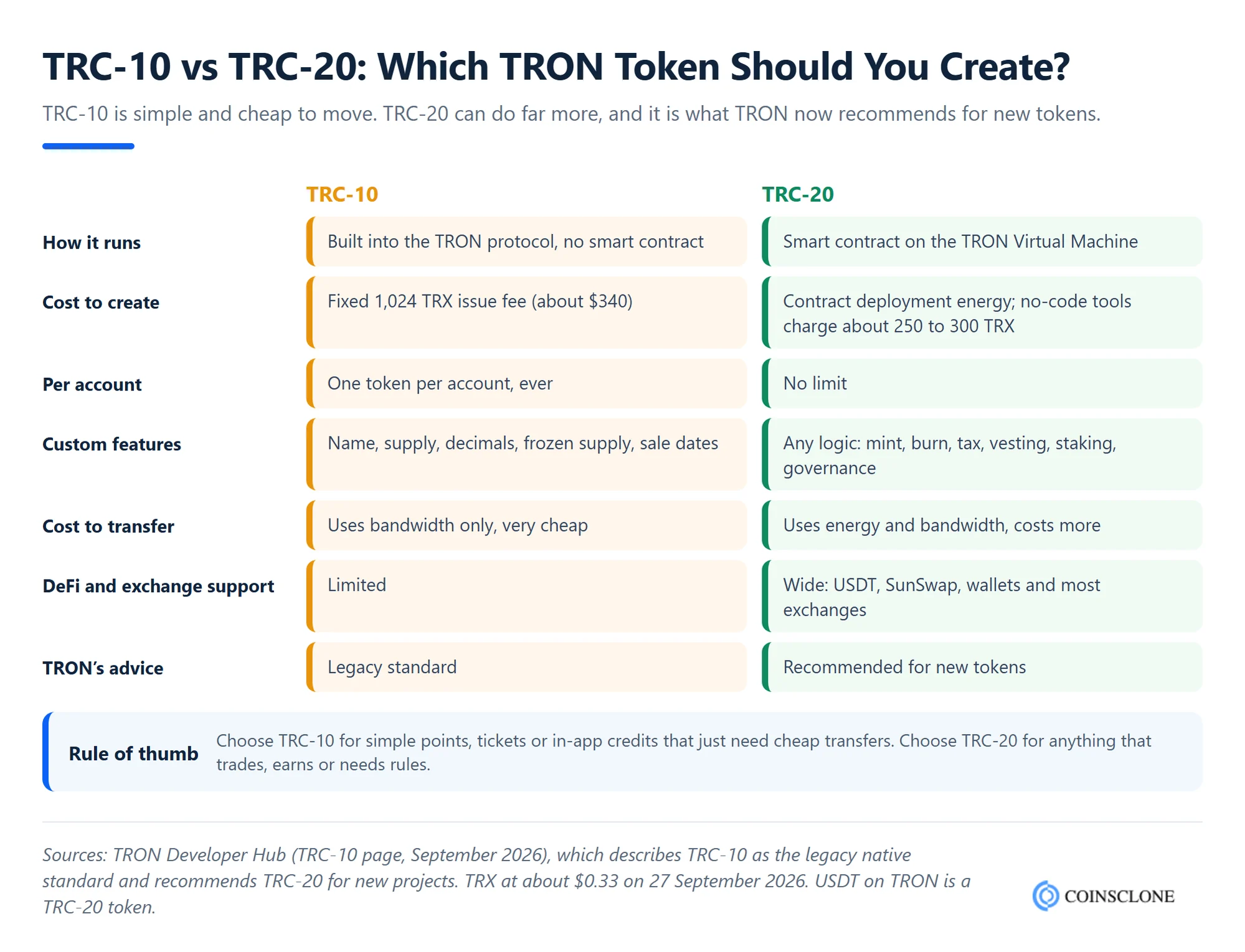
In short:
- Choose TRC-10 for simple use cases that only need cheap transfers, such as reward points, in-app credits, tickets or community tokens that will not trade on DeFi.
- Choose TRC-20 for anything that needs to trade on DEXs such as SunSwap, be listed on most exchanges, or run rules such as minting, burning, vesting or staking. USDT on TRON is a TRC-20 token.
If you are still deciding, see our guide to TRC20 token development and our comparison of ERC20 vs TRC20 tokens.
Benefits of the TRC-10 Standard
- No coding needed: You create a TRC-10 token by filling in a form in a TRON wallet or explorer.
- Very cheap transfers: Transfers use only bandwidth. Each account gets a small amount of free bandwidth every day, so light users may pay nothing.
- Fast: TRON confirms transactions in about three seconds.
- Native support: TRC-10 tokens are part of the protocol, so there is no contract code to audit or exploit.
- Built-in sale settings: You can set a TRX price, a sale start and end date, and lock part of the supply for a set time.
Limits of TRC-10 You Should Know
- Fixed issue fee: Creating a token costs 1,024 TRX, about $340 at a TRX price of $0.33 in September 2026.
- One token per account: Each TRON account can issue only one TRC-10 token, ever.
- No custom logic: No automatic taxes, blacklists, staking, vesting contracts or governance.
- Limited support: Many wallets, exchanges and DeFi apps focus on TRC-20, so check support before you launch.
- Legacy status: TRON recommends TRC-20 for new projects because of its better DeFi and cross-chain support.
Several well-known tokens started as TRC-10 and later moved to TRC-20. For example, BitTorrent’s original TRC-10 token is now listed as BTTOLD after BTT moved to a new TRC-20 token.
How to Create a TRC-10 Token: Step by Step
Step 1: Set Up a TRON Wallet
Install a TRON wallet that supports token issuance, such as TronLink, and create or import an account. Remember: this account can only ever issue one TRC-10 token.
Step 2: Fund the Account With TRX
You need at least 1,024 TRX for the issue fee, plus a little extra for bandwidth.
Step 3: Open the Token Issuance Page
Connect your wallet to the TRC-10 token creation page on Tronscan, TRON’s official block explorer, or use a developer library such as TronWeb.
Step 4: Fill In the Token Details
- Token name and abbreviation: For example, “Example Points” and “EXP”.
- Total supply: The number of tokens to create.
- Precision: The number of decimal places, from 0 to 6.
- TRX exchange rate: How many tokens one TRX buys, if you run a sale.
- Sale start and end time: The window for the token sale.
- Frozen supply: Optional amount of tokens locked for a set number of days.
- Description and website: Help users verify your project.
Step 5: Confirm and Pay the Fee
Review the details carefully, because they cannot be changed later. Confirm the transaction in your wallet and pay the 1,024 TRX fee.
Step 6: Verify and Share the Token ID
Find your token on Tronscan using its token ID, check the details, and share the official ID and issuer address so users do not confuse your token with copies.
How Much Does It Cost to Create a TRC-10 Token?
| Cost item | TRC-10 | TRC-20 (for comparison) |
| Creation | 1,024 TRX fixed (about $340) | Contract deployment energy; no-code tools charge about 250 to 300 TRX |
| Code audit | Not needed, no smart contract | Recommended for custom logic |
| Each transfer | Bandwidth only, often free for light use | Energy and bandwidth |
| Development | Form-based, minimal | From a simple template to custom contracts |
For the full picture, including audits, liquidity and listings, see our guide to the cost to create a crypto token.
TRC-10 Wallets, Explorer and Token Checker
- Wallets: TronLink supports TRC-10 tokens. Other TRON wallets vary, so check TRC-10 support before sending. See how to create a TRC20 wallet app if you plan your own.
- Explorer and checker: Tronscan lists every TRC-10 token by its token ID, with its issuer, supply, holders and transfers. Always check the token ID, not just the name, because many tokens share similar names.
- Swaps: Few DEXs support TRC-10 tokens directly. Most trading on TRON happens with TRC-20 tokens on DEXs such as SunSwap. Our SunSwap clone script is built for TRC-20 trading.
List of Well-Known TRC-10 Tokens
TRON has thousands of TRC-10 tokens, many of them inactive. Some recognisable examples include:
- BTTOLD: The original BitTorrent token, replaced by a TRC-20 version.
- Community and gaming tokens: Many early TRON dApps issued TRC-10 tokens for rewards and in-game credits.
- Loyalty and points tokens: Businesses use TRC-10 for simple points that users can hold and send.
To find current tokens, search the TRC-10 token list on Tronscan and sort by holders or transfers. For comparison, see our lists of ERC20 tokens and BEP20 tokens.
Why Choose Coinsclone for TRC-10 and TRON Token Development?
Coinsclone is a crypto token development company that has delivered more than 350 blockchain platforms for over 200 clients. We help you choose the right TRON standard for your project, then build it properly: simple TRC-10 tokens for points and credits, TRC-20 tokens with custom logic, and TRC721 NFTs. Our TRON token development services cover wallets, token sales and DEX listings too.
Create Your TRC10 Token — The Fastest Way to Launch on TRON
TRC10 Token Development — simplified and accelerated.Here’s how we help you launch your token in record time:
- Instant Deployment: Create and deploy a TRC10 token on TRON 90% faster.
- No Coding Needed: Fully automated creation + ready-made smart configurations.
- Brand & Customization : Your token name, symbol, supply, and logo — fully customizable.
- Utility Ready:Use your TRC10 token in exchanges, payments, apps, staking ecosystems, and more.
Get a free technical walkthrough of your TRC10 token setup — delivered in 24–48 hours.
Book a Free Demo to see how quickly we can take your token from idea to live on the TRON blockchain.
Frequently Asked Questions
What is a TRC-10 token?
A TRC-10 token is a token created directly by the TRON protocol, without a smart contract. It has a numeric token ID and uses only bandwidth for transfers, which makes it very cheap to move.
How much does it cost to create a TRC-10 token?
Creating a TRC-10 token costs a fixed 1,024 TRX, about $340 at September 2026 prices, plus a little bandwidth.
What is the difference between TRC-10 and TRC-20?
TRC-10 is built into the TRON protocol with no smart contract and limited features. TRC-20 is a smart contract standard that can run any logic and has much wider DeFi and exchange support. TRON recommends TRC-20 for new projects.
Can I create more than one TRC-10 token?
Not from the same account. Each TRON account can issue only one TRC-10 token.
Which wallet supports TRC-10 tokens?
TronLink supports TRC-10 tokens. Support in other wallets and on exchanges varies, so check before sending.
How do I check a TRC-10 token?
Search its token ID on Tronscan to see its issuer, supply, holders and transfers. Always use the token ID, because different tokens can share the same name.
Can I swap TRC-10 tokens?
Few DEXs support TRC-10 directly. Most TRON trading uses TRC-20 tokens, so projects that need trading usually choose TRC-20.
Is TRC-10 still worth using in 2026?
For simple points, credits or tickets that only need cheap transfers, yes. For tokens that need to trade, earn or follow rules, TRC-20 is the better choice.