
This guide shows how to create a crypto wallet in 2026, from the first product choice to launch day. It covers the wallet types you can build, how a wallet signs and sends a payment, the 10 build steps, the rules you must follow, and what it all costs. If you only want a wallet for your own coins, the first section shows you how to set one up in about five minutes.
The goal is simple. By the end, you will know which wallet to build, which parts it needs, and how long each path takes. You will also see the security mistakes that cost wallet owners billions in 2025, so you can design them out from day one.
In this guide:
- The five-minute way to set up a personal wallet, and the full way to build a wallet app
- How to choose between custodial, non-custodial, MPC and smart account wallets
- The 10 steps to build a wallet, with the tech stack for each layer
- The rules that apply to wallets in the US, the EU and the app stores
- 2026 cost ranges and timelines, from a white label launch in 3 to 5 weeks to a full custom build
How to Create a Crypto Wallet
There are two ways to read this question. Some people want a wallet to hold their own crypto. Others want to build a wallet app for thousands of users. Here is the quick answer for both.
Setting Up a Wallet for Yourself
Creating a personal wallet is free and takes a few minutes. Most guides from Coinbase, Bitcoin.com and others follow the same steps:
- Pick a type: a software wallet such as MetaMask or Trust Wallet for daily use, or a hardware wallet such as Ledger or Trezor for long-term savings.
- Download it from the official source: use the real app store listing or the maker’s own site. Buy hardware wallets only from the maker.
- Tap “Create a new wallet”: set a strong PIN or password and turn on Face ID or fingerprint unlock.
- Write down your seed phrase: the app shows 12 or 24 words. Write them on paper and keep them offline. Anyone with these words owns your funds.
- Confirm the phrase and receive crypto: the app asks you to re-enter the words. Then copy your address and send a small test amount first.
A software wallet costs nothing. Hardware wallets cost about $50 to $200.
Building a Crypto Wallet App for Your Business
Building a wallet that other people trust with their money is a much bigger job. You need to choose a custody model, connect to blockchains, protect private keys, pass security audits and follow the rules in each market. The rest of this guide walks through that process step by step.
What Is a Crypto Wallet & Why You Should Build One in 2026?
A crypto wallet is software that lets people store, send and receive crypto without a bank in the middle. Strictly speaking, the coins stay on the blockchain. The wallet holds the private keys that prove who owns them and signs each payment. Users back up those keys with a seed phrase, a list of 12 or 24 words.
Today, wallets do far more than hold coins. Multi-currency wallets store DeFi tokens, NFTs and stablecoins across many chains. They also let users swap tokens, stake and pay in shops. This is why the wallet has become the front door to Web3, and why it is a strong business idea.
The numbers back this up. Grand View Research values the global crypto wallet market at about $15.5 billion in 2025 and expects it to reach about $100.8 billion by 2033. Hot wallets, the software wallets this guide covers, hold more than half of that market.
Before you start building, it helps to know the main types of crypto wallets you can create.
See How Our MVP System Can Help You Create Your Crypto Wallet Fast
Crypto Wallet Development — done right.
- MVP System: Build your crypto wallet 90% faster.
- Pre-Built Modules: Wallets, tokens, and blockchain features ready—no coding needed.
- Brand & Customization: Your design, your tokens, your rules.
- Revenue Engine: Earn from transaction fees, staking, and token swaps.
Get a free branded demo of your crypto wallet in 48 hours — before you invest a cent.
Book a Free Demo to discover how our system can take you from idea to live crypto wallet in just 8–12 weeks.
Types of Crypto Wallets You Can Create
Crypto wallets come in several forms, and each one suits a different user. We have listed the common types of crypto wallets that businesses build today.
Web Wallets
Web wallets run in a browser or as a browser extension, like MetaMask. Users can reach their funds from any device with an internet connection. They are the easiest to ship, but they need strong phishing protection.
Mobile Wallets
Mobile wallet apps are built for iOS and Android. Most new users start here, so the app must feel as simple as a banking app. Phones also offer secure chips (Apple’s Secure Enclave and Android Keystore) that keep keys safe.
Desktop Wallets
Desktop wallets are apps that users install on a laptop or PC. The private keys stay on the local device, which gives users more control. Power users and traders often prefer them.
Hardware Wallets
Hardware wallets are physical devices that keep private keys offline. They block most online hacks and scams. Building one means hardware design and supply chains, so most businesses build the companion app instead.
Multi-currency Wallets
Multi-currency wallets hold many coins and tokens in one app. Cross-chain support lets users manage Bitcoin, Ethereum, Solana and stablecoins in one place. Most wallets launched today are multi-chain from day one.
Smart Contract and MPC Wallets
These newer wallets remove the scary seed phrase. MPC wallets split the key into shares, so no full key ever sits in one place. Smart account wallets use code on the blockchain to add social recovery, spending limits and gas paid in stablecoins. Both are now common in apps that target mainstream users.
Once you know the type, the next step is the biggest choice of all: who holds the keys.
Five Decisions to Make Before You Build
Every crypto wallet project starts with the same five choices. Get them right, and design and coding go much faster. Get them wrong, and you may need to rebuild later.
- Custody model: will your users hold their own keys (non-custodial), or will you hold them (custodial)? This choice decides your licences, your security setup and your legal risk.
- Chains: pick the networks your users already use. Most wallets start with Ethereum and its layer-2s, plus Bitcoin, Solana or Tron for stablecoins.
- Build path: start from a white label wallet, use a wallet SDK, or build fully custom code.
- Recovery: decide how users get back in when they lose a phone. Options include seed phrases, cloud backup, MPC key shares or social recovery.
- Revenue model: plan how the wallet will earn money, such as swap fees or on-ramp referrals, before you design the screens.
The custody choice matters most, so we have turned it into a simple decision tree.
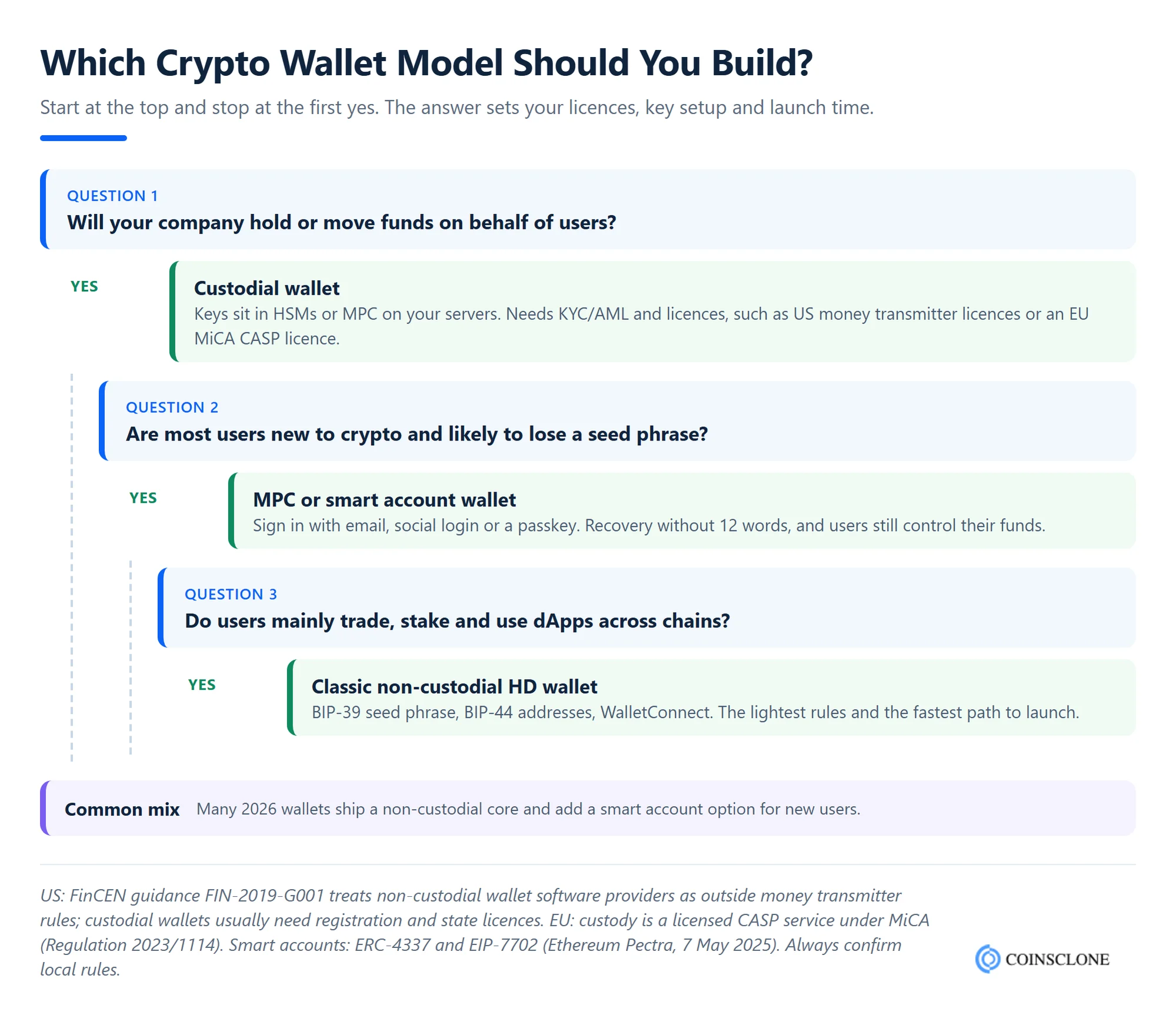
In short, if you move funds for users, you are a custodian and the rules get much stricter. Our guide on custodial vs non-custodial wallets explains the trade-offs in more depth.
Key Components & Architecture of a Crypto Wallet
Whatever the wallet type, the core parts stay the same. Here are the key components and the tech stack teams use for each one.
Front-end
The front end is the screen the user sees. It shows balances, sends and receives funds, and asks the user to approve each payment.
Tech stack used: React.js, Vue.js, React Native, Flutter, Swift (iOS), Kotlin (Android)
Backend
The backend runs the business logic, API calls, price feeds and push alerts. In a non-custodial wallet it never sees the private keys.
Tech stack used: Node.js, Python (Django/FastAPI), Go, Java Spring Boot
Blockchain Node and RPC Layer
The node links the wallet to each blockchain. It reads balances, estimates fees and broadcasts signed payments. Many teams rent nodes from providers like Alchemy or QuickNode and keep a backup provider in case one goes down.
Tech stack used: Bitcoin Core, Geth (Ethereum), BNB Chain node, Solana RPC, ethers.js, viem, bitcoinjs-lib
Private Key Management
This is the heart of the wallet. It creates keys, encrypts them and stores them safely. Most wallets follow the Bitcoin standards BIP-39 for seed phrases and BIP-32/BIP-44 for creating many addresses from one seed.
Tech stack used: BIP-32/39/44, Trust Wallet Core, Secure Enclave, Android Keystore, MPC libraries, HSMs for custodial wallets
Indexer and Database Layer
Blockchains are slow to search. So the indexer tracks each user’s transactions and token balances and saves them for fast loading. The database also stores settings, address books and logs.
Tech stack used: PostgreSQL, MongoDB, Redis, The Graph, provider APIs
These parts work together every time a user taps “Send”. The next section shows exactly how.
How Does a Crypto Wallet Work?
A crypto wallet does not move coins itself. Instead, it builds a payment, signs it with the private key and hands it to the blockchain. The key point is where the key stays. In a non-custodial wallet, the private key never leaves the user’s device.
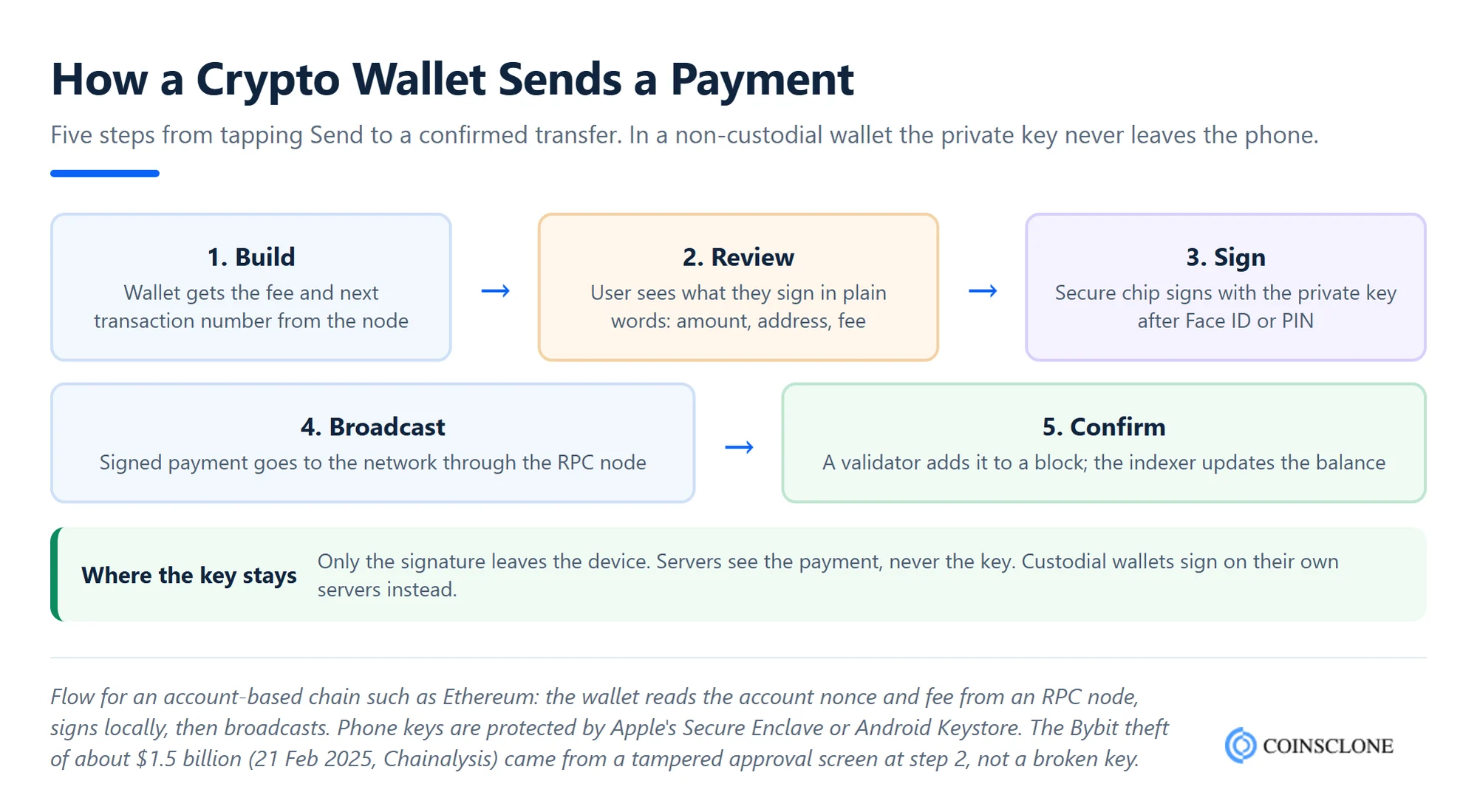
Here is the same flow in plain words:
- Build: the user enters an amount and address. The wallet asks the node for the fee and the account’s next transaction number.
- Review: the wallet shows the user what they are signing in plain language, including the fee.
- Sign: the secure chip on the phone signs the payment with the private key.
- Broadcast: the wallet sends the signed payment to the network through its node.
- Confirm: a validator adds it to a block, and the indexer updates the user’s balance.
Step 2 is where many real-world hacks happen, as the security section below shows. Now let’s dive into the step-by-step crypto wallet development process.
Step-by-Step Process to Create a Crypto Wallet App
Here are the 10 steps teams follow to create a crypto wallet app. Let’s look at each one.
Step 1: Define Your Wallet Purpose & Audience
First, decide who the wallet is for. A wallet for DeFi traders needs swaps, staking and NFT views. A wallet for shoppers needs stablecoin payments and simple screens. Study your users and the apps they use today, such as MetaMask, Trust Wallet or Phantom, and note what they complain about.
Step 2: Select Blockchain Network & Tech Stack
Next, pick the chains. Base the choice on where your users hold funds, what fees they pay and which tokens they need. Ethereum, its layer-2s like Base and Arbitrum, BNB Chain, Solana and Tron are the usual picks.
Each chain has its own tools. For EVM chains, teams use ethers.js or viem, plus WalletConnect so the wallet can link to apps. For Bitcoin and Solana, they add the matching libraries.
Step 3: Design UI/UX for Wallet App
With the chains chosen, designers map the key screens: sign-up, backup, send, receive, swap and settings. Tools like Figma help build clickable prototypes. Test them with real users early. The backup screen and the “confirm payment” screen deserve the most care, because mistakes there cost users money.
Step 4: Backend & Blockchain Integration
Then developers build the backend and admin panel. The backend handles price feeds, alerts, user support and reports. In this phase, the team also connects the nodes and the indexer, so balances and history load quickly on every chain.
Step 5: Implement Key Management System
Now the team builds the key system. In a non-custodial wallet, keys are created and stored on the device, locked by the secure chip and unlocked by Face ID or a PIN. In an MPC wallet, key shares are split between the device and a server. In a custodial wallet, keys sit in hardware security modules (HSMs) with strict access rules.
Whatever the model, the key system must be built by engineers who know cryptography. This step decides whether your users’ funds are safe.
Step 6: Add Core Features
Next, the wallet gets its core features. Features shape how users feel about the wallet every day. Some of the core crypto wallet features are:
- Send/receive crypto
- Transaction history
- Fund deposit
- Currency conversion
- Multi-chain support
- Real-time balance
- In-app swaps
- QR scanning
- Staking modules
- Customer support
- Crypto trade view
- NFT view
- Dispute resolution
- API integrations
- Credit/debit card purchases
These are the common features most wallets include. Beyond them, you can add extras such as crypto cards or bill payments to stand out.
Step 7: Security & Compliance Setup
Along with features, the team adds security layers to block scams, hacks and phishing. Strong security builds trust, and trust drives daily use. If you build a custodial wallet, KYC and AML checks are a must. The security and compliance sections below list what to include.
Step 8: Testing and Quality Assurance
Once the build is done, the wallet goes through testing. Teams run unit tests, integration tests and load tests. They also test on testnets with real flows. Finally, an outside firm runs a security audit and a penetration test. Fix every serious finding before launch.
Step 9: Deployment & Maintenance
After testing, the wallet is ready for launch. Smart contracts, if any, go live on the mainnet. Mobile apps go to Google Play and the Apple App Store. Note that Apple’s App Review Guidelines (rule 3.1.5) only accept wallets from developers enrolled as an organization, not as individuals. After launch, plan for steady updates as chains, phones and rules change.
Step 10: Marketing, Monetization & Growth
When the wallet is live, promote it to the right users. Referral rewards, airdrops for early users and partnerships with dApps work well. Track sign-ups, backup rates and the number of users who send their first payment.
With these steps, a skilled team can create a crypto wallet smoothly. Many businesses speed things up by working with a development firm that has built wallets before.
Advanced Security Features You Should Integrate in the Crypto Wallet
Security is not optional. Chainalysis found that more than $3.4 billion of crypto was stolen in 2025. The largest single theft hit Bybit on 21 February 2025, when attackers took about $1.5 billion by tampering with the screen used to approve a wallet transfer. Personal wallets were hit too, with about 158,000 break-ins affecting at least 80,000 people.
The lesson for wallet builders is clear. Protect the key, and also protect what the user sees when they sign. Some of the top security features to build in are:
- Two-factor authentication
- Biometric authentication
- Multi-signature approval
- Private key encryption
- Seed phrase backup & recovery
- Clear signing (show what a payment does in plain words)
- Transaction simulation before signing
- Anti-phishing and scam address warnings
- Session timeout
- SSL/TLS encryption with certificate pinning
- Address whitelisting
- Cold storage
- Transaction signing policy
Beyond this list, you can add more layers based on your wallet type and users. Our guide on crypto wallet security covers each threat in more detail.
Fortify your Crypto wallet with uncompromised security standards with us!
Rules and Compliance for Crypto Wallets
The rules depend mostly on your custody model. Here is what applies in the main markets.
- United States: under FinCEN’s 2019 guidance, providers of non-custodial wallet software are not money transmitters. Custodial wallets usually are, so they need FinCEN registration, state licences and full AML programs.
- European Union: under MiCA, holding crypto for clients is a licensed service. Custodial wallets need a CASP licence. The EU’s transfer of funds rule has applied since 30 December 2024. It requires CASPs to collect sender and receiver data, and to check ownership of self-hosted wallets for transfers over EUR 1,000.
- App stores: Apple only accepts wallets from registered organizations. Google Play also asks custodial wallets and exchanges to hold local licences in many countries.
- Sanctions: every wallet with a swap, card or fiat feature should screen addresses against sanctions lists.
Rules change often, so check with a legal expert in each country you launch in. A non-custodial wallet with partner on-ramps is usually the lightest path to market.
Key Blockchain Protocols Supported in Crypto Wallets
Each blockchain has its own token standards, and your wallet must support the right ones to show users’ tokens and NFTs correctly. Here are the main chains and standards in 2026.
| Blockchain | Key Features | Supported Standards |
| Bitcoin | The largest crypto asset; simple payments and savings | Native BTC (SegWit, Taproot addresses) |
| Ethereum | Smart contracts, the largest DeFi and NFT ecosystem | ERC-20, ERC-721, ERC-1155 |
| Ethereum layer-2s (Base, Arbitrum, Optimism) | Ethereum security with much lower fees | ERC-20, ERC-721, ERC-1155 |
| BNB Chain | Low gas fees, fast transactions | BEP-20, BEP-721, BEP-1155 |
| Polygon | Low-cost EVM chain for payments and apps | ERC-20, ERC-721, ERC-1155 |
| Solana | Very fast transactions, low fees | SPL tokens, Token-2022 |
| Tron | High throughput, widely used for USDT payments | TRC-20, TRC-721 |
Tron’s older TRC-10 standard is now legacy, so most wallets focus on TRC-20 tokens such as USDT. If Tron is your main market, make USDT on TRC-20 a first-class feature with clear fee guidance.
How to Make Money From a Crypto Wallet
A wallet is free for users, so plan your revenue early. Here are the most common models:
- Swap fees: a small fee on in-app token swaps. For example, MetaMask adds a 0.875% service fee to each swap quote.
- On-ramp and off-ramp referrals: partners that sell crypto for cards or bank transfers share part of their fee.
- Staking commission: a share of the rewards users earn when they stake through the wallet.
- Premium features: paid tiers for advanced tools, portfolio tracking or business accounts.
- Crypto cards and payments: a share of card fees when users spend from the wallet.
Our article on how crypto wallets make money breaks down each stream with examples.
Cost to Create a Crypto Wallet in 2026
The cost to create a crypto wallet depends on the chains, features, custody model, design and the team you hire. Published 2026 market estimates put a basic MVP at about $15,000 to $90,000 and a multi-chain wallet with swaps at $50,000 to $200,000. Enterprise and custody wallets can pass $500,000.
| Wallet level | What it includes | Typical market cost | Typical time |
| Basic MVP | One chain, send and receive, balances, basic security | $15,000 to $90,000 | 2 to 4 months |
| Mid-level | Multi-chain, swaps, WalletConnect, NFTs | $50,000 to $200,000 | 4 to 7 months |
| Advanced | MPC keys, DeFi, gas abstraction | $200,000 to $380,000 | 6 to 9 months |
| Enterprise | Institutional custody, compliance, custom infrastructure | $150,000 to $500,000+ | 7 to 14 months |
Also plan for running costs. Maintenance usually takes 15% to 20% of the build cost each year, plus node fees and repeat audits. Our full guide to the crypto wallet development cost shows each cost line and how to cut it. Starting from a tested white label wallet is the fastest way to lower both cost and time.
Latest Trends in Crypto Wallet Development
Wallets are changing fast. Here are the trends shaping new wallets in 2026:
- Smart accounts go mainstream: account abstraction through ERC-4337 lets users pay gas in stablecoins and recover accounts without a seed phrase. Since Ethereum’s Pectra upgrade on 7 May 2025, EIP-7702 lets ordinary wallets gain these smart features too.
- Passkeys replace seed phrases: Ethereum’s Fusaka upgrade in December 2025 added EIP-7951, which lets the chain check the same passkey signatures that phones use for Face ID. Users can sign in and sign payments with a fingerprint.
- MPC and embedded wallets: apps now create wallets inside their own sign-up flow, with an email or social login, while key shares keep funds safe.
- Stablecoin payments: more users hold USDT and USDC for payments, so wallets add cards, merchant payments and fiat cash-out.
- AI assistants: wallets are testing AI helpers that explain transactions and flag scams before users sign.
These trends point to one goal: wallets that feel as easy as a banking app while users keep control of their funds.
Challenges of Crypto Wallet Development & How to Overcome Them?
Wallet demand is strong, but building one still brings real hurdles. Here are the main ones and how to handle them:
- Security threats: wallets are prime targets for hacks and phishing. Use secure chips, clear signing, outside audits and a bug bounty, and protect both the user app and the admin panel.
- Scalability issues: busy networks slow down balances and payments. Use more than one node provider, cache data in an indexer and test under heavy load.
- Unclear rules: each country has its own laws for wallets. Pick your custody model with care, launch in clear markets first and get legal advice.
- User experience: seed phrases scare new users and cause lost funds. Passkeys, MPC and smart accounts make sign-up and recovery much easier.
- Cross-chain risk: bridges have been hacked many times. Use well-audited bridges and warn users about risky routes.
With an experienced team, most of these challenges can be solved early. The choice of build method is the next big decision, so let’s compare the options.
Custom Crypto Wallet Development or Ready-made Crypto Wallet: Which One Do You Prefer?
Businesses use three main ways to create a crypto wallet: custom development, white label crypto wallet software and a crypto wallet clone script. The right choice depends on your budget, time and goals.
If you are a startup eager to enter the blockchain market, then
- Pick a ready crypto wallet script with proven core features, and launch fast.
If you are an SMB that wants your own brand with limited resources, then
- Pick a white label crypto wallet that you can customise with features that fit your market.
If you are an established business or enterprise with unique needs, then
- Choose custom crypto wallet development with advanced features such as MPC, smart accounts or AI tools, built by an in-house team or a trusted crypto wallet development partner.
The biggest difference between these paths is time. The chart below shows how long each one usually takes to reach launch.
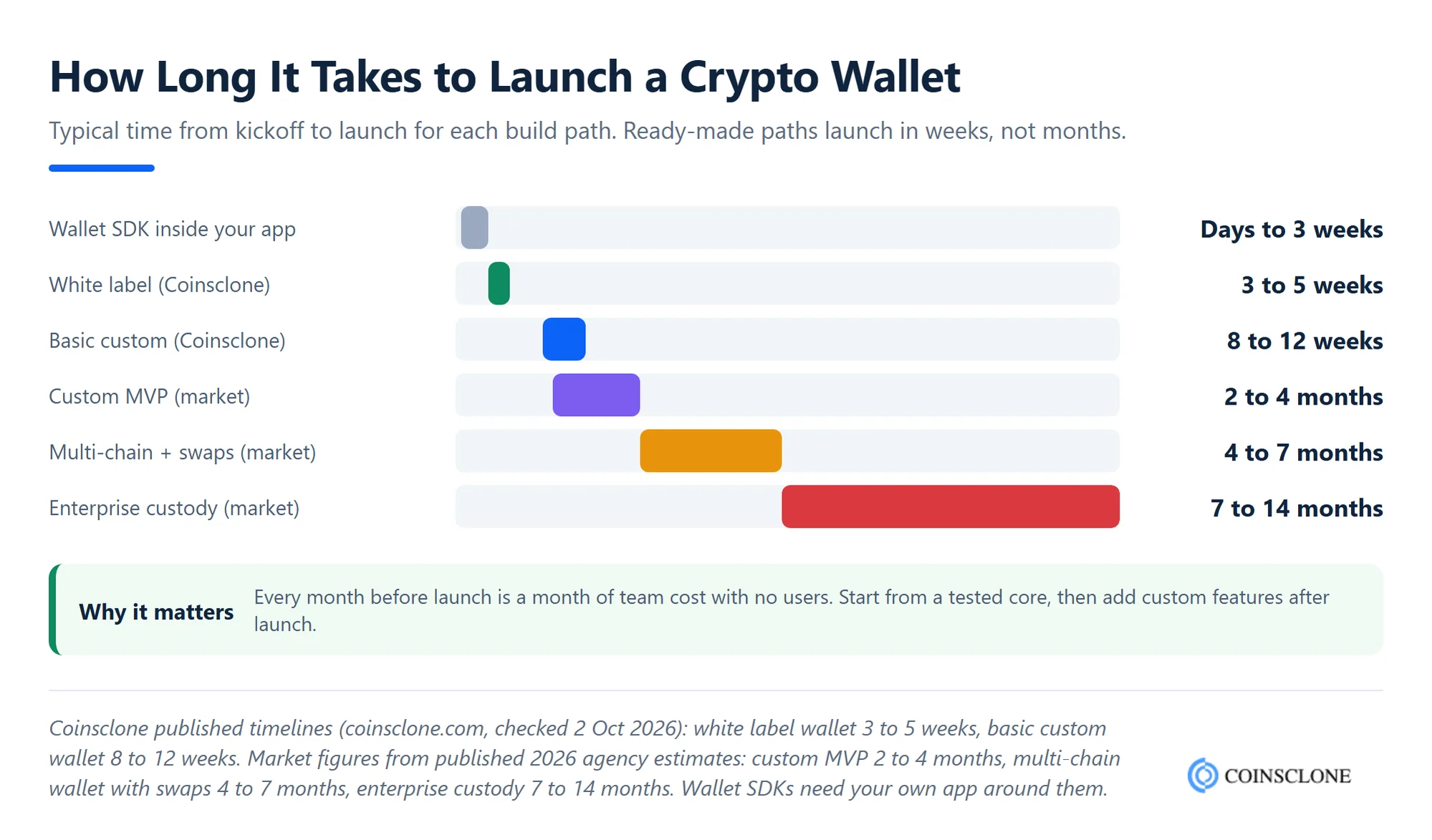
Here is how the three methods compare on other factors.
| Factors | Custom Crypto Wallet Development | White Label Crypto Wallet | Crypto Wallet Clone Script |
| Overall Cost | Highest; see market ranges above | Lower; you reuse a tested core | Lowest; proven model, fewer changes |
| Ownership | Full ownership of code and IP | Depends on licence terms | Licence or full source code |
| Time to Launch (Coinsclone) | 8 to 12 weeks for a basic custom wallet; longer for advanced builds | 3 to 5 weeks | 3 to 5 weeks |
| Scalability | High | High | Medium to high |
| Security | Built to your needs, audit required | Tested core, audit recommended | Tested core, audit recommended |
| Customization | Full | Branding, features and chains | Source-level changes |
Among the three, pick the one that fits your stage. A white label crypto wallet gets you to market fastest with your own brand. A crypto wallet script is also a great choice for startups, since it copies the features of a proven wallet such as Trust Wallet or MetaMask.
Whichever method you choose, you still need a skilled team that has shipped secure wallets before.
Why Choose Coinsclone to Build Your Crypto Wallet?
Coinsclone is a leading crypto wallet development company that has been building blockchain products since 2018. We have delivered 350+ platforms for 200+ clients across 20 industries, including wallets, exchanges and payment gateways.
We help you pick the right custody model, chains, features and security setup. Our white label wallet launches in 3 to 5 weeks, and a basic custom wallet takes 8 to 12 weeks. After launch, we stay with you for support, updates and new features.
Frequently Asked Questions
Can I create my own crypto wallet?
Yes. Anyone can set up a personal wallet for free in a few minutes by downloading an app such as MetaMask or Trust Wallet and saving the seed phrase. Building a wallet app for other users is a bigger project that needs key management, blockchain links, audits and legal checks.
Is it free to create a crypto wallet?
Creating a software wallet for yourself is free. You only pay network fees when you send crypto. Hardware wallets cost about $50 to $200. Building a wallet app as a business costs from about $15,000 for a basic MVP to $500,000 or more for an enterprise wallet.
How much does it cost to develop a cryptocurrency wallet?
Published 2026 estimates put a basic MVP at about $15,000 to $90,000 and a multi-chain wallet with swaps at $50,000 to $200,000. The final cost depends on the chains, custody model, features, design and team location.
How long does it take to complete the crypto wallet development process?
A white label wallet launches in about 3 to 5 weeks with Coinsclone. A basic custom wallet takes about 8 to 12 weeks. Larger multi-chain or MPC builds take about 4 to 9 months, and enterprise custody wallets 7 to 14 months.
How do crypto wallets make money?
Most wallets earn from swap fees, on-ramp referral fees, staking commissions, premium features and card spending. MetaMask, for example, charges a 0.875% fee on swaps.
Does a non-custodial wallet need KYC?
Usually not. In the US, FinCEN’s 2019 guidance says non-custodial wallet software providers are not money transmitters. But if your wallet holds user funds, or offers fiat on-ramps directly, KYC and AML checks apply. Check the rules in each country you serve.
What challenges are faced in creating a crypto wallet?
The biggest challenges are security threats, scaling across busy networks, changing rules, user-friendly recovery and safe cross-chain transfers.
See How Our MVP System Can Help You Create Your Crypto Wallet Fast
Crypto Wallet Development — done right.
- MVP System: Build your crypto wallet 90% faster.
- Pre-Built Modules: Wallets, tokens, and blockchain features ready—no coding needed.
- Brand & Customization: Your design, your tokens, your rules.
- Revenue Engine: Earn from transaction fees, staking, and token swaps.
Get a free branded demo of your crypto wallet in 48 hours — before you invest a cent.
Book a Free Demo to discover how our system can take you from idea to live crypto wallet in just 8–12 weeks.