
Launching a digital startup demands an idea that is affordable, profitable, and scalable. Building a crypto wallet, the essential tool for blockchain transactions, meets all three criteria and offers strong business potential.
Compared to other crypto wallet businesses, developing a TRC20 wallet app provides ultra-low transaction fees, massive community support, and strong profit potential. This makes it an appealing choice for entrepreneurs looking to build a presence in decentralized finance.
Yet, here is the real query: ‘How to create a TRC20 wallet with enriched features?’
You have landed at the right blog because we are here to explain the essential steps, features, and benefits of TRC20 wallet app development.
Kickstart your Cryptocurrency Wallet Business with our guide.
See How Our MVP System Can Help You Create a TRC-20 Wallet App Faster
Crypto Wallet Development — done right.
- MVP System : Build your TRC-20 wallet app 90% faster.
- Pre-Built Modules : TRON blockchain integration, TRC-20 token support, and wallet management—no coding needed.
- Brand & Customization : Your design, your tokens, your blockchain.
- Revenue Engine : Earn from transaction fees, swaps, and staking.
Get a free branded demo of your TRC-20 wallet app in 48 hours — before you invest a cent.
Book a Free Demo to discover how our system can take you from concept to live TRC-20 wallet app in just 2–4 weeks.
What is a USDT TRC20 Wallet?
A USDT TRC20 wallet is a digital wallet used to store, send, receive, and manage Tether (USDT) tokens that follow the TRC20 token standard on the TRON blockchain. TRC20 is a smart contract standard that defines how tokens operate on TRON, similar to how ERC20 works on Ethereum. A USDT TRC20 wallet interacts directly with the USDT smart contract deployed on the TRON network.
When a USDT TRC20 wallet is created, it generates a public address and a private key. The public address is used to receive USDT, while the private key is required to sign and authorize transactions. The wallet does not store USDT directly. Instead, it reads the token balance from the TRON blockchain by calling the USDT TRC20 smart contract.
USDT TRC20 wallets are commonly used because transactions on TRON are fast and typically require low network fees, paid in TRX, the native token of the TRON network. Even when transferring USDT, a small amount of TRX is needed to cover bandwidth or energy costs.
A USDT TRC20 wallet can be built as a mobile app, web app, or desktop wallet. It may support features such as transaction history, QR code payments, balance tracking, and mnemonic phrase recovery. Understanding how a USDT TRC20 wallet works is a key step when learning how to create a TRC20 wallet app.
Difference Between TRC20 and USDT TRC20 Wallet
TRC20 and USDT TRC20 wallets are popular for storing TRC20-standardized crypto tokens. If you want to know more, then let’s start with
TRC20 Wallet
A TRC20 wallet is a digital wallet that is built on the Tron blockchain to send, store, and receive TRC20 tokens. The TRC20 is a technical standard for fungible tokens on the Tron blockchain. Popular tokens like TRX, BTT, WIN, etc, are stored in these specialized wallets.
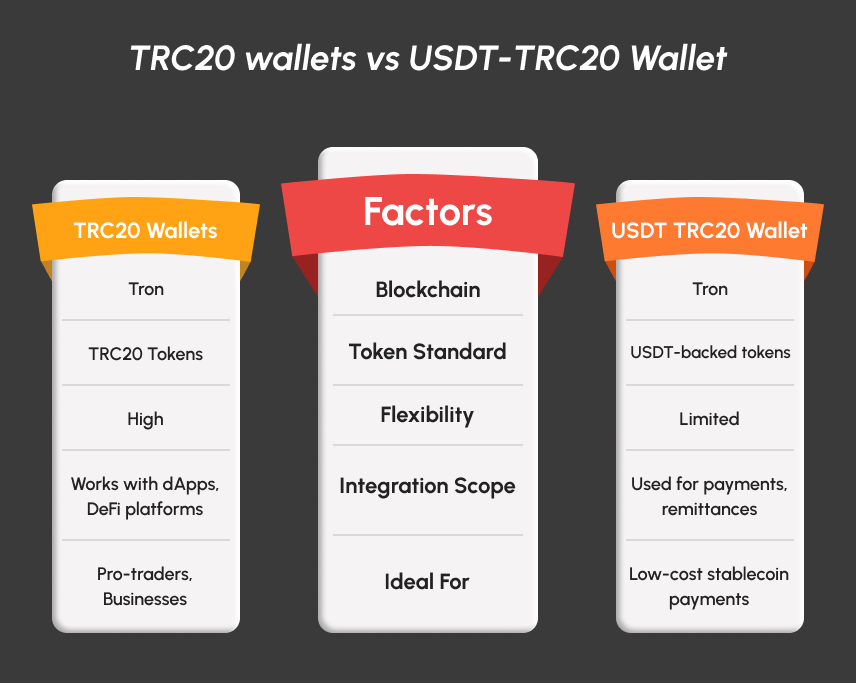
USDT TRC20 Wallet
The USDT TRC20 wallet is a specialized kind of crypto wallet that helps to store, receive, and send USDT-backed Tron tokens. This wallet is utilized to store stable and dollar-pegged transactions with low fees compared to other networks.
Why Should You Create Your Own TRC20 Wallet?
Creating your own TRC20 wallet allows full control over how the wallet functions, stores keys, and interacts with the TRON blockchain. Instead of relying on third-party tools, a custom TRC20 wallet is built to follow specific technical requirements, security standards, and user flows.
One major reason to create a TRC20 wallet is key ownership. When you design the wallet, private keys and mnemonic phrases can be generated and stored according to your chosen security model. This reduces dependency on external systems and allows better control over encryption, backups, and recovery methods.
Another reason is direct blockchain interaction. A custom TRC20 wallet communicates directly with TRON nodes and TRC20 smart contracts. This ensures accurate token balance retrieval, transparent transaction handling, and better monitoring of network activity. It also allows support for multiple TRC20 tokens under one wallet address.
Creating a TRC20 wallet also helps in performance optimization. TRC20 Wallet logic can be optimized for faster loading, efficient transaction signing, and real-time balance updates. Developers can decide how the TRC20 wallet handles TRX fees, bandwidth usage, and transaction confirmations.
Finally, building your own wallet improves technical understanding of how TRON accounts, smart contracts, and token standards work together. This clarity is essential when learning how to create a TRC20 wallet app, as it ensures the wallet is reliable, secure, and aligned with blockchain rules.
As we have done with the basics, let’s get into the core query on ‘how to create a TRC20 wallet app?’
How to Create a TRC20 Wallet App?
Unlike other wallet development, the TRC20 wallet app can be created without much complex development process. Within 10 easy steps, the TRC20 wallet app can be built with exponential features. We have explained each step in detail for a deeper understanding.
Step 1: Research & Requirement Analysis
The TRC20 wallet app development is kick-started by defining the core purpose, market analysis, and feature identification. In this phase, startups can elaborate the business scope, vision, and mission to create a high-tech wallet app.
Step 2: Tech Stack Utilization
Once the consultations are over, the tech stack for creating a TRC20 wallet app has to be choosen. For Android mobiles, utilizing Kotlin/Java is an ideal choice. On the other hand, for iOS devices, Swift can be used. Other frameworks like React native, Flutter, etc, can be utilized.
Step 3: Tron Blockchain Integration
Various tools can be used to integrate the Tron blockchain network. Some of them are TronWeb, Tronlink, and Tron APIs. With these frameworks, startups can integrate the Tron blockchain within the wallet app.
Step 4: UI/UX Design
After the blockchain implementation, designers are involved to offer a clean, intuitive, and responsive interface. The wallet will be designed to provide a smooth user experience with easy navigation. Simple onboarding will help new and experienced crypto wallet users.
Step 5: Token Standard Support
Then, the Tron token standards are incorporated to send, receive, and store tokens securely. The multi-token support feature can also be integrated to make the TRC20 wallet more versatile.
Step 6: Security Feature Integration
Then, the security features like end-to-end encryption, biometric authentication, two-factor authentication, seed phrase backup, etc. This ensures the crypto wallet stores the user data and assets securely.
Step 7: Smart Contract Integration
For decentralized transactions, smart contracts are incorporated with high-tech advanced features. This enhances the overall utility of the TRC20 wallet app beyond just storing.
Step 8: Testing & QA
After the overall development process is over, testers take the platform to conduct a rigorous testing process. The extensive testing ensures the platform’s performance, scalability, and blockchain interactions.
Step 9: Deployment
The TRC20 wallet app is ready to be deployed on the crypto market for public usage. The TRC20 wallet apps are listed on platforms like the Google Play Store (for Android) and Apple App Store (for iOS).
Step 10: Post-Launch Support
Even after the successful TRC20 wallet app launch, continuous updates and security patches are given for feature enhancements. The post-launch support helps the wallet to be competitive in the evolving blockchain ecosystem.
This is how a potential TRC20 wallet app is developed with the help of a crypto wallet development team. As they comprise efficient developers, designers and testers, the creation of the TRC20 wallet app is done without any hassles.
For a potential functioning of the TRC20 wallet app, integrating enriched features is essential. Know about the important features to make the platform unbeatable in the competitive digital landscape.
Core Features of the TRC20 Wallet App
Crypto wallet features play a major role in creating the TRC20 wallet app. Depending on the user needs, business scope, and market needs, the features can be integrated. Some of the core user, admin, and security features of the TRC220 wallet App are,
User Panel
- Mobile Login – Allows users to log in or onboard the wallet without hassles.
- Multi-currency Support – Enable users to store multi-blockchain tokens or crypto assets seamlessly.
- QR Code Scanner – Transactions for merchants are done instantly.
- Transaction history – Users can view the past wallet transactions via the panel.
- In-App Token Swap – Enable the platform users to swap crypto assets without relying on a third-party domain.
- Push Notifications – Instant Notifications are dropped for users to stay relevant about prices.
Admin Panel
- Real-time Analytics – Helps to track the live user activity, transactions, and trading patterns of users.
- Dispute Management – Technical issues raised by the users can be resolved instantly.
- Fraud Detection – Fraud or suspicious activity of users can be detected with enhanced security features.
- Revenue Configuration – Commissions/fees settings can be modified or customized depending on the admin’s needs.
- API integrations – Third-party payment gateways, crypto-to-fiat/fiat-to-crypto transactions are monitored.
- Recovery – The option enables the admin to claim the lost storage and other databases.
Security Features To be Included
- 2FA – Beyond just a password, OTP verification is done to protect the account.
- Biometric Login – Secure wallet access using fingerprint or face recognition.
- Encrypted Backup – The account details and data can be recovered using by encryption method.
- Seed Phrase Storage – Keeps your 12/24-word recovery phrase secure for wallet restoration.
These are the core features of the TRC20 wallet app. Apart from this, additional features like a multicurrency wallet development and functionalities can be optimized for enhanced performance. But here, startups are misunderstanding the overall cost with all these features. Same as the TRC20 wallets, there are popular TRC20 tokens to watch out for in 2026 in the next section.
Top TRC20 Tokens Supported by TRC20 Wallet Apps
The TRC20 tokens are smart contract-based digital assets that are built on the Tron blockchain and follow a standardized protocol. They are widely adopted for low transaction fees, high-speed transfers, and easy integrations. Some of the top TRC20 tokens to watch out for in 2026 are,
- TRX (Tronix) – The native token of the Tron network is known for fast speed and lower fees.
- USDT-TRC20 (Tether on TRON) – A stablecoin that is pegged to the US dollar (fiat currency) for global payments and trading.
- BTT (BitTorrent Token) – The BTT Tron token supports sharing, rewards, and micropayments on the Tron blockchain.
- WIN (WINkLink Token) – The WIN token is a decentralized oracle system to interact with real-world data and events.
- JST (JUST Token) – It is a governance token of the JUST ecosystem that allows users to participate in DeFi lending, staking, and protocol governance.
Business Benefits of Building a TRC20 Wallet App
The TRC20 wallet app business idea offers multiple business benefits for startups and entrepreneurs. Creating a wallet app will make you stand out in the competitive crypto market. Some of the top business perks of TRC20 wallet app development are,
Global Outreach
Creating a TRC20 wallet app opens the door for a global user base and wider visibility. As the wallet apps are decentralized, users from worldwide can access for utilizing the platform.
High ROI
The TRC20 wallet app creation is a potentially profitable business model with multiple revenue streams. Some of them are transaction fees, token swaps, staking fees, and premium subscriptions.
Enhanced Security
As the TRC20 wallet app is integrated with high-tech security features, it will comprise a huge user base. The high-tech security feature integration ensures user trust and business credibility.
Community Building
With the crypto wallet business, startups can build a strong crypto community that not only boosts user engagement but also the brand’s presence. A startup can build a strong community by integrating governance, loyalty programs, and token-based rewards.These are the wide range of business benefits of creating a TRC20 wallet app. Yet, the overall cost estimation will fit the pockets of startups. Let’s see about the cost factors in the next section.
How much does it cost to create a TRC20 Wallet App?
The approximate cost to develop the TRC20 wallet app ranges between $15,000 – $20,000. Yet, several factors such as features, security integrations, platform compatibility (Android, iOS, Web), UI/UX design, etc, play a vital role. Based on these, the overall cost estimation may vary.
Along with these, the choice of a crypto wallet development company is way more important for the cost factors. The development firm also offers relevant and high-tech TRC20 wallet development services will charge an affordable rate. So, pick the right Crypto wallet development company like Coinsclone.
Final Thoughts
Coinsclone is a leading crypto wallet development company that has 10+ years of experience in creating crypto wallets. With several crypto wallet development services, our team ensures to deliver a high-tech crypto wallet business for startups. We help startups and entrepreneurs to succeed in the crypto space by offering relevant consultations.
Our team guides you in every phase of the TRC20 wallet app development. We also offer post-launch support to make the mobile application stay relevant. Get a detailed demo from our team to kickstart your crypto wallet business!!
FAQs
1. What is a TRC20 wallet?
A TRC20 wallet is a cryptocurrency wallet designed to store and manage TRC20 tokens on the TRON blockchain. It allows users to send, receive, and check balances of TRC20-based tokens by interacting with TRON smart contracts using a wallet address and private key.
2. How does a TRC20 wallet work?
A TRC20 wallet works by generating a public address and private key linked to the TRON network. When a user sends tokens, the wallet signs the transaction using the private key and broadcasts it to the blockchain. The wallet reads token balances directly from TRC20 smart contracts.
3. What are the steps to create a TRC20 wallet app?
To create a TRC20 wallet app, follow these steps:
- Set up TRON blockchain connectivity.
- Generate wallet addresses and private keys.
- Integrate the TRC20 smart contract interaction.
- Enable token send and receive functions.
- Display real-time token balances
- Add transaction history tracking.
- Apply encryption and backup options.
4. Is TRC20 wallet creation different from ERC20 wallet creation?
Yes. A TRC20 wallet connects to the TRON blockchain, while an ERC20 wallet connects to Ethereum. TRC20 wallets use TRON APIs, TRX for transaction fees, and TRON-based smart contracts. ERC20 wallets use Ethereum nodes, ETH gas fees, and Ethereum smart contracts.
5. What security features are required in a TRC20 wallet app?
A secure TRC20 wallet app should include private key encryption, mnemonic phrase backup, password protection, secure local storage, and optional biometric authentication. These features help prevent unauthorized access and protect user funds.
6. Can a TRC20 wallet store multiple tokens?
Yes. A TRC20 wallet can store multiple TRC20 tokens using a single wallet address. The wallet reads balances for each token by calling their respective smart contracts on the TRON blockchain.
7. Do TRC20 wallets require TRX for transactions?
Yes. TRC20 wallets require TRX to pay transaction fees on the TRON network. Even when sending TRC20 tokens, a small amount of TRX is needed to process the transaction.
See How Our MVP System Can Help You Create a TRC-20 Wallet App Faster
Crypto Wallet Development — done right.
- MVP System : Build your TRC-20 wallet app 90% faster.
- Pre-Built Modules : TRON blockchain integration, TRC-20 token support, and wallet management—no coding needed.
- Brand & Customization : Your design, your tokens, your blockchain.
- Revenue Engine : Earn from transaction fees, swaps, and staking.
Get a free branded demo of your TRC-20 wallet app in 48 hours — before you invest a cent.
Book a Free Demo to discover how our system can take you from concept to live TRC-20 wallet app in just 2–4 weeks.