
This guide shows how to integrate a crypto payment gateway into your website or mobile app in 2026. It covers the three ways to add crypto checkout and how a payment moves from the buyer’s wallet to your order system. It also walks through the six setup steps, what each major gateway charges, and the tax and legal rules to check first.
By the end, you will know which method fits your business, how long it takes, and what it will cost per sale. You will also see the mistakes that break crypto checkouts, such as unsigned webhooks and unhandled underpayments, so you can avoid them before launch.
In this guide:
- The three ways to add crypto payments: a plugin, an API, or your own gateway
- How a crypto payment flows from checkout to a confirmed order, step by step
- 2026 fees from BitPay, CoinGate, NOWPayments, Stripe and Coinbase, with a worked cost example
- The six steps to integrate, test and go live safely
- The US, EU and India rules that apply when you accept crypto
See How Our MVP System Can Launch Your Payment Gateway Faster
Crypto Payment Gateway Development — done right.
- MVP System : Integrate a secure crypto payment gateway 90% faster.
- Multi-Currency Support : Accept Bitcoin, Ethereum, USDT & 100+ coins instantly.
- Merchant-Friendly Setup : Plug & play APIs, no coding required.
- Revenue Engine : Earn from transaction fees, merchant subscriptions & swaps.
Get a free branded demo of your payment gateway in 48 hours — before you invest a cent.
Book a Free Demo to discover how our Crypto Payment Gateway Integration System can take you from idea to live payments in just 8 – 12 weeks.
How to Integrate a Crypto Payment Gateway
To integrate a crypto payment gateway, you open a merchant account, pick the coins you will take, and link the gateway to your checkout with a plugin or an API. The gateway then watches the blockchain. It tells your server when a payment is final and pays you out in crypto or local cash.
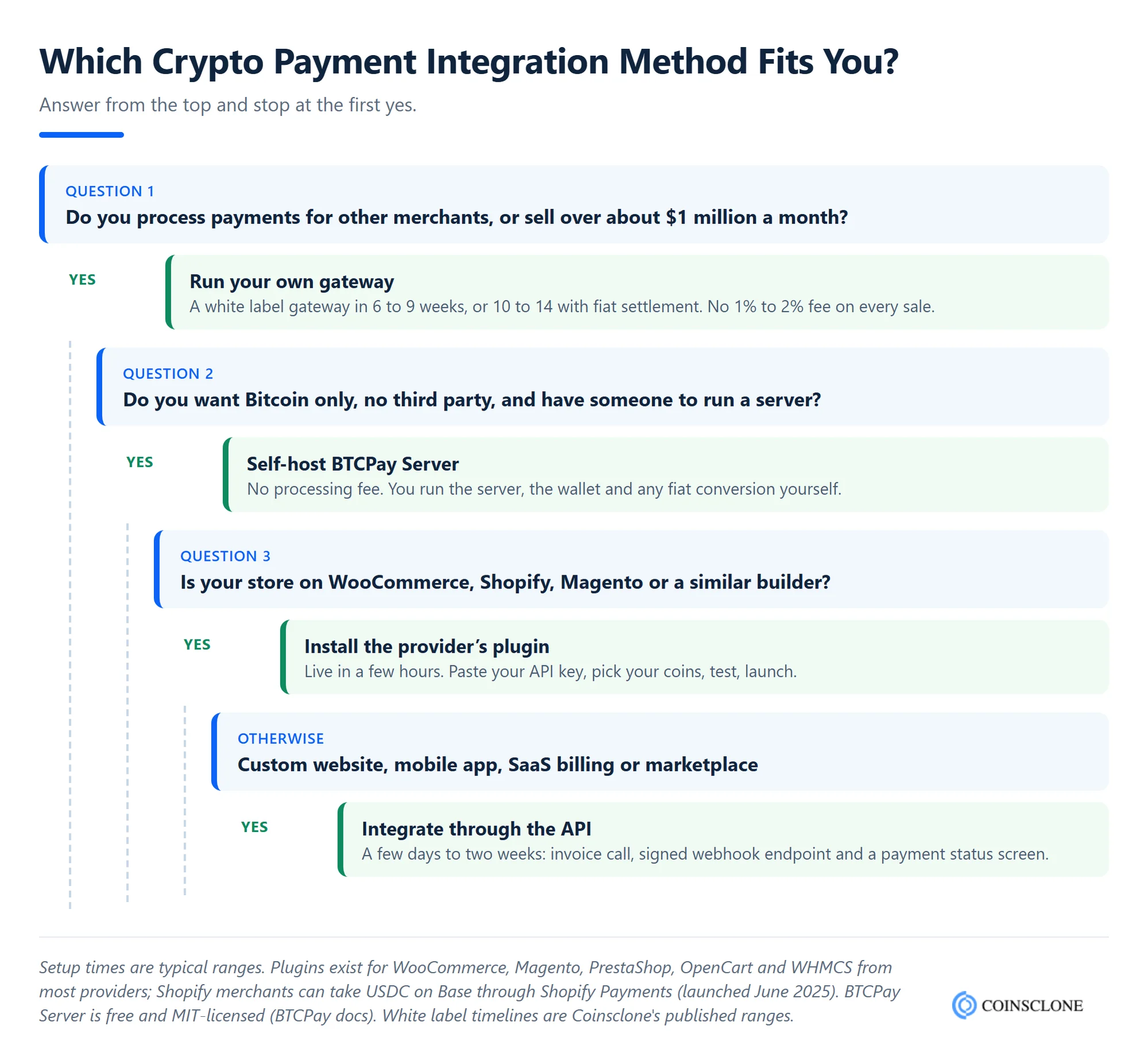
There are three ways to do it. The right one depends on your platform, your sales volume and how much control you want.
| Method | Best for | Typical setup time | What you pay |
| Plugin | WooCommerce, Shopify, Magento, PrestaShop and other store builders | A few hours | The provider’s fee, usually 1% to 2% |
| API or hosted checkout | Custom websites, mobile apps, SaaS billing and marketplaces | A few days to two weeks | The provider’s fee, plus your developer time |
| Your own gateway | High volume sellers, payment firms and platforms that serve many merchants | 6 to 14 weeks with a white label base | Build and hosting cost, but no per-sale fee to a third party |
Option 1: Install a Plugin
A plugin is the fastest route. Most gateways offer free plugins for the main store builders, such as WooCommerce. You install the plugin, paste your API key, choose your coins, and the crypto option appears at checkout. On Shopify, you can also take USDC through Shopify Payments. Shopify added it with Coinbase and Stripe in 2025, so no extra app is needed there.
Option 2: Connect Through an API
An API gives you full control over the checkout. Your server asks the gateway for an invoice and shows the buyer a hosted payment page or your own screen. It then waits for a signed webhook that says the payment is complete. This is the route for custom stores, mobile apps, subscription billing and any platform that needs crypto payments inside its own flow.
Option 3: Run Your Own Gateway
The third route is to own the gateway. Some merchants self-host the free, open source BTCPay Server, which charges no transaction fees but needs a server and someone to run it. Others, such as payment firms, exchanges and high volume sellers, build a branded gateway that they control end to end. This route costs more up front but removes the 1% to 2% fee on every sale and lets you serve other merchants too.
Why More Firms Now Take Crypto Payments
Crypto checkout has moved from a niche extra to a standard choice. Shopify now offers USDC on the Base network to its merchants, and Stripe accepts stablecoin payments in the same dashboard as cards. When the largest store and payment brands add a way to pay, buyers start to expect it. Here is what you lose when you skip it.
Limited global reach: Cards and bank transfers rely on local bank networks. Many buyers in Latin America, Africa and Asia hold their dollars as stablecoins, not in a US bank. A crypto gateway lets them pay you in the coin they hold, wherever they live.
High transaction fees: A standard US online card payment costs about 2.9% plus 30 cents on Stripe, and more for cross-border cards. Most crypto gateways charge 1% to 2%, and some charge nothing beyond network fees.
Slow settlements: Card and wire payments can take two to five business days to reach your account. Stablecoin payments on fast networks confirm in seconds, and Bitcoin payments in about 10 to 60 minutes.
Chargeback fraud: A card buyer can dispute a payment weeks later and pull the money back. Crypto payments cannot be reversed by the buyer, so “friendly fraud” chargebacks disappear. Stripe, for one, notes that its stablecoin payments do not turn into chargebacks.
An outdated brand image: Many younger and tech-savvy buyers look for a crypto option. Offering one shows that your brand is modern and makes it easier to reach that audience.
In short, a crypto payment option has moved from a nice-to-have to a sensible part of the payment mix. For a closer look at the pros and cons, see our guide to crypto vs traditional payment gateways.
What Makes a Crypto Payment Gateway Business-Ready?
The core functions and the features that are built into the crypto payment gateway decide whether it is ready for real sales. Before you sign up with a provider, or brief a team to build one, check that it offers the features below.
Many coins and networks: A good gateway takes Bitcoin (BTC), Ether (ETH) and the two main dollar coins, USDT and USDC, on more than one chain. Low-fee chains such as Tron, Solana, Base and Polygon keep small payments cheap for your buyers.
Strong security: Look for safe key storage, multi-sig or MPC wallets, 2FA logins and a list of approved payout addresses. These stop one stolen password from draining your funds.
Simple APIs and plugins: The gateway should offer clear API docs, signed webhooks, SDKs and ready-made plugins. Good tools let your team add crypto checkout without complex code.
Instant crypto to fiat swaps: The gateway locks in the price at the time of sale and pays you in dollars, euros or your local money. This guards you from price swings and keeps your books simple.
A sandbox for testing: A test network lets you run fake payments before going live. Without it, every test costs real money.
Clear dashboards and reports: Merchants need live payment status, reports they can download and links to tools such as QuickBooks or Xero to keep tax records in order.
Built-in KYC and AML checks: The gateway should check its merchants, screen payments against sanctions lists, and follow the anti-fraud rules in each country it serves. This protects you from legal risk and builds trust with banks and regulators.
Support and room to grow: Payments are time-critical, so you need fast technical support. The gateway must also handle more traffic as your sales grow, without forcing you to switch providers.
A gateway with these features keeps payments secure, compliant and simple for both you and your buyers.
How a Crypto Payment Moves From Checkout to Confirmed Order
Before you start the setup, it helps to see what happens behind the “Pay with crypto” button. Each gateway, from a store plugin to a custom API build, follows the same basic flow.
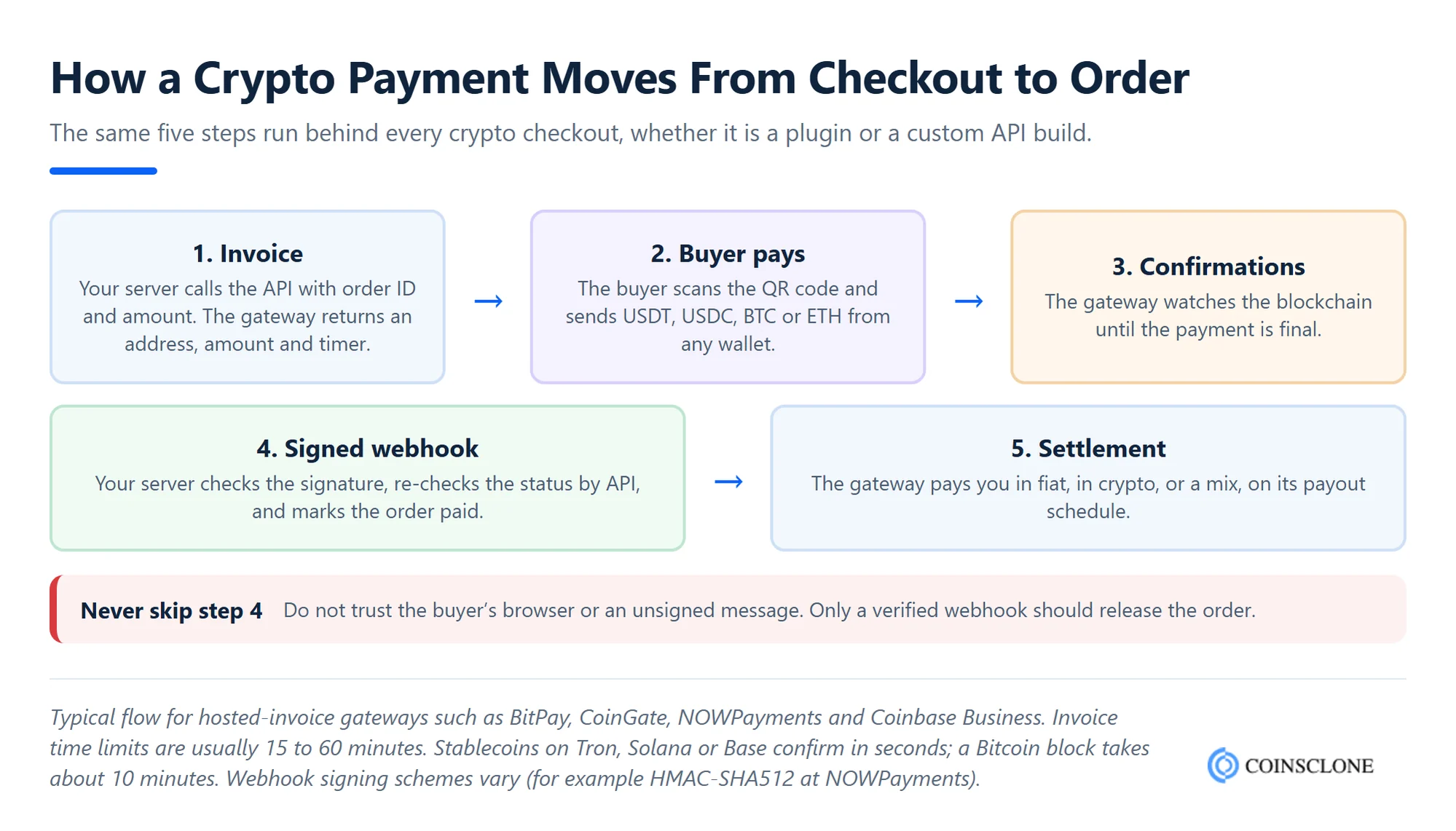
- Create an invoice: When the buyer clicks “Pay with crypto”, your server calls the gateway’s API with the order ID and amount. The gateway returns an invoice with a unique wallet address, the exact crypto amount and a time limit, often 15 to 60 minutes.
- The buyer pays: The buyer sees a hosted payment page or your own screen with a QR code. They scan it with their wallet and send the funds.
- The gateway watches the chain: It spots the payment and waits until the network has confirmed it enough times. Stablecoins on fast networks confirm in seconds; Bitcoin needs one or more blocks of about 10 minutes each.
- Your server gets a webhook: The gateway sends a signed message (a webhook) to your server with the new status. Your server checks the signature, confirms the status with the API, and marks the order as paid.
- You get settled: The gateway converts the funds to fiat or keeps them as crypto, based on your settings, and pays out to your bank or wallet.
The key point for developers is step 4. Never mark an order as paid because the buyer’s browser says so. Only trust a signed webhook that your server has checked.
Crypto Payment Gateway Integration in Six Steps
Setting up a crypto payment gateway can look complex, but it follows a clear path. These six steps work for a plugin or an API, and they keep your launch safe.
Step 1: Choose Your Cryptocurrencies and Networks
First, decide which coins you will accept. Most stores start with Bitcoin, Ethereum, USDT and USDC. Stablecoins matter most, because their price stays close to one dollar, so neither you nor your buyer takes on price risk. Then choose the networks. USDT on Tron and USDC on Base or Solana cost buyers only cents to send. The same coins on Ethereum can cost more. You can add other coins later as demand grows.
Step 2: Pick a Trusted Crypto Payment Gateway Provider
Next, compare gateways on fees, coins, payout choices, the countries they serve and their licences. Check that the gateway works in your country. For example, Coinbase shut Coinbase Commerce on 31 March 2026. The new product, Coinbase Business, only serves firms in the US and Singapore. Our list of the top crypto payment gateways is a good place to start your shortlist.
Step 3: Open a Merchant Account and Set Up Your Wallet
Now sign up and pass the gateway’s business checks (often called KYB). You will need company papers, proof of address and details of what you sell. Then decide where the money goes:
- Convert to fiat: The gateway pays your bank in dollars, euros or your local money.
- Keep it as crypto: The provider sends funds to your own business wallet. Use a multi-signature or MPC wallet so one person or one stolen key cannot move the funds alone.
- A mix of both: Many gateways let you settle a share in crypto and the rest in fiat.
Step 4: Connect the Gateway Through a Plugin or API
Once your account is ready, connect the gateway to your site or app. With a plugin, you install it, paste your API key and secret, and pick your coins. With an API, your developer builds three parts:
- An invoice call: Your server creates a payment for each order with the order ID and amount.
- A webhook endpoint: A server URL that receives payment updates, checks the signature on each one, and updates the order.
- A payment status screen: A page or app view that shows the buyer whether the payment is pending, confirmed or expired.
Keep your API keys on the server only, never in the website code or the mobile app. Also, make your webhook handler safe to run twice, because gateways often resend the same message.
Step 5: Test Every Payment Case in a Sandbox
Before you go live, run test payments in the provider’s sandbox or on a test network. Do not stop at one happy path. Test every case a real buyer can create:
| Payment case | What happens | What your system should do |
| Paid in full | The buyer sends the exact amount in time | Mark the order paid after the confirmed webhook |
| Underpaid | The buyer sends too little, often because the wallet took its fee from the amount | Ask the buyer to send the rest, or refund, based on your policy |
| Overpaid | The buyer sends too much | Fulfil the order and refund the extra, or keep it as store credit |
| Expired | The buyer pays after the invoice time limit | Hold the order and check the new price before fulfilling |
| Wrong network or coin | The buyer sends USDT on the wrong network | Have a clear recovery and support process, as these funds may be hard to return |
| Refund | You need to return money | Ask for the buyer’s refund address; crypto cannot be pulled back like a card refund |
Step 6: Go Live and Track Each Payment
Finally, switch to your live keys and launch. Watch the first few days closely. Match every paid order with a settled payment in the gateway dashboard, and keep records for tax. Also set alerts for failed webhooks, so a missed message never leaves a paid order unshipped.
If you plan to go further and create a crypto payment gateway of your own, the same steps apply, but your team builds the invoice engine, wallet layer and webhooks instead of renting them. That choice pays off once your volume is large enough, which the next section shows in numbers.
What It Costs to Accept Crypto Payments in 2026
The main running cost of crypto checkout is the provider’s fee on each sale. Here are the published rates of the main gateways as of October 2026.
| Provider | Published fee | Notes |
| BitPay | 2% + 25 cents (under $500,000 a month), falling to 1% + 25 cents above $1 million | BitPay pricing; settles in fiat, crypto or both |
| CoinGate | 1% | CoinGate pricing; free SEPA withdrawals, EUR 50 minimum |
| NOWPayments | 1% service fee | NOWPayments pricing; 350+ coins, lower fees at high volume |
| Stripe stablecoin payments | 1.5% | USDC on Ethereum, Solana, Polygon, Base and Tempo; settles to your Stripe balance |
| Coinbase Business | 1% for merchants who moved from Commerce | US and Singapore businesses only |
| BTCPay Server | No processing fee | Self-hosted; you pay for the server and the network fees |
To see what those rates mean in money, take a store that sells $100,000 a month with an average order of $100. That is 1,000 orders a month.
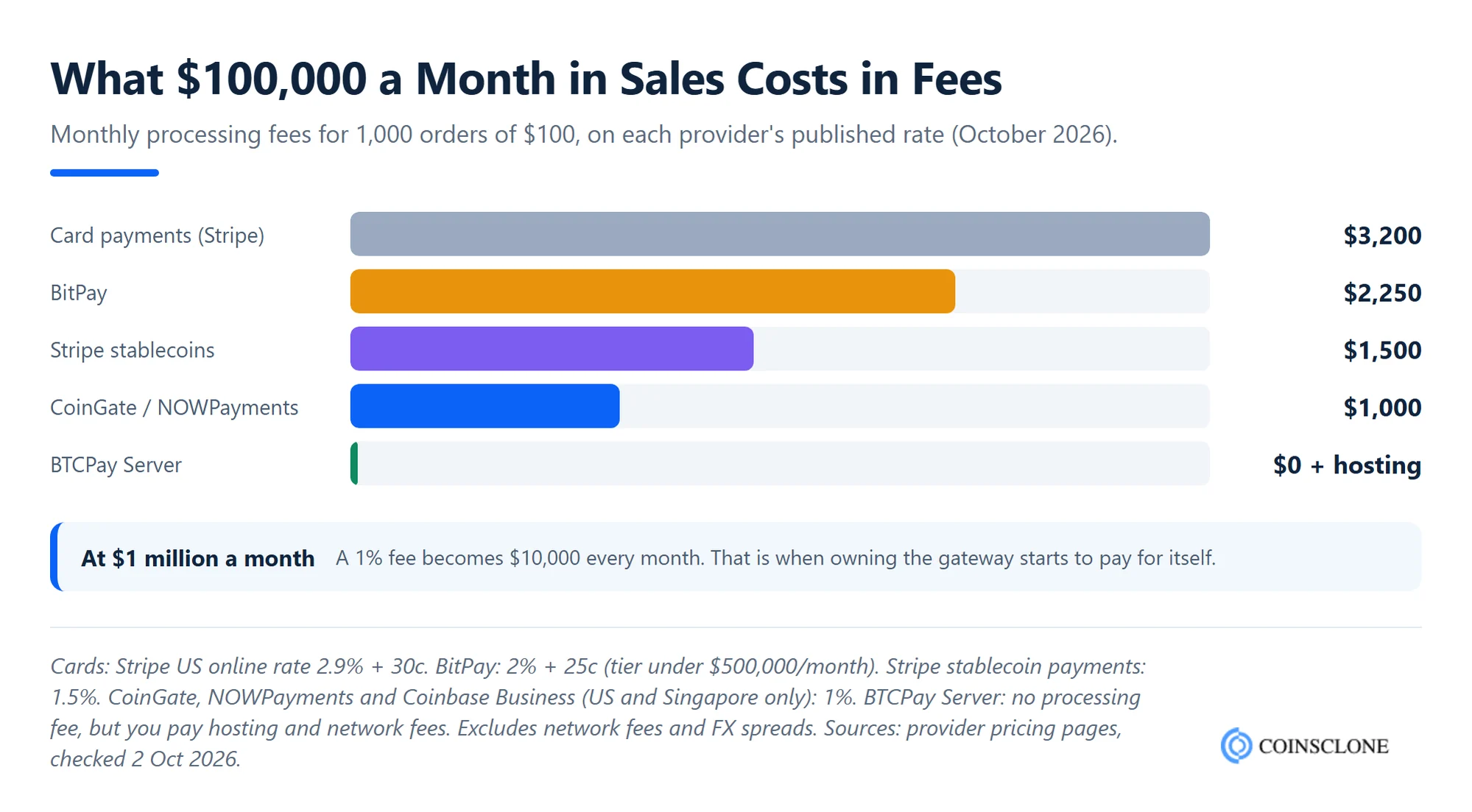
On these numbers, a crypto gateway saves between about $950 and $2,200 a month compared with cards, before network fees and currency spreads. At $1 million a month, the 1% fee alone comes to $10,000 every month. That is the point where many payment firms and large sellers choose to run their own gateway instead. Our guide to the cost to develop a crypto payment gateway breaks down that build budget.
How to Ensure a Smooth Crypto Payment Gateway Integration
Most failed crypto checkouts fail for the same few reasons. A secure, compliant and easy-to-use setup keeps buyers coming back. Use these best practices from day one.
Beat price swings with instant swaps: Crypto prices can move a few percent in an hour. Turn on auto-conversion to fiat, or price in stablecoins, so the amount you earn matches the price you charged.
Check each webhook: Check the signature on each webhook, then ask the gateway’s API for the payment status before you ship. Fake “payment complete” messages are a common attack.
Lock down your keys and payouts: Keep API keys in a secrets vault, turn on 2FA for each dashboard user, and approve your payout addresses in advance. Our tips to build a secure crypto payment gateway go deeper.
Follow KYC/AML rules: A licensed provider handles most buyer checks for you. Still, keep records of your sales and know your own reporting duties in each country you sell to.
Use SDKs and plugins to save time: Ready-made SDKs and plugins cut your build time and lower the chance of bugs. They also work across websites, mobile apps and point-of-sale (POS) systems.
Build trust with a clear checkout and refund policy: Show the exact amount, the network, a countdown timer and a QR code. Publish a refund policy that explains how crypto refunds work. A clear screen also reduces “wrong network” mistakes.
Together, these steps protect your revenue and give buyers a checkout they trust.
Rules and Taxes to Check Before You Accept Crypto
Accepting crypto as a merchant is legal in most major markets, but it comes with duties. The rules below are the ones most of our clients ask about. Always confirm the details with a local adviser.
United States: The GENIUS Act, signed on 18 July 2025, set the first federal rules for payment stablecoin issuers. For merchants, the key point is tax. The IRS treats crypto as property, so crypto you receive for goods or services counts as income at its fair market value on the day you receive it.
EU: Under MiCA, firms that hold or transfer crypto for clients need a CASP licence, and the grace periods in each member state ended by 1 July 2026 at the latest. A merchant that only sells its own goods usually does not need one, but your gateway does. So pick a provider with a MiCA licence if you sell to EU buyers.
India: Crypto is not legal tender in India. Gains on virtual digital assets are taxed at 30%, and a 1% TDS applies to transfers. Crypto firms that serve users in India must also sign up with the FIU-IND, the country’s anti-money laundering unit.
Your gateway’s licence: In most countries, the gateway that holds or swaps funds needs a licence, such as a US money transmitter licence or an EU CASP licence. A licensed gateway takes most of the legal work off your desk.
Real-World Examples of Firms That Take Crypto
More and more firms use crypto payment gateways to take sales, reach new markets and win tech-savvy buyers. Here is how firms in each field put crypto payments to work.
E-commerce stores: Online stores accept crypto to serve buyers worldwide, lower their fees and get paid faster. Shopify stores can now take USDC through Shopify Payments and still get paid in their local money by default.
Travel and hospitality: Travel firms accept crypto for cross-border bookings. This makes booking easier for global guests, speeds up settlement and avoids the cost of handling many currencies.
Gaming and entertainment: Online gaming platforms accept crypto for in-game purchases and subscriptions. Low-fee networks make tiny payments worth taking.
SaaS and tech firms: Many SaaS firms and web3 startups bill their global clients in stablecoins. Stablecoins remove price swings, and payments confirm in seconds. Stripe Billing now runs stablecoin plans too.
Freelancers and remote teams: Freelancers take crypto from clients abroad to avoid high bank charges and slow wire transfers.
Charities and non-profits: Many good causes now take gifts in crypto. Each gift is cheap to send and easy to trace, and it draws donors who like to give in crypto.
In short, crypto payment gateways now suit almost any firm that sells online or across borders.
Coinsclone: Your Partner for Crypto Payment Gateway Integration
Coinsclone is a top crypto payment gateway development company. Since 2018, our team has delivered 350+ platforms for 200+ clients across 20 industries. We help firms that want more than a plugin. Payment firms, exchanges, marketplaces and large sellers come to us for their own branded gateway.
Our crypto payment gateway takes many coins and stablecoins and swaps crypto to fiat at once. It comes with merchant dashboards, signed webhooks, plugins for the main store builders, and KYC and AML tools built in. A standard white label gateway launches in 6 to 9 weeks, and a version with fiat settlement in 10 to 14 weeks. We also offer 24/7 technical support after launch. Talk to our team to plan a crypto payment gateway that fits your business.
Frequently Asked Questions
How do I add crypto payments to my website?
Sign up with a crypto payment gateway, pass its business checks, and connect it to your site. On a store builder such as WooCommerce, install the gateway’s plugin and paste your API key. On a custom site or app, use the provider’s API to create invoices and a webhook to confirm payments. A plugin setup can take a few hours; an API build usually takes a few days.
Is it legal to accept crypto payments?
Yes. In most countries, such as the US, the UK, the EU states and India, a firm can take crypto as payment. You must still pay tax on the income and keep records. A few countries, such as China, ban or restrict crypto payments, so check local rules before you sell there.
How much does it cost to accept crypto payments?
Most gateways charge 1% to 2% per sale. Right now, CoinGate and NOWPayments charge 1% and Stripe charges 1.5% for stablecoins. BitPay charges 2% plus 25 cents for stores that sell under $500,000 a month. Self-hosted BTCPay Server has no processing fee, but you pay for hosting.
Does Stripe accept crypto payments?
Yes. Stripe takes USDC on five networks: Ethereum, Solana, Polygon, Base and Tempo. The buyer pays from their crypto wallet, and the money settles in your Stripe balance in your local currency. US firms can switch it on in the dashboard. Firms in the EU, Hong Kong, Mexico and Switzerland can join a private preview.
How long does crypto payment settlement take?
Stablecoin payments on networks such as Tron, Solana or Base confirm in seconds. Bitcoin payments take about 10 to 60 minutes, based on how many blocks the gateway waits for. The payout to your bank then follows the provider’s schedule, which is often daily.
Can I convert crypto payments to fiat automatically?
Yes. Most gateways, such as BitPay, CoinGate and Stripe, can turn each payment into fiat at the time of sale. This protects you from price swings, and you receive dollars, euros or another local currency in your bank account.
Do I need a licence to accept crypto payments?
Usually not, if you only sell your own goods or services and use a licensed gateway. The gateway that holds or converts the funds needs the licence, such as a MiCA CASP licence in the EU. If you plan to process payments for other merchants, you will need your own licence in most countries.
See How Our MVP System Can Launch Your Payment Gateway Faster
Crypto Payment Gateway Development — done right.
- MVP System : Integrate a secure crypto payment gateway 90% faster.
- Multi-Currency Support : Accept Bitcoin, Ethereum, USDT & 100+ coins instantly.
- Merchant-Friendly Setup : Plug & play APIs, no coding required.
- Revenue Engine : Earn from transaction fees, merchant subscriptions & swaps.
Get a free branded demo of your payment gateway in 48 hours — before you invest a cent.
Book a Free Demo to discover how our Crypto Payment Gateway Integration System can take you from idea to live payments in just 8 – 12 weeks.