
A crypto POS system lets a shop take crypto at the counter the same way it takes a card. The cashier enters the amount, the screen shows a QR code, and the customer pays from a phone wallet. The shop can keep the crypto or get dollars in its bank account.
This guide is for two readers. Shop owners who want to accept crypto in store, and payment firms, retail chains and fintechs who want to build their own crypto POS. All fees and rules are checked as of 1 November 2026.
In this guide:
- How a crypto POS sale works, step by step, and what goes wrong at the till
- The four ways people pay with crypto in a shop, from Lightning to stablecoins
- Real fees compared with card fees on $10,000 of monthly sales
- The rules that apply to the shop and to the firm that runs the POS
- What it takes to build a crypto POS system: features, parts, cost and timeline
What Is a Crypto POS System?
A crypto POS system is the software, and sometimes the hardware, that lets a store accept crypto as payment at the point of sale. It creates a payment request for the exact amount, watches the blockchain for the payment, and then marks the sale as paid in the till.
It can be a feature inside a POS you already use, an app on a tablet or phone, or a card terminal with a crypto app loaded on it. Behind each one sits a crypto payment gateway that prices the sale, tracks the payment and settles the money.
One quick note on words. In crypto, “PoS” also means proof of stake, the way chains like Ethereum agree on blocks. That has nothing to do with checkout. In this guide, POS always means point of sale.
How Does a Crypto POS System Work?
Every crypto POS follows the same basic loop. The details change by coin and network, but the steps do not.
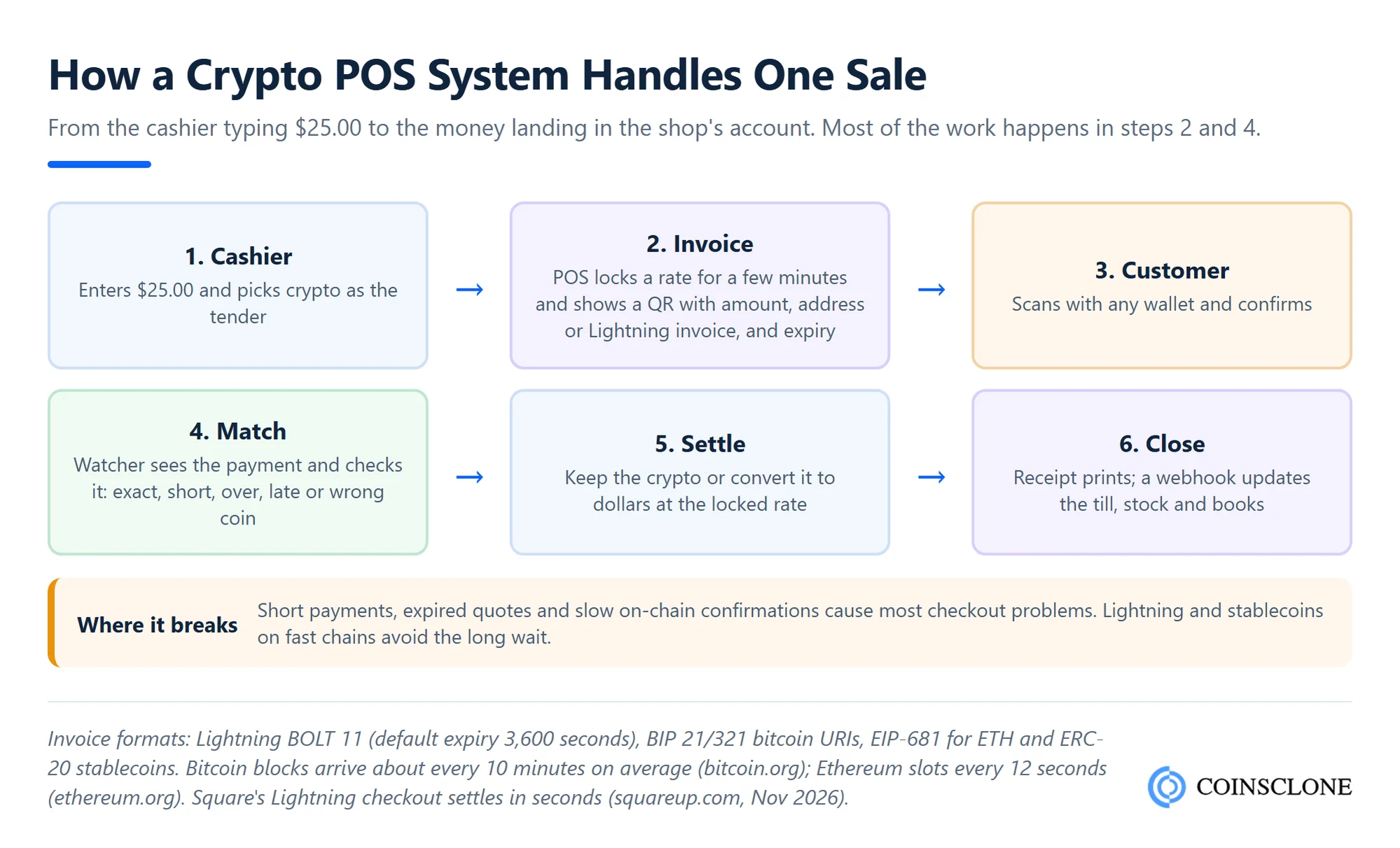
- Ring up the sale: The cashier enters the total and picks crypto as the payment type.
- Create the invoice: The POS fixes the price in crypto for a short window and shows a QR code. The code holds the amount, the address or Lightning invoice, and an expiry time.
- Customer pays: The customer scans with a wallet app and confirms.
- Match the payment: A watcher service sees the payment on the network and checks it against the invoice.
- Settle: The shop keeps the crypto or converts it to local money at the locked rate.
- Close the sale: A receipt prints and the till, stock and books update.
The QR code follows a shared format so any wallet can read it. Bitcoin uses a standard bitcoin payment link format. Ethereum and its tokens use EIP-681 payment requests. Lightning uses an invoice that, under the BOLT 11 spec, expires after one hour unless the POS sets a shorter time.
How long does a crypto payment take at the counter?
It depends on the network. A Bitcoin block comes about every 10 minutes on average, which is too slow for a coffee queue. Ethereum adds a new block every 12 seconds. Lightning and stablecoins on fast networks clear in seconds, which is why most in-store systems now use them.
What happens if the customer pays too little or too late?
This is where cheap systems fail. A good crypto POS handles each case on its own:
- Short payment: Show the gap and ask for a second payment, or refund what came in.
- Overpayment: Flag the extra and return it, minus the network fee.
- Late payment: If the quote expired, re-price at the new rate or refund.
- Wrong coin or network: Catch it before the customer leaves, because sending it back may need manual work.
What Are the Ways to Pay With Crypto in a Store?
Shoppers can pay with crypto in four main ways. Each one puts a different load on the shop.
| Method | How the customer pays | Speed at the till | What the shop gets |
| On-chain QR invoice | Scans a QR and sends BTC, ETH or another coin | Seconds to many minutes, by network | Crypto, or cash after conversion |
| Lightning | Scans a Lightning invoice from a Bitcoin wallet | Seconds | Bitcoin or cash |
| Stablecoin | Pays USDC or USDT from a wallet on a fast network | Seconds | Stablecoins or cash |
| Crypto card | Taps a Visa or Mastercard linked to a crypto balance | Same as any card | Cash, as a normal card sale |
Stablecoins are taking the lead. In the first half of 2026, CoinGate saw USDC pass Bitcoin as the most used coin, at 22.1% of payments against 21.0%, in its H1 2026 payments report. The same report counted 782,403 paid orders, up 21.4% on a year earlier.
Lightning is growing but still small. Only 9.6% of CoinGate’s Bitcoin payments used Lightning in that period. Square is the big test. Its sellers can take Bitcoin over Lightning on the hardware they already own, and the Square bitcoin page says the payment settles in seconds.
Crypto cards need no crypto setup at all. For the shop, a crypto card is a normal card sale. The card firm sells the crypto and pays the shop in local money, so card fees still apply. If you want to run that model yourself, our guide on how to launch a crypto card program covers it.
What Types of Crypto POS Systems Are There?
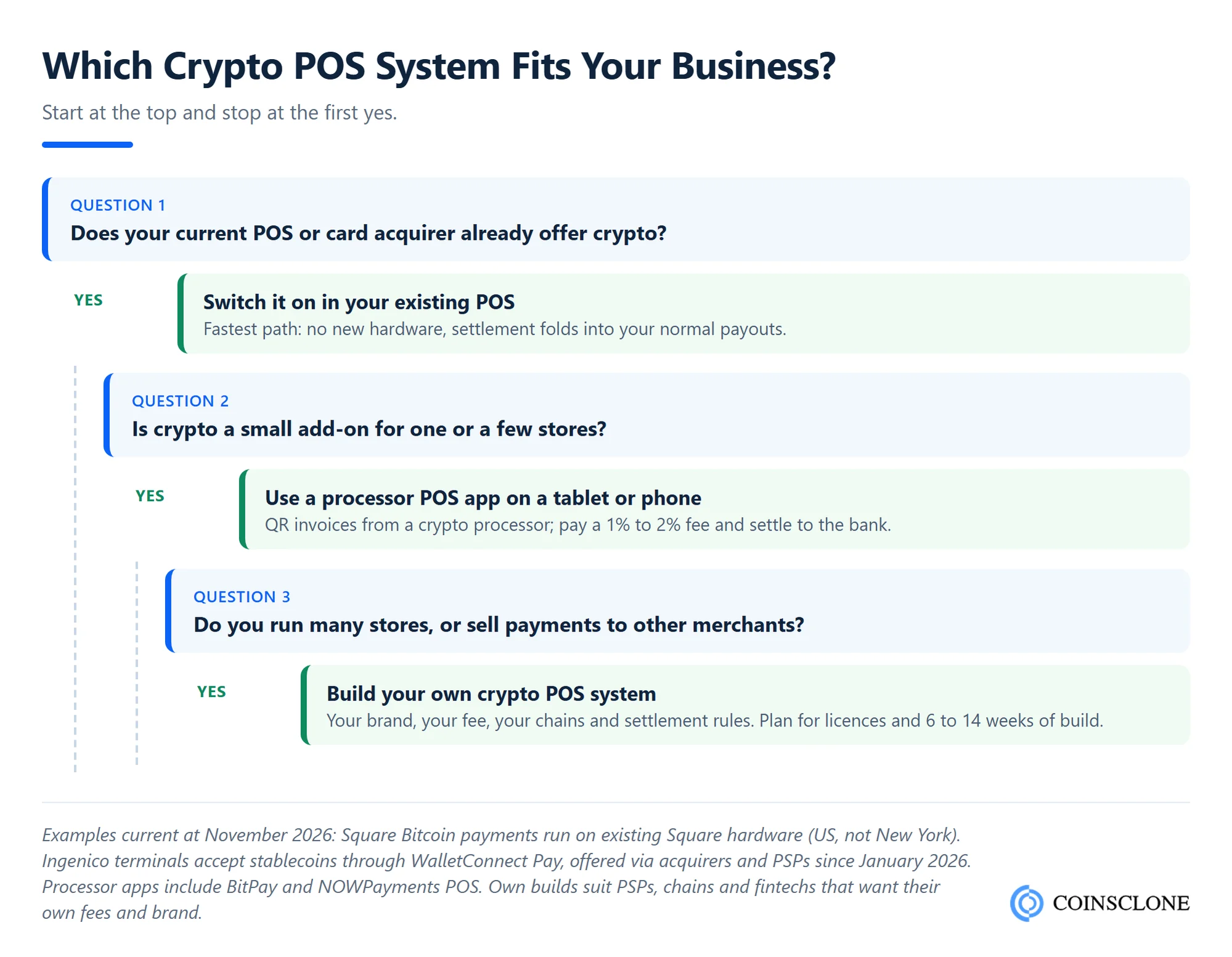
There are four main types. The right one depends on how many stores you run and who you sell to.
- Plugin in your current POS: Your POS or card firm adds crypto as a payment type. Square’s Bitcoin payments are the best known case. No new hardware, but you take only what the vendor supports.
- App on a tablet or phone: A crypto payment firm gives you a POS app that shows QR invoices. Setup is fast, and you pay their fee on each sale.
- Terminal with a crypto app: Card terminal makers now load crypto apps. Ingenico added stablecoin payments through WalletConnect Pay in January 2026, sold through banks and payment firms rather than to shops directly.
- Your own crypto POS system: You build the app, the gateway and the settlement layer. This suits retail chains, payment firms and fintechs that want their own brand, fees and coin list.
A forum thread from 2026 shows why the first option is not always enough. A shopper on Stacker News tried to pay with Bitcoin at a Square store and found no option. Other users said older hardware may not get the update. Shops need to check the feature is live on their own devices.
How Do Merchants Get Paid: Crypto or Cash?
Most shops do not want to hold crypto. In CoinGate’s H1 2026 data, 75.4% of orders were settled to fiat money and 24.6% in crypto.
There are three common setups:
- Instant conversion: The POS locks the rate at checkout and pays the shop in dollars or euros. The shop carries no price risk.
- Split settlement: Part of each sale converts to cash and part stays in crypto. Square lets sellers keep Bitcoin or take dollars.
- Hold everything: The shop keeps the crypto in its own wallet. This gives full control but full price risk.
The rate lock is the key part. If the price of Bitcoin drops a minute after the customer pays, a converting POS still pays the shop the locked amount. The payment firm takes that risk, which is one reason it charges a fee.
How Do Crypto POS Fees Compare With Card Fees?
Crypto fees are often lower than card fees, but not always. Fixed fees per sale change the picture for small tickets.
| Provider | Published fee (US, as of 1 Nov 2026) | Notes |
| Square card payments | 2.6% + 15 cents in person | Square fee page, Free plan |
| Square Bitcoin payments | 0% through 2026, then 1% | Not for sellers in New York State or outside the US |
| BitPay | 2% + 25 cents under $500,000 a month; 1% + 25 cents at $1 million or more | BitPay pricing, higher for high-risk sectors |
| NOWPayments | 1% service fee | NOWPayments pricing, network fees extra |
Here is what that means for a cafe with 400 sales of $25 a month, or $10,000 in total.
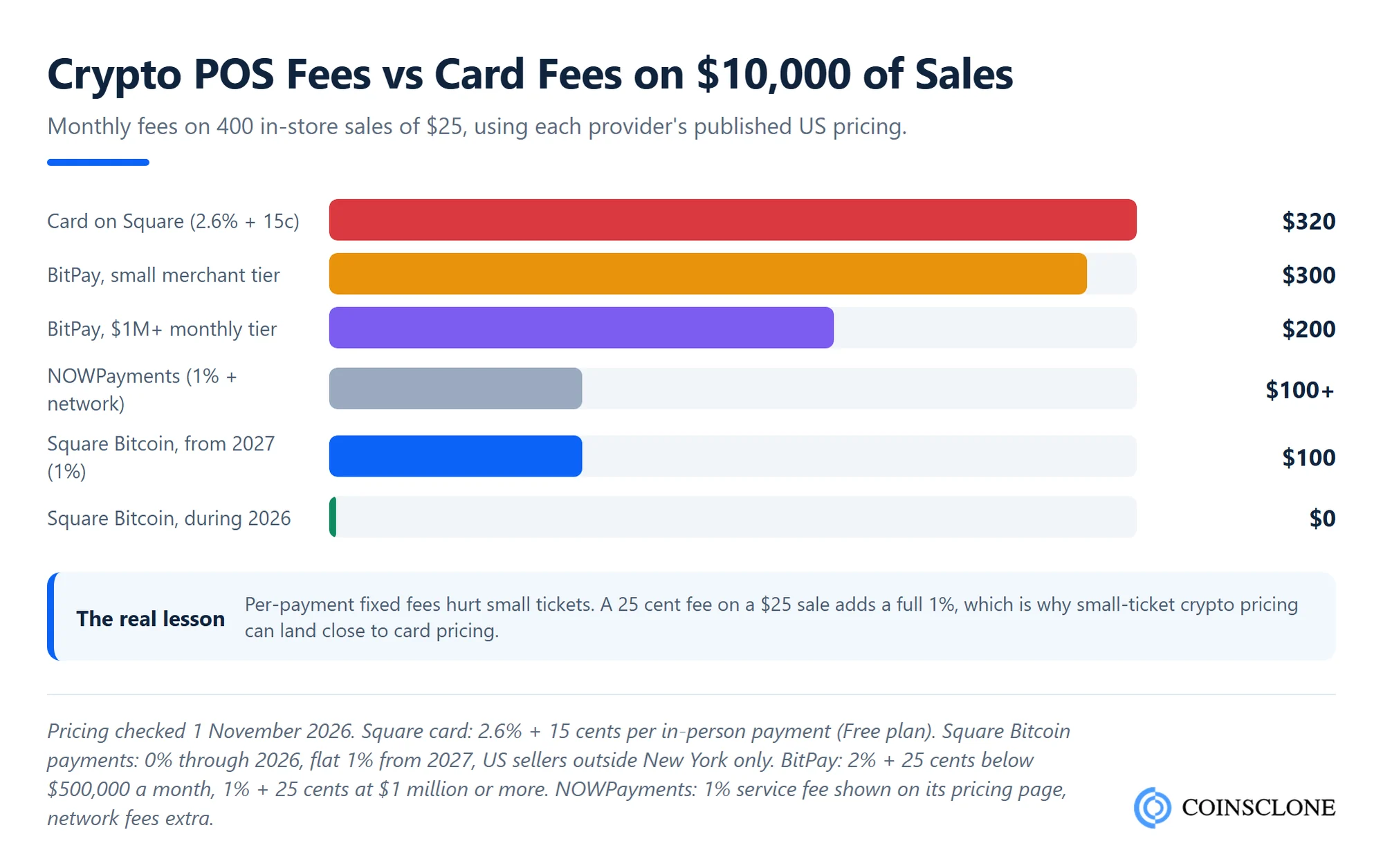
- Card on Square: 2.6% of $10,000 is $260, plus 400 x 15 cents, so $320.
- BitPay, small tier: 2% is $200, plus 400 x 25 cents, so $300.
- Square Bitcoin from 2027: 1% is $100.
- Square Bitcoin in 2026: $0.
The lesson: a 25 cent fixed fee on a $25 sale adds a full 1%. On small tickets, a crypto processor can cost almost as much as a card. Flat percentage pricing, or your own POS, is where real savings show up.
There is one more saving. Crypto payments are final. Square states that Bitcoin payments “cannot be disputed or reversed,” so there are no chargebacks. For shops that lose money to card fraud, that matters as much as the fee.
How do refunds work with a crypto POS?
Since a crypto payment cannot be pulled back, a refund is a new payment from the shop to the customer. The POS should log the original sale, ask for the customer’s wallet address, and decide which rate to use: the rate at purchase or the rate today. Write that rule into your refund policy before the first sale.
Is It Legal to Accept Crypto Through a POS?
In the US and the EU, a shop that takes crypto for its own goods is not running a payment service. The heavier rules fall on the firm that runs the POS. Some countries limit crypto payments, so check local law first. Here is how that splits in the US and the EU.
For the shop. In the US, the IRS treats digital assets as property, not money. Crypto received for goods or services is ordinary income, and the shop must keep the US dollar value at the time of each sale. A good POS records this for you on every receipt.
For the firm that runs the POS. FinCEN’s 2019 guidance on crypto business models is clear. A crypto payment processor that takes crypto from shoppers and pays shops in cash, or the other way around, is a money transmitter. It does not get the usual payment processor exemption. That means federal registration, an AML program and, usually, state money transmitter licences.
In the EU. Firms that hold or exchange crypto for clients need a MiCA licence as a crypto-asset service provider. The grace period for firms working under older national rules ended on 1 July 2026 at the latest, so every new crypto POS business in the EU now needs full approval.
How your design changes the rules. A POS that only shows a QR and lets funds go straight to the shop’s own wallet is lighter to run than one that holds and converts funds. Many builders start with a licensed partner for conversion and payouts, then add their own licences as volume grows.
How to Build a Crypto POS System
If you plan to offer crypto checkout to many stores, or run it across your own chain, building gives you control of fees, coins and brand. Here is what goes into it.
What features does a crypto POS system need?
- Fast invoices: QR codes for on-chain coins, Lightning and stablecoins, with a clear countdown.
- Rate lock: A short fixed price window with live market data from more than one source.
- Payment matching: Rules for short, over, late and wrong-network payments.
- Settlement choice: Per-merchant rules to keep crypto, convert to cash, or split.
- Refunds: Full and partial refunds with a fixed rate policy.
- Merchant dashboard: Sales, payouts, fees, tax values and exports for accounting tools.
- Staff roles: Separate rights for cashiers, managers and owners.
- Till integration: APIs and webhooks so the sale closes in the existing POS and stock system.
- Offline fallback: A clear message and a retry path when the network drops.
- Compliance tools: Merchant KYC, sanctions screening on payments, and audit logs.
What does the architecture look like?
A crypto POS system has six main parts:
- POS client: An Android or iPad app, or an app on a terminal, that shows the invoice.
- Invoice and pricing service: Turns a cash amount into a crypto amount, sets the expiry and signs the request.
- Chain watchers: Nodes or node providers for each network, plus a Lightning node, that spot payments in real time.
- Wallet layer: Hot wallets for fast payouts and cold or MPC storage for reserves.
- Conversion and payouts: Links to exchanges or liquidity partners and bank rails for cash settlement.
- Merchant API and dashboard: Webhooks, reports, refunds and user roles.
This is the same core a crypto payment gateway uses online. A POS adds the in-store client, faster networks and stricter timing. If stablecoins will be your main rail, a stablecoin payment gateway is the natural base.
What are the steps to build one?
- Pick your model: Non-custodial (funds go to the shop’s wallet) or custodial with conversion. This decides your licences.
- Choose networks and coins: Start with Lightning and USDC or USDT on one or two fast networks.
- Line up partners: Liquidity for conversion, a bank for payouts, and KYC and screening tools.
- Build the core: Pricing, invoices, watchers, wallets and the merchant API.
- Build the POS app: Test it with real cashiers. Fewer taps win.
- Run a pilot: One or two stores, real sales, and a review of every failed payment.
- Launch and expand: Add coins, terminals and countries once the pilot is clean.
How Much Does It Cost to Build a Crypto POS System?
A crypto POS system is a payment gateway with an in-store front end, so gateway costs are the best guide. Published 2026 agency cost guides put crypto payment gateways in three bands.
| Build type | Typical market range | What you get |
| White label | $20,000 to $60,000 | Ready gateway, your brand, POS app added on top |
| Standard custom | $40,000 to $100,000 | Custom features, chosen chains, merchant dashboard |
| Full platform | $100,000 to $300,000+ | Multi-country settlement, terminals, licensing support |
The main cost drivers:
- Number of networks: Each chain and Lightning needs its own watcher, wallet logic and testing.
- Custody and conversion: Holding and converting funds adds MPC wallets, liquidity links and reconciliation.
- Hardware support: Apps for card terminals need certification work with each terminal maker.
- Compliance: KYC, screening and reporting tools carry build costs and monthly fees.
- Till integrations: Each POS or ERP you connect to adds API work.
On timing, Coinsclone delivers a standard payment gateway in 6 to 9 weeks, or 10 to 14 weeks with settlement built in. A POS app sits on top of that core. A white label crypto payment gateway is the fastest route if you need to be live this quarter. For a deeper split of line items, see our guide to crypto payment gateway development cost.
If you would rather plug in a ready processor first, our list of the best crypto payment gateways compares their fees.
Launch Your Own Crypto POS System
Crypto POS development, done right.
- In-Store POS App: Tablet, phone and terminal checkout with QR and Lightning invoices
- Stablecoin Rails: USDC and USDT on fast networks with locked rates at the till
- Settlement Engine: Keep crypto, convert to cash or split each sale per merchant
- Merchant Dashboard: Refunds, payouts, tax values, webhooks and till integrations
See a live demo of our crypto POS and payment gateway.
Book a Free Demo to plan your crypto POS system.
How Coinsclone Helps You Build a Crypto POS System
Coinsclone builds crypto POS systems on top of its payment gateway core: the in-store app, invoice and pricing service, chain watchers, wallets, settlement and merchant dashboard. We support Lightning, stablecoins and major coins, with fiat conversion through your chosen partners. Coinsclone has built crypto products since 2018 and delivered 350+ platforms for 200+ clients across 20 industries. Start with our crypto payment gateway development team to scope your POS.
Frequently Asked Questions
What is a crypto POS?
A crypto POS is a point of sale setup that lets a store take crypto as payment. It shows a QR code or Lightning invoice for the exact amount, confirms the payment on the network, and records the sale. The store can keep the crypto or have it converted to local money.
Is Bitcoin POS or PoW?
Bitcoin uses proof of work (PoW), not proof of stake (PoS). That is a question about how the network agrees on blocks. It is separate from a crypto POS, which means point of sale. You can accept Bitcoin at a point of sale whatever its consensus model.
How do I accept Bitcoin in a small store?
The simplest route is a POS that already supports it. In the US, Square sellers outside New York can turn on Bitcoin payments over Lightning on their current hardware. Elsewhere, a crypto payment firm’s POS app on a tablet or phone works. Check fees per sale and how payouts reach your bank before you start.
Can I accept crypto payments with Stripe?
Stripe offers stablecoin payments in USDC on networks such as Ethereum, Solana, Polygon and Base, per its stablecoin payments docs. The money settles to your Stripe balance in your local currency. The docs describe a flow where the customer connects a wallet on a hosted page, so it fits online checkout more than the card reader.
Do I need a crypto wallet to accept crypto payments?
Not always. If your POS converts each payment to cash, the payment firm handles the crypto and you receive local money. You need your own wallet only if you want to keep some or all of the crypto.
What happens if the price drops right after a customer pays?
With a converting POS, nothing changes for you. The rate is locked when the invoice is created, and you are paid that amount. If you hold the crypto, its value moves with the market from the moment it arrives.
Can one crypto POS terminal accept several cryptocurrencies?
Yes. Most crypto POS apps let the customer pick a coin and network before the QR code appears. Each extra network adds support work for the provider, so check the list covers the coins your customers actually use, such as USDC, USDT and Bitcoin.