
The Kalshi API lets you read market data and place trades on Kalshi from your own code. It comes in three forms: REST for requests, WebSocket for live data, and FIX for high-speed order entry. Market data is free to read without a key. Trading needs an API key that signs every request, and a demo site lets you test with mock funds first.
This guide shows you how to get started, step by step, with every rule checked against Kalshi’s own docs on 2 November 2026. You will learn the rate limits, the fees and the bots people build. You will also see what the rules let a business build on top of Kalshi, which most guides skip.
In this guide:
- How to create a Kalshi API key and sign your first request
- The real rate limits for each tier, and how to earn a higher one
- What each Kalshi trading bot type needs, with a worked example on fees
- The CFTC and Kalshi rules that apply to automated trading
- Which build route fits a business: a private bot, a data product, a front end or your own market
What Is the Kalshi API?
The Kalshi API is the set of interfaces that connect software to Kalshi, a US exchange for event contracts. The CFTC designated KalshiEX LLC as a contract market in November 2020. Each contract pays $1 if its event happens and nothing if it does not, so a price of $0.42 reads as a 42% chance.
The Kalshi API docs now cover two exchanges. The Predictions APIs handle event contracts. A newer Perps API handles perpetual futures and has its own rate limits. This guide covers the Predictions side, which is what most bots trade.
Here are the base addresses Kalshi recommends as of 2 November 2026:
| Environment | REST base URL | WebSocket URL |
| Production | https://external-api.kalshi.com/trade-api/v2 | wss://external-api-ws.kalshi.com/trade-api/ws/v2 |
| Demo | https://external-api.demo.kalshi.co/trade-api/v2 | wss://external-api-ws.demo.kalshi.co/trade-api/ws/v2 |
The older api.elections.kalshi.com host still works. Despite its name, it serves all Kalshi markets, not just elections. Some older guides still list a “v1” trading host and say login tokens expire every 30 minutes. That no longer applies: today you sign each request with a key pair.
REST, WebSocket or FIX: Which Kalshi API Should You Use?
Most teams use REST and WebSocket together. FIX suits firms that already run FIX engines for other markets.
| Interface | Best for | Key facts |
| REST | Market lookups, placing and canceling orders, portfolio reads | Public market data needs no key; trading needs signed requests |
| WebSocket | Live order book, trades, fills and ticker updates | You sign the connection once; then you subscribe to channels |
| FIX | Low-latency order entry and market data for pro desks | FIX 5.0 SP2 over TLS 1.2 or higher; one connection per API key |
Kalshi also publishes official SDKs: kalshi_python_sync, kalshi_python_async and kalshi-typescript. The older kalshi-python package is deprecated. Kalshi notes that its SDKs can lag the API, so for live trading it suggests building your client from its OpenAPI and AsyncAPI specs.
How Do You Get a Kalshi API Key?
You create a key in your Kalshi account, save the private key, then sign each request with it. The steps are the same on the demo site and on the live site.
- Open your profile settings: log in, go to Account Settings, and find the “API Keys” section.
- Create a key: click “Create New API Key”. Ed25519 is the default type. Pick RSA only if your code supports RSA-PSS alone.
- Save the private key at once: Kalshi shows it one time and does not store it. You also get a Key ID.
- Or bring your own key: you can make a key pair yourself and paste in only the public key, so the private key never leaves your system.
How Does Kalshi API Authentication Work?
Every private request carries three headers, as set out in Kalshi’s API key guide:
- KALSHI-ACCESS-KEY: your Key ID.
- KALSHI-ACCESS-TIMESTAMP: the current time in milliseconds.
- KALSHI-ACCESS-SIGNATURE: a base64 signature of the timestamp, the HTTP method and the path, joined with no spaces.
For example, to read your balance you would sign the text “1793577600000GET/trade-api/v2/portfolio/balance”. Ed25519 keys sign that text directly. RSA keys use RSA-PSS with SHA-256.
Two mistakes cause most “401 Unauthorized” errors. First, people sign the path with its query string. Kalshi wants the path only, so “/portfolio/orders?limit=5” is signed as “/trade-api/v2/portfolio/orders”. Second, people send the timestamp in seconds, not milliseconds.
How Do You Test in the Kalshi Demo Environment?
Kalshi runs a full demo environment at demo.kalshi.co with mock funds. It is the safest place to test a Kalshi trading bot before real money is at risk.
Keep three points in mind:
- Separate logins: demo keys only work on demo hosts, and live keys only work on live hosts.
- Not real prices: Kalshi warns that demo prices and market behavior may not match real markets. Use demo to test your code, not your strategy.
- Same code path: only the base URL changes, so you can switch with one setting.
A good habit is to run every new release against demo for a full trading day, including a reconnect, before it touches the live account.
What Market Data Can You Get From the Kalshi API?
You can read nearly all public market data without a key. Kalshi’s data follows a simple tree: a series (such as daily high temperature in New York) holds events (one day), and each event holds markets (one price range or outcome).
The main public endpoints are:
- Markets and events: lists, filters by series or status, and full contract rules.
- Order book: the current bids for one market.
- Trades: recent completed trades across markets.
- Candlesticks: price history in 1 minute, 1 hour or 1 day bars.
- Historical data: older settled markets, trades and orders move to separate history endpoints after a cutoff date, which a cutoff endpoint reports.
How Do You Read the Kalshi Order Book?
The Kalshi order book returns bids only, for YES and for NO. This trips up many new builders. In a binary market, a YES bid at $0.60 is the same as a NO ask at $0.40, so asks are implied.
Here is a worked example from Kalshi’s order book guide. The best YES bid is $0.42 and the best NO bid is $0.56. The best YES ask is $1.00 minus $0.56, which is $0.44. So the spread is 2 cents. Your bot should compute asks this way rather than look for an ask field.
Prices and sizes come as strings, such as “0.4200” and “13.00”. Kalshi uses fixed-point strings because some markets now trade below one cent per tick and allow part contracts. Read the price_ranges field for each market and round your prices to its tick.
What Does the Kalshi WebSocket Stream?
The WebSocket gives live updates, so you do not have to poll. You sign the connection once, then subscribe to channels. Public channels include ticker, trade and market lifecycle updates. Private channels include order book deltas, your fills, your positions and order group updates. Most bots keep a local order book from a snapshot plus deltas, then trade off that copy.
What Are the Kalshi API Rate Limits?
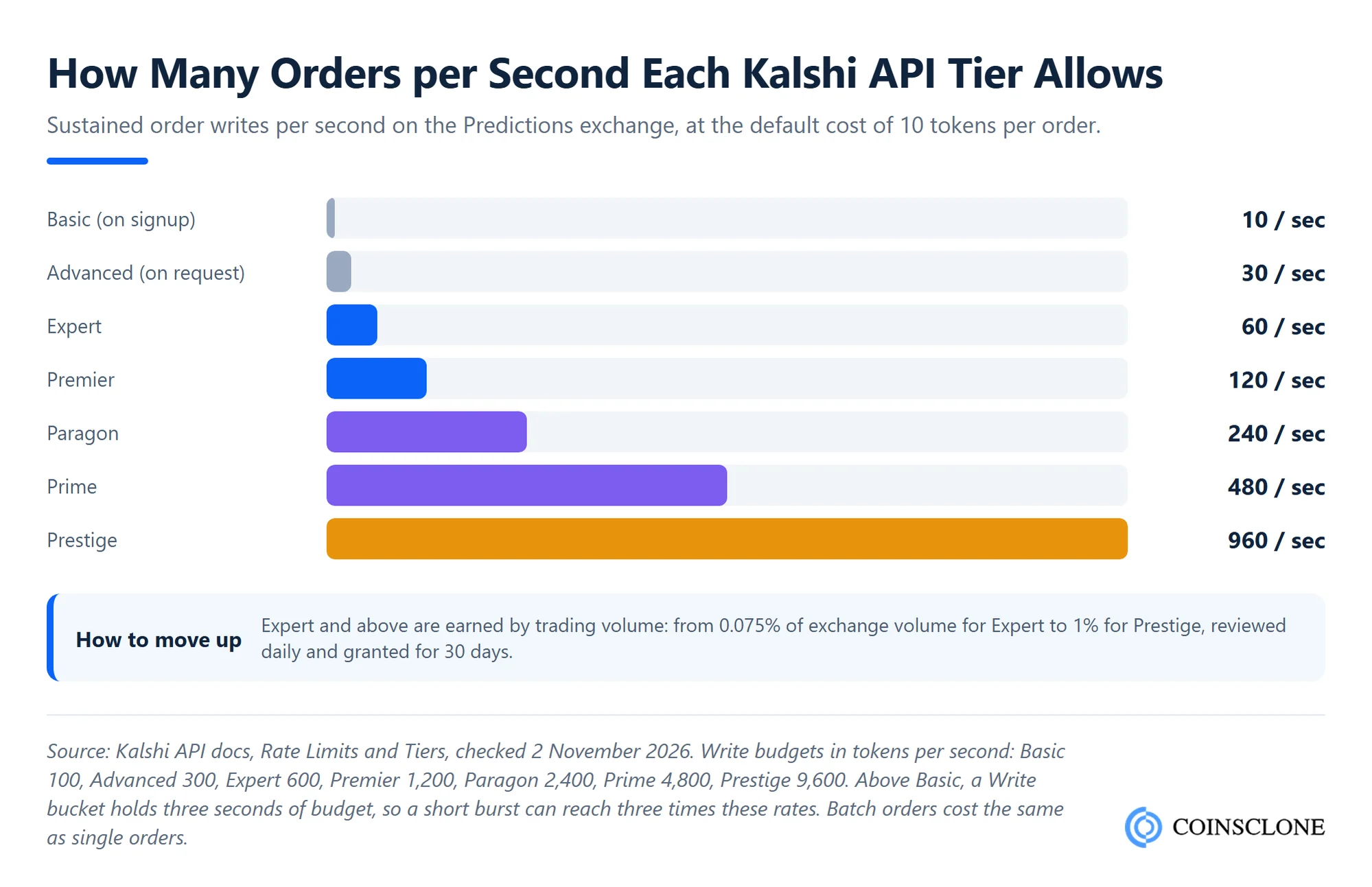
Kalshi uses a token system. Each request costs tokens, and your tier sets how fast your token balance refills. Most requests cost 10 tokens. Reads and writes have separate budgets, and REST and FIX share them. These figures come from Kalshi’s rate limits page, checked on 2 November 2026.
| Tier | Read budget (tokens/sec) | Write budget (tokens/sec) | How you get it |
| Basic | 200 | 100 | Complete signup |
| Advanced | 300 | 300 | Request it through the API |
| Expert | 600 | 600 | 0.075% volume share |
| Premier | 1,200 | 1,200 | 0.125% volume share |
| Paragon | 2,400 | 2,400 | 0.25% volume share |
| Prime | 4,800 | 4,800 | 0.50% volume share |
| Prestige | 12,000 | 9,600 | 1.00% volume share |
To get your real speed, divide the budget by the cost. A Basic account can make about 20 reads and 10 orders per second. An Advanced account can place about 30 orders per second.
A few rules matter more than the table:
- Bursts: above Basic, a write bucket holds three seconds of budget. After a quiet spell, you can fire up to three times your rate at once.
- Batches save nothing: a 25-order batch costs 250 tokens, and the whole batch must fit in your bucket or it is rejected.
- Cancels are cheap: each cancel in a batch costs 2 tokens.
- Balance has its own limit: Basic and Advanced can check balance once per second. Listen to fills instead of polling.
- What a 429 means: you get “too many requests” with no Retry-After header. Back off and retry, as the Kalshi Developer Agreement requires.
- WebSocket caps: up to 200 open connections on Basic to Expert, rising to 1,000 on Prime and Prestige.
Volume share is your trailing 30-day volume divided by twice last month’s total exchange volume. Kalshi reviews it daily and grants a tier for 30 days at a time.
How Do You Place Orders With the Kalshi API?
You place an order with a signed POST to the orders endpoint. Kalshi’s order quick start uses these fields:
- ticker: the market you want to trade.
- side: “bid” to be long YES, or “ask” to be long NO.
- count and price: contracts as a string, and the price in dollars, such as “0.0100”.
- time_in_force: for example, good till canceled.
- self_trade_prevention_type: stops your own orders from trading with each other.
- client_order_id: a unique ID you create, so a retry never places the same order twice.
Kalshi now states direction with two fields on orders and fills. Outcome_side is “yes” or “no”, and book_side is “bid” or “ask”. Buying YES and selling NO both mean long YES. Kalshi marked the older action and side fields as deprecated, with removal no earlier than 28 May 2026. New code should read only the new direction fields.
Which Kalshi Safety Controls Should a Bot Use?
Kalshi gives you several built-in tools that a careful bot should use from day one:
- Order groups: you set a contract limit, and if fills pass it within a rolling 15-second window, Kalshi cancels every resting order in the group. This is a strong kill switch for market makers.
- Cancel on pause: set cancel_order_on_pause so resting orders drop when trading pauses.
- Subaccounts: split one account into a main account plus up to 63 numbered subaccounts, each with its own balance. A key can be locked to one subaccount.
- Maintenance window: Kalshi pauses trading every Thursday from 3:00 to 5:00 AM ET. Expect disconnects and plan to reconnect after 5:00 AM.
For large or combo trades, Kalshi also runs a request for quote system. A requester asks for a price, market makers reply in private, and the trade locks in two steps: accept, then confirm.
How Much Does Kalshi Charge in Fees?
Kalshi charges a trading fee on orders that match at once, and in some markets a fee on resting orders that fill later. The Kalshi fee schedule, effective 7 July 2026, sets these formulas:
- Taker fee: rounded up (M x 0.07 x C x P x (1 – P))
- Maker fee: rounded up (M x 0.0175 x C x P x (1 – P))
Here C is the number of contracts, P is the price in dollars, and M is a multiplier for each market. For taker fees M is 1 unless stated. For maker fees M is 0 unless stated, so most resting orders pay nothing. Canceling a resting order is free.
The fee is highest near 50 cents and falls toward the edges:
| Price per contract | Taker fee on 100 contracts | Fee per contract |
| $0.10 or $0.90 | $0.63 | 0.63 cents |
| $0.25 or $0.75 | $1.3125 | about 1.31 cents |
| $0.50 | $1.75 | 1.75 cents |
This shape matters for bots. A strategy that takes liquidity near 50 cents needs an edge above about 1.75 cents per contract before it makes a cent.
What Kalshi Trading Bots Do People Build?
A Kalshi bot is a program that reads data and trades through the API on rules you set. Most fall into five types:
| Bot type | What it does | API parts it leans on |
| Market making | Posts YES and NO bids around fair value and earns the spread | WebSocket book, order groups, cheap cancels, write budget |
| Arbitrage | Buys a full set of outcomes when they cost under $1, or trades price gaps | Fast book reads, batch orders, fee math |
| Signal or data | Trades on public data such as weather models or economic releases | Market lists, ticker channel, scheduled jobs |
| Hedging | Offsets risk held elsewhere, such as a weather or rate exposure | Positions, subaccounts, RFQ for size |
| RFQ quoting | Answers requests for quotes on combo markets | Communications channel, quote endpoints |
If you plan to run more than one strategy, our guide to crypto market making software explains how spread capture and inventory risk work in practice.
Kalshi Arbitrage Bot: A Worked Example After Fees
Arbitrage looks easy on paper. Suppose an event has three outcomes and exactly one must win. The YES asks are 30, 33 and 33 cents, so a full set costs 96 cents and pays $1. That looks like a free 4 cents per set.
Now add taker fees on 100 contracts of each:
- At 30 cents: 0.07 x 100 x 0.30 x 0.70 = $1.47
- At 33 cents: 0.07 x 100 x 0.33 x 0.67 = about $1.55, twice
Total fees come to about $4.57. You paid $96 plus $4.57 to collect $100, so you lose about $0.57.
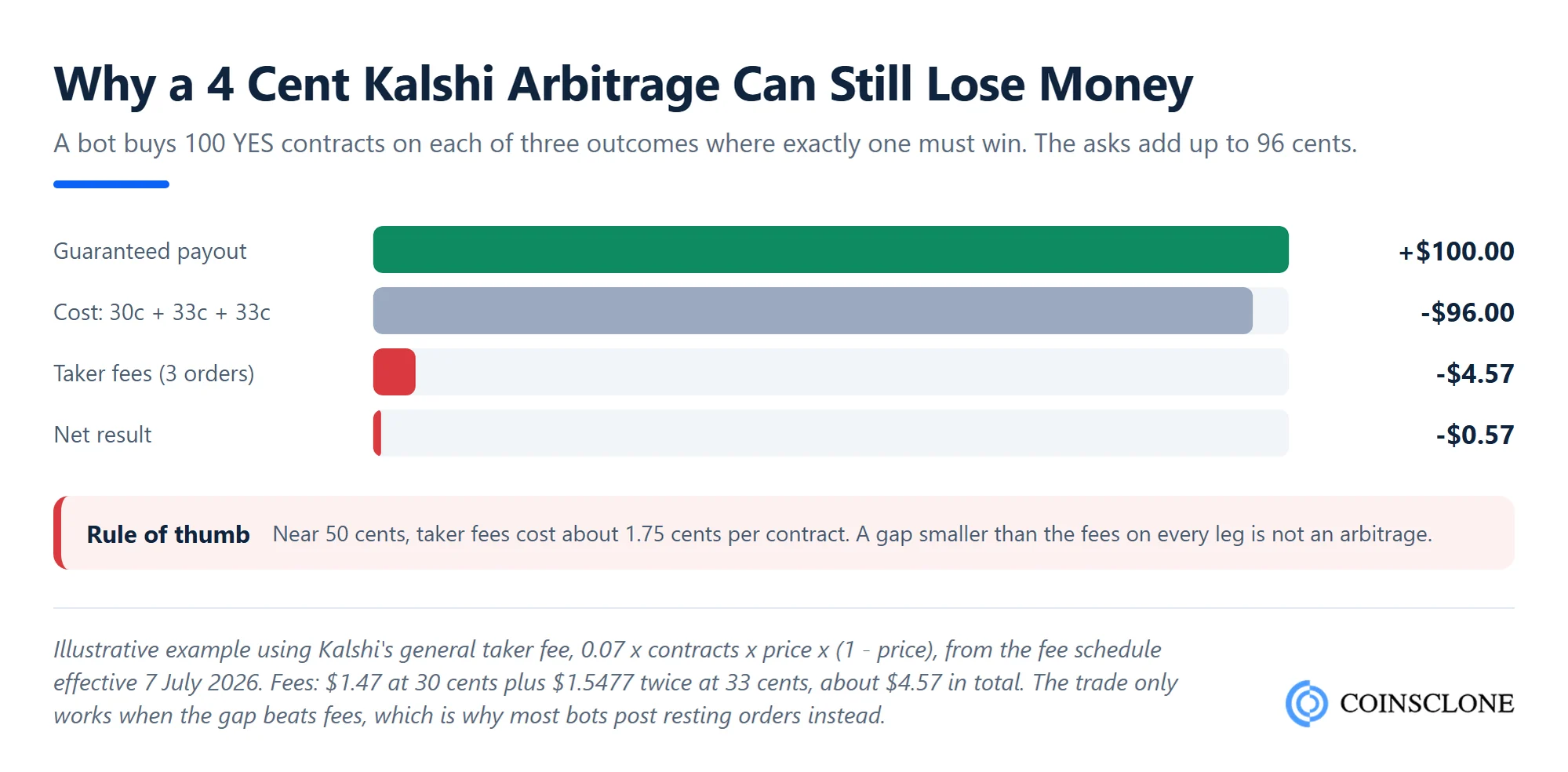
This is why working Kalshi bots tend to rest orders and wait for fills. Resting orders usually pay no maker fee, while taking liquidity costs up to 1.75 cents per contract. The same logic applies across venues, as our crypto arbitrage bot guide shows for exchanges.
Is It Legal to Run a Bot on Kalshi?
Yes. Kalshi publishes its API for automated trading, and a member may use it for their own trades. But a bot must follow the same rules as a human trader, and some rules bite harder at machine speed.
- No spoofing or disruptive trading: US law, in Section 4c(a)(5) of the Commodity Exchange Act, bans bidding or offering with intent to cancel before execution. It also bans trading that shows reckless disregard for orderly trading at the close.
- No wash trades: the Kalshi Developer Agreement names spoofing and wash sales as banned uses of the API. Turn on self-trade prevention.
- Exchange risk controls: under the CFTC’s Electronic Trading Risk Principles from January 2021, exchanges like Kalshi must have rules and pre-trade risk controls for electronic orders. Expect your bot to meet pre-trade checks, rate limits and rejected orders.
- No trading on inside information: Kalshi bars trading on material nonpublic information. In February 2026 it suspended and fined two traders for it, and in August 2026 it banned former Congressman George Santos for life. A bot fed with private data is a fast way to the same outcome.
Bots also get flagged for poor behavior, not just bad intent. Hammering the API after errors, ignoring 429s or crossing your own orders all draw attention. Retry with backoff, cap your retries and watch your logs.
Can a Business Build a Product on the Kalshi API?
Only in limited ways, and this is where most plans go wrong. Section 3 of the Kalshi Developer Agreement (version 1.1) says API use is “expressly limited to facilitating a members own trading on the Exchange”. It then bans, among other things:
- Storing or sharing API data with third parties without Kalshi’s prior written approval.
- Helping other members trade or open accounts, or asking users for their Kalshi password.
- Sublicensing the API to a third party.
- Using the API for benchmarking or competitive monitoring.
Kalshi’s data terms add that site data may not be used to train AI systems or shared as datasets without written consent. So a “Kalshi signals” app that relays data to paying users, or a copy-trading bot that runs other people’s accounts, needs Kalshi’s approval first.
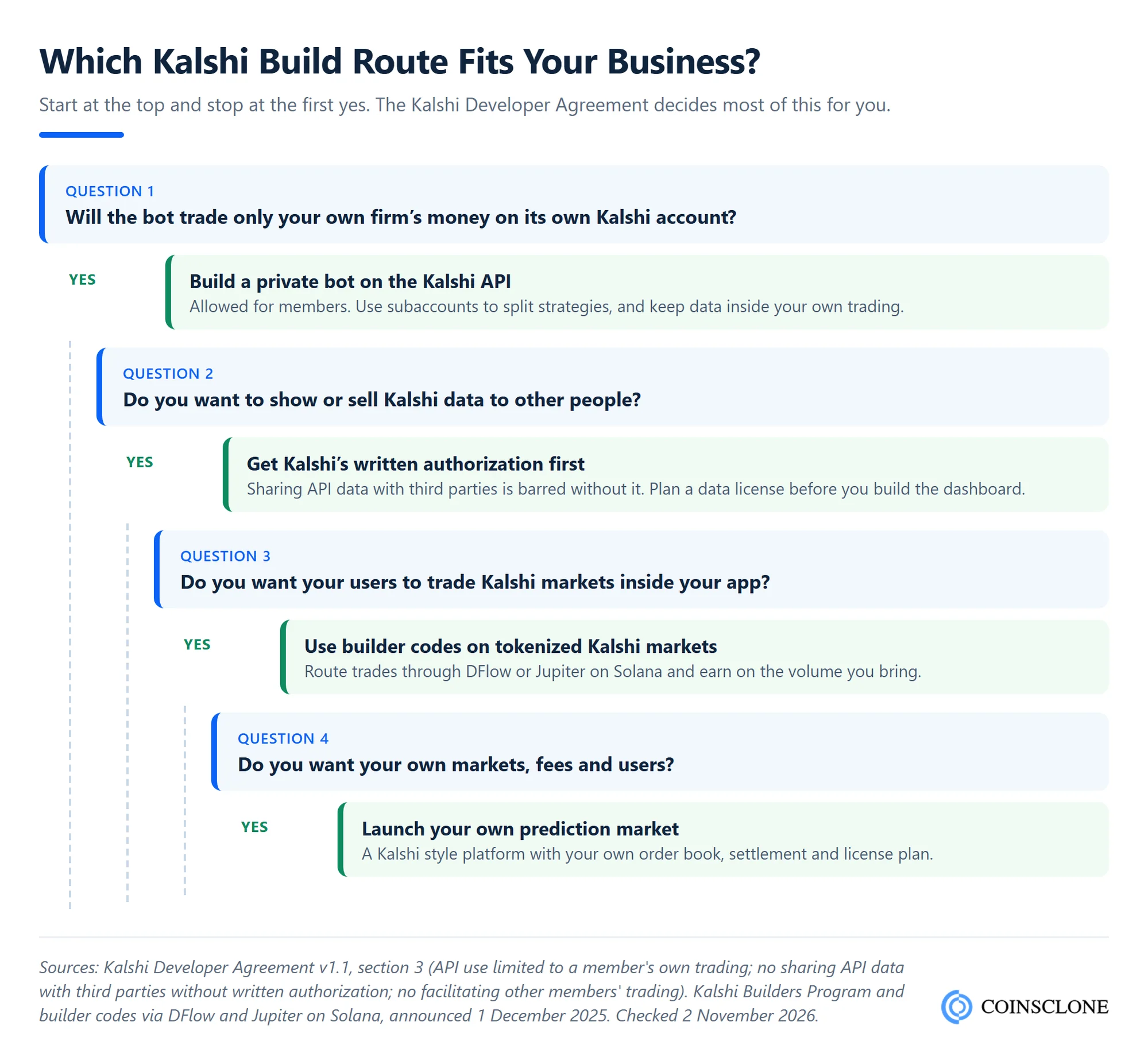
That leaves four workable routes:
- A private trading bot: a firm trades its own money on its own account. This is the core use the API allows.
- A licensed data product: dashboards or feeds for others, after you get Kalshi’s written approval.
- A front end with builder codes: in December 2025 Kalshi launched builder codes and a $2 million Builders Program. Apps route trades to tokenized Kalshi markets on Solana through DFlow or Jupiter and earn on the volume they bring. Check the current program terms and which countries your users are in before you build.
- Your own prediction market: if you want your own markets, users and fees, you need your own platform rather than an API on top of someone else’s.
What Does It Take to Build a Kalshi Trading Bot?
A production bot has more parts than the strategy. Plan for a signing module and a WebSocket client that rebuilds the book after each disconnect. Add a strategy engine and a risk layer with position limits and order groups. You also need an order manager that tracks client_order_id, plus logs, alerts and a kill switch.
Cost depends on four drivers more than on line count. These are the number of markets and strategies, the speed target (REST or FIX), how much backtesting data you need, and how much monitoring you want around the clock. A single-strategy bot on REST is a small build. A multi-market maker on FIX with full risk tooling is a serious trading system.
Build a Kalshi Trading Bot That Plays by the Rules
Prediction market bot development, done right.
- Signed API access: Ed25519 or RSA key signing, demo testing and safe key storage
- Live order books: WebSocket feeds that rebuild cleanly after every disconnect
- Risk controls: order groups, position limits, self-trade prevention and a kill switch
- Your own venue: a Kalshi style prediction market with order book and settlement
See a live demo of our prediction market and trading bot builds.
Book a Free Demo to plan your Kalshi bot or your own event exchange.
How Coinsclone Helps You Build on Prediction Markets
Coinsclone builds trading bots that follow exchange rules, with signed API access, live order books, risk limits and kill switches. Our crypto trading bot development team can build a private Kalshi bot for your firm’s own account. If you would rather own the venue, our Kalshi clone script launches a Kalshi style event exchange in 6 to 8 weeks. For a fully custom build, see our prediction market platform development service. Coinsclone has built crypto products since 2018 and delivered 350+ platforms for 200+ clients across 20 industries.
Frequently Asked Questions
Does Kalshi have an API?
Yes. Kalshi offers REST, WebSocket and FIX APIs for event contracts, plus a separate Perps API for perpetual futures. Public market data needs no key, while trading needs a signed API key. Full docs are at docs.kalshi.com.
Is the Kalshi API free?
Yes. Kalshi’s fee schedule lists no charge for API access. You pay the normal trading fees on matched orders, which peak at 1.75 cents per contract near a 50 cent price. Rate limits depend on your tier, starting at about 20 reads and 10 orders per second on Basic.
Does Kalshi allow bots?
Yes. Kalshi publishes its API so members can automate their own trading. Bots must follow the Developer Agreement and exchange rules, which ban spoofing, wash trades and trading on inside information. Bots may not trade for other members or share API data without written approval.
Are Kalshi trading bots legal?
Running a bot for your own account on Kalshi is legal in the places where Kalshi lets you trade. Kalshi is a CFTC-regulated exchange, so US laws against spoofing and market manipulation apply to bots as they do to people. Selling a bot service that trades other people’s Kalshi accounts runs into the Developer Agreement.
How do I avoid getting banned from Kalshi for running a bot?
Trade only your own account, and never on nonpublic information. Respect rate limits with exponential backoff, turn on self-trade prevention and avoid placing orders you plan to cancel before they can fill. Keep your contact email current, since Kalshi may ask you about your API use.
How much can you make with a Kalshi trading bot?
There is no typical return, and many bots lose money. Profit depends on a real edge after fees: a taker trade near 50 cents costs 1.75 cents per contract. Test in the demo environment, then start small on live markets.
Do I need to code to use a Kalshi bot?
To build on the Kalshi API yourself, yes, usually in Python or TypeScript with Kalshi’s official SDKs. Some no-code tools exist, but check that they run on your own API key and do not ask for your Kalshi password. The Developer Agreement bans third parties from collecting it.