
This guide explains how to create a TRC20 wallet, from a five-minute personal wallet to a full TRC20 wallet app that you launch for your own users. You will see the 10 build steps, the tools TRON developers use, and what each step needs to get right.
You will also get the real numbers behind a TRON wallet in 2026. That includes what a USDT transfer costs after the 2025 fee cut, how energy and bandwidth work, the app store and licence rules, and what a build costs and how long it takes.
In this guide:
- The quick way to get a TRC20 address, and the 10 steps to build your own TRC20 wallet app
- How TRON fees work, with worked numbers: about 6.5 TRX to send USDT to a known address and 13 TRX to a new one
- The features, tools and security checks a USDT TRC20 wallet needs
- Licence and app store rules for custodial and non-custodial wallets
- Cost ranges and timelines, so you can plan a budget
See How Our MVP System Can Help You Create a TRC-20 Wallet App Faster
Crypto Wallet Development — done right.
- MVP System : Build your TRC-20 wallet app 90% faster.
- Pre-Built Modules : TRON blockchain integration, TRC-20 token support, and wallet management—no coding needed.
- Brand & Customization : Your design, your tokens, your blockchain.
- Revenue Engine : Earn from transaction fees, swaps, and staking.
Get a free branded demo of your TRC-20 wallet app in 48 hours — before you invest a cent.
Book a Free Demo to discover how our system can take you from concept to live TRC-20 wallet app in just 8–12 weeks.
How to Create a TRC20 Wallet App
There are two ways to create a TRC20 wallet. The first is for people who only need an address. The second is for businesses that want their own branded wallet app.
If you only need a TRC20 address for yourself, it takes about five minutes:
- Install a trusted wallet: Download TronLink, Trust Wallet or another TRON-ready wallet from the official app store or website.
- Create a new wallet: Tap “Create wallet” and set a strong password or PIN.
- Back up the recovery phrase: Write the 12 or 24 words on paper and keep them offline. Never screenshot them.
- Copy your address: Open TRX or USDT and tap “Receive”. A TRC20 address is 34 characters long and always starts with a capital “T”.
- Activate it: Ask someone to send you a little TRX. The network only records a new address after its first transfer, and you need TRX to pay fees.
If you want your own TRC20 wallet app for users, follow the 10 steps below. Together they cover planning, TRON integration, security, testing and launch.
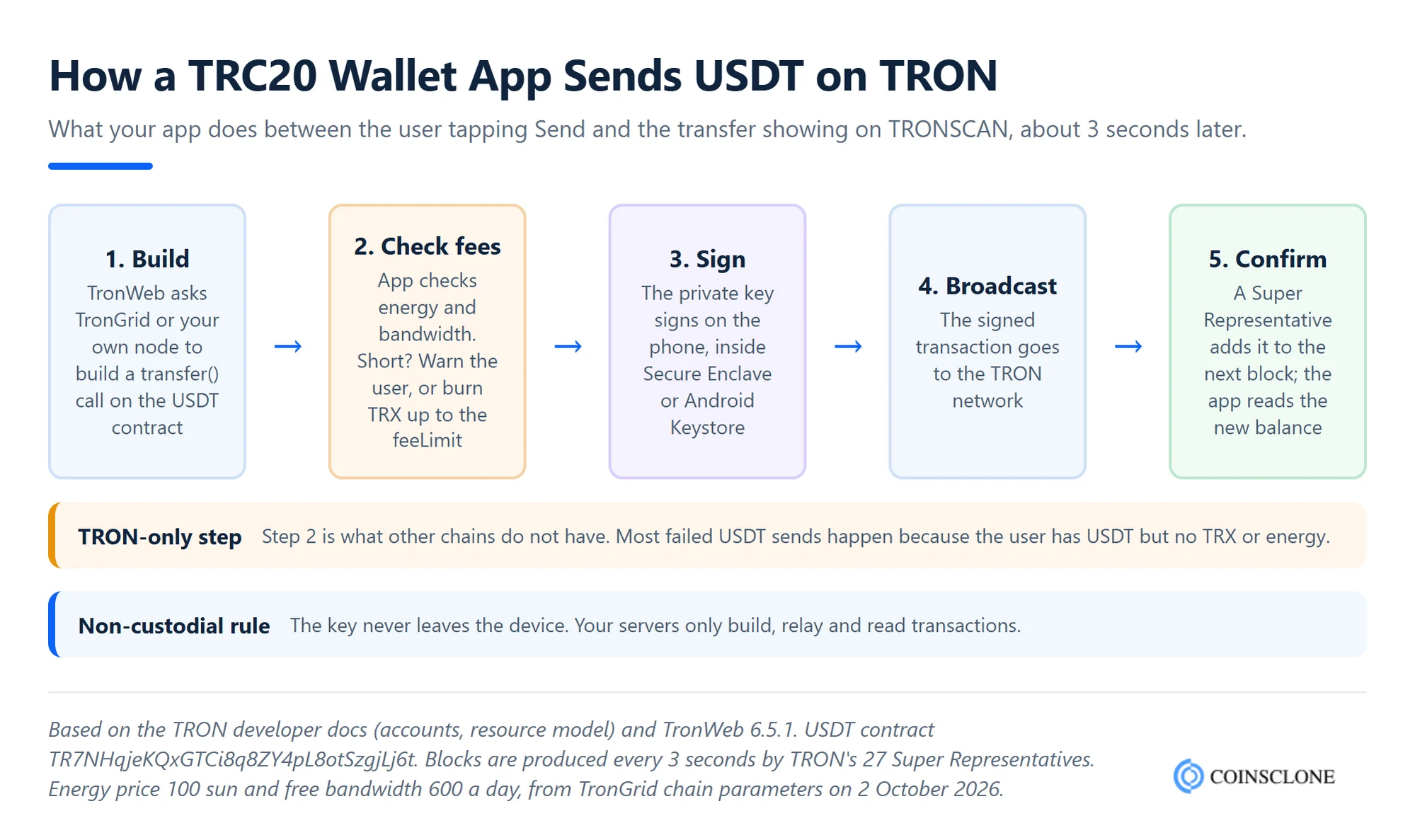
Step 1: Research and Requirement Analysis
Start by deciding who the wallet is for and what it must do. A wallet for merchants needs QR payments and invoices. A wallet for traders needs swaps and price alerts. A wallet for remittances needs simple USDT sends and low fees.
At this stage, also make the biggest choice of all: custodial or non-custodial. In a non-custodial wallet, users hold their own keys. In a custodial wallet, your company holds them. This choice decides your licence needs, your security design and your app store path, as we explain in our guide to custodial vs non-custodial wallets.
Step 2: Choose the Tech Stack
Next, pick the tools for each layer of the app:
- Mobile apps: Kotlin for Android and Swift for iOS, or React Native or Flutter to share one codebase across both.
- Web or extension wallet: React or Vue for the front end.
- Backend: Node.js, Go or Python for price feeds, push alerts and transaction history.
- TRON library: TronWeb, the official JavaScript SDK. Version 6.5.1 was released in September 2026.
Step 3: Integrate the TRON Blockchain
Your wallet needs a way to read the chain and send transactions. Most teams start with TronGrid, TRON’s hosted API, and later add their own TRON full node for speed and uptime.
Here is the core of a TRC20 transfer with TronWeb. It reads a USDT balance and sends USDT from the official USDT contract:
const { TronWeb } = require('tronweb');
const tronWeb = new TronWeb({
  fullHost: 'https://api.trongrid.io',
  headers: { 'TRON-PRO-API-KEY': process.env.TRONGRID_KEY },
  privateKey: userKey // signed on the device in a non-custodial app
});
const usdt = await tronWeb.contract().at('TR7NHqjeKQxGTCi8q8ZY4pL8otSzgjLj6t');
const balance = await usdt.balanceOf(userAddress).call(); // 6 decimals
const txId = await usdt.transfer(toAddress, 10 * 1e6).send({ feeLimit: 30_000_000 });
The `feeLimit` caps how much TRX the transfer can burn, in sun (1 TRX = 1,000,000 sun). Set it with care. Too low and the transfer fails; too high and a bad contract can burn more than expected.
Step 4: Generate and Protect Keys
A TRON wallet creates a 32-byte private key on the secp256k1 curve, the same curve Bitcoin and Ethereum use. The address comes from that key. According to the TRON account docs, the address is 21 bytes with a “41” prefix, shown to users as a 34-character Base58 string that starts with “T”.
For recovery, use a BIP39 seed phrase and the BIP44 path for TRON, which is coin type 195 (m/44’/195’/0’/0/0). Using the standard path means users can restore their wallet in TronLink or Trust Wallet if they ever leave your app. Store keys in the phone’s secure hardware: the Secure Enclave on iOS or the Android Keystore.
Step 5: Design the UI and UX
Good design matters more in a wallet than in most apps, because one wrong tap can lose money. Keep onboarding short. Show the full address with a copy button and a QR code. Before every send, show the amount, the recipient and the expected fee in plain words.
Above all, explain TRX fees inside the app. Many first-time users hold USDT but no TRX, so their transfer fails. A clear message such as “You need about 13 TRX to send USDT to this new address” prevents most support tickets.
Step 6: Add TRC20 Token Support
Every TRC20 token is a smart contract with standard functions such as `balanceOf` and `transfer`. To support a token, your app stores its contract address, symbol and decimals, then calls those functions.
Start with USDT and TRX, then add a token list and a “custom token” option. Always match tokens by contract address, never by name. Scammers often deploy fake tokens named “USDT”.
Step 7: Build Energy and Fee Handling
This step is unique to TRON. Instead of a simple gas fee, TRON uses two resources: bandwidth for every transaction and energy for smart contract calls such as a USDT transfer. If the account has neither, the network burns TRX to cover them.
A strong TRC20 wallet app estimates the fee before each send, warns users who lack TRX, and offers cheaper options. These include staking TRX for energy, renting energy from a market, or a GasFree-style service that lets users pay the fee in USDT. We break down the numbers in the fees section below.
Step 8: Add Security Features
Next, add the security layer: biometric login, a PIN, encrypted local storage, seed phrase backup checks and screenshot blocking on sensitive screens. Then run a full security review before launch.
Also guard against address poisoning, a common scam on TRON. Attackers send tiny transfers from look-alike addresses so that the fake address appears in the user’s history. Show the full address before sending, warn on first-time recipients, and never let users copy addresses straight from history without a check.
Step 9: Test on a TRON Testnet
TRON offers two public testnets, Nile and Shasta, with free test TRX from a faucet. Test every flow there first: wallet creation, restore from seed, sends to new and old addresses, failed sends with no TRX, and token swaps. Then hire an outside firm to audit the app and any smart contracts.
Step 10: Launch and Support the App
Finally, publish the app on Google Play and the Apple App Store, or as a browser extension. Watch error rates, failed transfers and support tickets in the first weeks.
After launch, keep shipping updates. TRON fees, TronWeb versions and app store rules all change. A white label build like ours can go live in about 3 to 5 weeks, while a fully custom wallet usually takes 8 to 12 weeks.
What is a USDT TRC20 Wallet?
A USDT TRC20 wallet is a digital wallet that stores, sends and receives Tether (USDT) on the TRON blockchain. TRC20 is the token standard that sets the rules for tokens on TRON, much like ERC20 does on Ethereum. You can compare the two standards in our guide to ERC20 vs TRC20 tokens.
When you create a USDT TRC20 wallet, it makes a public address and a private key. The address receives USDT. The private key signs and approves each transfer. The wallet does not hold USDT itself. Instead, it reads your balance from the USDT smart contract on TRON.
USDT on TRON is popular because transfers settle in seconds and fees are low. It is also the largest home of USDT. According to DefiLlama, about $92 billion of USDT sat on TRON in early October 2026, about half of all USDT in circulation and more than on Ethereum.
You can build a USDT TRC20 wallet as a mobile app, web app, browser extension or desktop wallet. Most add transaction history, QR code payments, balance tracking and seed phrase recovery.
Difference Between TRC20 and USDT TRC20 Wallet
In practice, there is no technical difference. A TRC20 wallet holds any token built on TRON’s TRC20 standard. A “USDT TRC20 wallet” is simply a TRC20 wallet that people use mainly for USDT. The same TRON address holds TRX, USDT and every other TRC20 token at once.
| TRC20 wallet | USDT TRC20 wallet | |
| Network | TRON | TRON |
| Tokens held | Any TRC20 token plus TRX | Mainly USDT, plus TRX for fees |
| Address | Starts with “T”, 34 characters | The same address |
| Main use | DeFi, dApps, tokens, staking | Payments, remittances, trading |
| Fees paid in | TRX (energy and bandwidth) | TRX, or USDT through a GasFree service |
The main point for builders: you do not need two products. One TRC20 wallet app, with USDT shown first, serves both groups.
TRC20 Wallet Fees: Energy, Bandwidth and Activation
Fees are where TRON differs most from other chains, and where many wallets confuse their users. Here is how they work in October 2026.
Creating an address is free. Your wallet makes the key pair offline. However, the network only records the address after it gets its first transfer. The sender pays 1 TRX to create the account, plus 0.1 TRX if it lacks bandwidth.
Every transaction uses bandwidth. Each account gets 600 free bandwidth points a day, enough for one or two simple transfers. Beyond that, the network burns TRX at 1,000 sun per byte.
Smart contract calls use energy. A USDT transfer is a contract call, so it needs energy. It uses about 65,000 energy when the receiver already holds USDT, and about 130,000 when the receiver has never held it.
Energy got cheaper in 2025. Under Proposal #104, TRON cut the energy price from 210 sun to 100 sun on 29 August 2025. As a result, a USDT transfer now burns about 6.5 TRX to an existing holder and about 13 TRX to a new one.
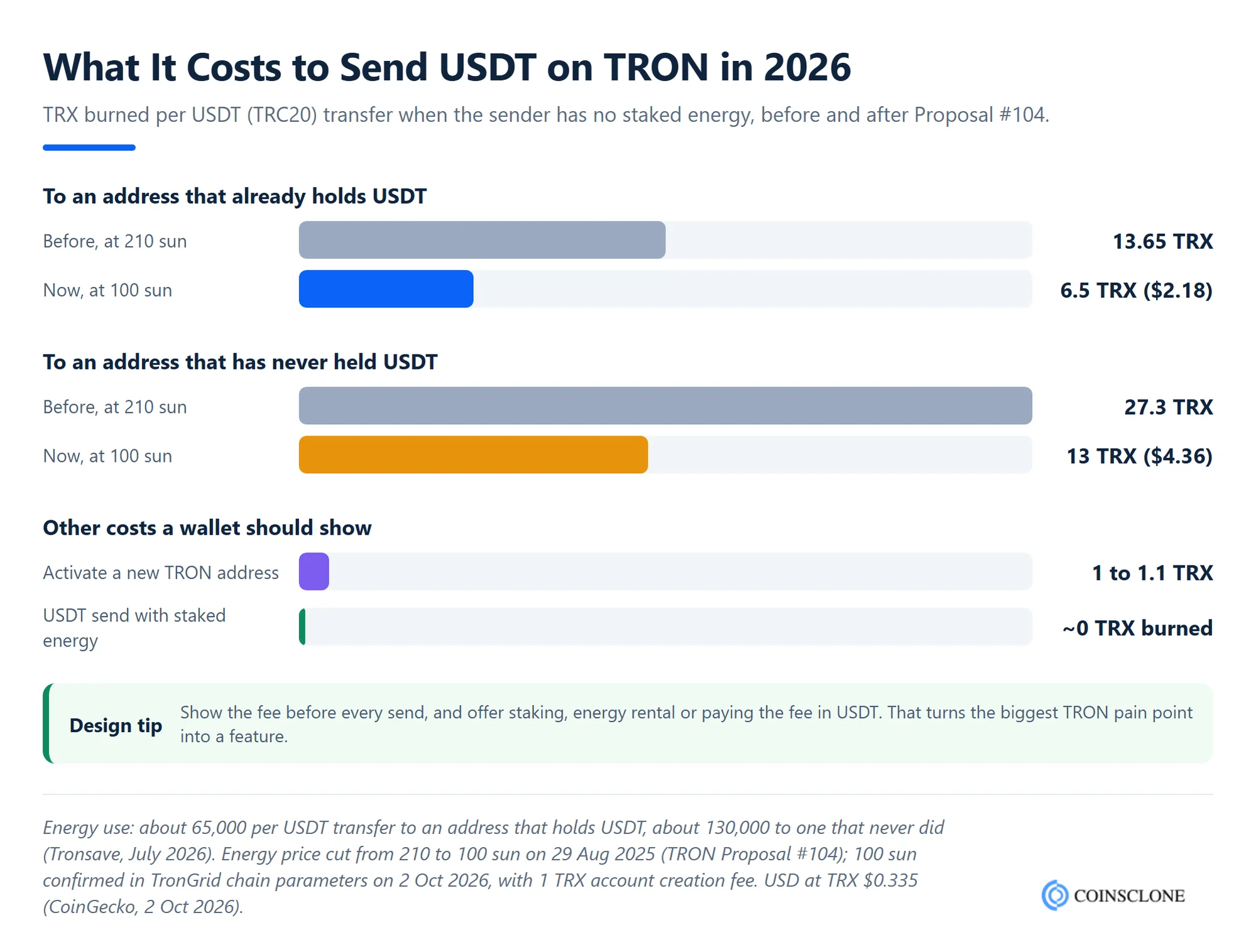
There are three ways to cut those fees, and your wallet can offer all of them:
- Stake TRX: Users who stake TRX get energy that refills every day, so regular transfers burn no TRX.
- Rent energy: Energy markets let users rent energy for one transfer, usually for less than the TRX burn.
- Pay in USDT: GasFree-style services pay the TRX fee for the user and take a fixed charge in USDT instead.
For a business wallet that moves USDT for many users, these choices change your running costs a lot. Plan your energy model before launch.
Why Should You Create Your Own TRC20 Wallet?
Creating your own TRC20 wallet gives you full control over how the wallet works, stores keys and talks to the TRON blockchain. Instead of relying on someone else’s app, you build it to your own rules, security standards and user flows.
One major reason is key ownership. When you design the wallet, you choose how keys and seed phrases are made and stored. That gives you control over encryption, backups and recovery.
Another reason is direct blockchain access. A custom TRC20 wallet talks to TRON nodes and TRC20 smart contracts directly. As a result, balances stay accurate, transfers are clear, and one address can hold many TRC20 tokens.
A custom wallet also helps with speed and fees. You decide how the wallet loads, signs transfers, updates balances and handles TRX fees, energy and bandwidth.
Finally, a branded wallet is a business you own. You keep the users, the data and the revenue from swaps, staking and premium plans, instead of sending them to another app.
Core Features of the TRC20 Wallet App
Crypto wallet features shape how useful your TRC20 wallet app will be. The right mix depends on your users, your business model and your market. Here are the core user, admin and security features.
User Panel
- Easy Login: Lets users sign in with a PIN or biometrics, without long forms.
- Multi-currency Support: Lets users hold TRX, USDT and other TRC20 tokens, plus coins on other chains if you add them.
- QR Code Scanner: Lets users pay merchants instantly by scanning a code.
- Transaction History: Shows past transfers with links to the TRONSCAN explorer.
- In-App Token Swap: Lets users swap tokens without leaving the app.
- Fee Estimator: Shows the TRX or energy each send needs before the user confirms.
- Energy Staking and Rental: Lets users stake TRX or rent energy to cut USDT fees.
- Push Notifications: Alerts users about incoming funds and price moves.
Admin Panel
- Real-time Analytics: Tracks live user activity, transfers and swap volume.
- Dispute Management: Helps your team resolve user issues quickly.
- Fraud Detection: Flags suspicious activity and known scam addresses.
- Revenue Settings: Lets the admin set swap fees, commissions and plan prices.
- API Integrations: Connects payment gateways and crypto-to-fiat services.
- Token Listing Control: Lets the admin add or hide tokens by contract address.
Security Features to Include
- 2FA: Adds a one-time code on top of the password.
- Biometric Login: Unlocks the wallet with a fingerprint or face scan.
- Encrypted Backup: Keeps a secure backup that only the user can unlock.
- Seed Phrase Storage: Protects the 12 or 24-word recovery phrase for wallet restore.
- Address Checks: Warns users before they send to a new or look-alike address.
These are the core features of a TRC20 wallet app. You can also add multicurrency wallet development so users can hold Bitcoin, Ethereum and other chains in the same app.
Top TRC20 Tokens Supported by TRC20 Wallet Apps
TRC20 tokens are smart contract tokens built on TRON. They are popular because transfers are fast and cheap. A TRC20 wallet app should support these from day one:
- TRX (TRON): The native coin of the TRON network. It is not a TRC20 token itself, but every wallet needs it to pay fees and stake for energy.
- USDT (Tether on TRON): The most used TRC20 token, a stablecoin pegged to the US dollar for payments and trading.
- USDD: TRON’s own dollar stablecoin, used across TRON DeFi.
- BTT (BitTorrent Token): Supports file sharing rewards and micropayments in the BitTorrent ecosystem.
- WIN (WINkLink): The token of WINkLink, an oracle network that brings real-world data to TRON smart contracts.
- JST (JUST): The governance token of the JUST DeFi platform for lending and stablecoins.
- SUN: The governance token of the SUN.io DeFi platform and SunSwap exchange.
One token to leave out: Circle stopped minting USDC on TRON in February 2024 and ended support for it in 2025, so do not present it as a live TRC20 stablecoin.
Licence and App Store Rules for TRC20 Wallets
Before you launch, check two sets of rules: the law where your users live, and the app stores.
Custodial wallets need licences in most big markets. If your company holds user keys, regulators treat you as a crypto service provider. In the EU, that means a CASP licence under MiCA, whose transition period ended on 1 July 2026 at the latest. In the US, it usually means money transmitter or money services business registration.
Google Play checks licences too. Since 29 October 2025, the Google Play crypto wallet policy asks custodial wallets and exchanges to meet local licence rules in more than 15 markets, including the US and EU. After community pushback, Google added a clear note that non-custodial wallets are out of scope.
Apple wants a company account. Under App Review Guideline 3.1.5, wallet apps must come from developers enrolled as an organization, not as individuals.
As a result, many startups launch a non-custodial TRC20 wallet first. It is faster to approve, and users keep control of their funds.
Common Mistakes When You Create a TRC20 Wallet
Most failed TRC20 wallets make the same few mistakes. Avoid these and you will save time, money and user trust:
- Ignoring TRX fees: Users hold USDT but no TRX, and every send fails. Show the fee up front and offer energy options.
- Hardcoding private keys: Never put keys in code or plain storage. Use secure hardware on the device and HSM or MPC on servers.
- Matching tokens by name: Fake “USDT” tokens are everywhere. Always use the official contract address.
- Skipping address checks: Address poisoning drains users who copy addresses from history.
- Using a custom seed path: A non-standard path stops users from restoring their wallet in other apps.
- Relying on one API: If your only TronGrid key hits its rate limit, the app stops working. Add a backup node.
Business Benefits of Building a TRC20 Wallet App
A TRC20 wallet app is a strong business idea for startups and established firms alike. Here are the main benefits.
Global Reach
TRON is the main rail for USDT payments and remittances in many parts of Asia, Africa and Latin America. As a result, a TRC20 wallet app can win users worldwide from day one.
Many Revenue Streams
A TRC20 wallet app can earn from swap fees, energy rental margins, staking services, card programs and premium plans. Each one can grow with your user base.
Lower Costs for Users
Because TRON fees are low, your users save money on every transfer. This is a strong selling point against wallets on costlier chains.
Community Building
A wallet is also a community tool. You can add governance, loyalty programs and token rewards that keep users active and build your brand.
How Much Does It Cost to Create a TRC20 Wallet App?
The cost depends on how much you build from scratch. Published 2026 agency estimates put a basic single-chain wallet MVP at about $15,000 to $90,000. A multi-chain wallet with swaps costs about $50,000 to $200,000. A TRC20 wallet usually sits at the lower end, because it starts with one chain.
The main cost factors are:
- Platforms: iOS, Android, web and extension are each separate work, though React Native or Flutter can share code.
- Features: Swaps, staking, energy rental and fiat on-ramps add time and cost.
- Security: A third-party audit costs about $5,000 to $50,000 or more.
- Custody model: Custodial wallets add licences, KYC and server-side key storage.
- Running costs: Plan about 15 to 20% of the build cost a year for upkeep, plus node and API fees.
Time matters as much as money. At Coinsclone, a white label wallet takes about 3 to 5 weeks, and a custom wallet takes about 8 to 12 weeks. For a detailed breakdown, read our guide to crypto wallet development cost.
Final Thoughts
Creating a TRC20 wallet takes five minutes for a user, but building a TRC20 wallet app that people trust takes careful work. Get the keys, the fee handling and the address checks right, and TRON’s low fees and huge USDT supply give your wallet a strong start.
Coinsclone is a crypto wallet development company that has built crypto products since 2018, with 350+ platforms delivered for 200+ clients across 20 industries. Our team builds TRC20 wallets as white label or fully custom apps, with TronWeb integration, energy handling and post-launch support included. Book a free demo to see a working TRON wallet before you decide.
Frequently Asked Questions
What is a TRC20 wallet?
A TRC20 wallet is a crypto wallet that stores and manages TRC20 tokens on the TRON blockchain. It lets users send, receive and check balances of tokens such as USDT by talking to TRON smart contracts through a wallet address and private key.
How do I create a TRC20 wallet?
Install a trusted TRON wallet such as TronLink or Trust Wallet, tap “Create wallet”, set a password and back up your recovery phrase offline. Then open TRX or USDT and tap “Receive” to see your address. Someone must send you TRX once to activate it.
Does it cost money to create a TRC20 address?
No. Creating the address is free because the wallet makes it offline. However, the network only records it after its first incoming transfer, and the sender pays a 1 TRX account creation fee.
How does a TRC20 wallet work?
A TRC20 wallet holds a private key linked to a TRON address. When a user sends tokens, the wallet signs the transfer with the private key and broadcasts it to the network. It reads token balances directly from each token’s smart contract.
What are the steps to create a TRC20 wallet app?
The main steps are research, choosing the tech stack, TRON integration with TronWeb, key generation, UI design, TRC20 token support, energy and fee handling, security, testnet testing and launch. A white label build takes about 3 to 5 weeks and a custom one about 8 to 12 weeks.
Is TRC20 wallet creation different from ERC20 wallet creation?
Yes. A TRC20 wallet connects to TRON, while an ERC20 wallet connects to Ethereum. TRC20 wallets use TronWeb or TronGrid, pay fees in TRX through energy and bandwidth, and use addresses starting with “T”. ERC20 wallets use Ethereum nodes, ETH gas and addresses starting with “0x”.
Can I use one address for both TRX and USDT?
Yes. One TRON address holds TRX, USDT and every other TRC20 token. The wallet reads the balance of each token from its own smart contract.
What security features does a TRC20 wallet app need?
A secure TRC20 wallet app needs encrypted key storage in secure hardware, seed phrase backup, a PIN or password, biometric login and address checks against poisoning scams. An outside security audit before launch is also strongly advised.
Do TRC20 wallets need TRX for transactions?
Yes, in most cases. Sending USDT burns about 6.5 TRX to an existing holder and about 13 TRX to a new address, unless the sender has staked or rented energy. Some GasFree services let users pay the fee in USDT instead.
See How Our MVP System Can Help You Create a TRC-20 Wallet App Faster
Crypto Wallet Development — done right.
- MVP System : Build your TRC-20 wallet app 90% faster.
- Pre-Built Modules : TRON blockchain integration, TRC-20 token support, and wallet management—no coding needed.
- Brand & Customization : Your design, your tokens, your blockchain.
- Revenue Engine : Earn from transaction fees, swaps, and staking.
Get a free branded demo of your TRC-20 wallet app in 48 hours — before you invest a cent.
Book a Free Demo to discover how our system can take you from concept to live TRC-20 wallet app in just 8–12 weeks.