
The Polymarket API is a set of free REST and WebSocket services that let your software read prediction market data and place trades on Polymarket. You can read markets, prices and order books with no key at all. To trade, you sign a message with a wallet to create an API key, a secret and a passphrase. US traders use a separate Polymarket US API with its own keys.
Polymarket changed a lot in 2026: a new trading engine, a new collateral token, new SDKs and a new Data API. Many guides still show the old setup. This guide follows the official docs as checked on 1 November 2026, so the endpoints, limits and steps below match what works today.
In this guide:
- Which Polymarket API does what, with base URLs and when each one needs a key
- How to get a Polymarket API key, and which of the three key types you need
- The real rate limits, including the new order tiers based on volume
- How the geoblock check and the Polymarket US API shape what you can build
- What businesses build on the API, and when to launch your own market instead
What Is the Polymarket API?
The Polymarket API is how software talks to Polymarket. Polymarket is a prediction market where people buy and sell shares in outcomes, such as “Yes” or “No” on an election. Each share pays $1 if its outcome happens and $0 if not. So a price of $0.62 reads as a 62% chance.
The API is not one service. It is a group of services, and each has one job. Here is the short map:
| API | Base URL | What it does | Key needed? |
| Gamma API | gamma-api.polymarket.com | Find events and markets; read titles, rules, tags and outcome IDs | No |
| CLOB API | clob.polymarket.com | Read prices and order books; place and cancel orders | Only to trade |
| Data API | data-api.polymarket.com | Positions, trades, activity, PnL, leaderboards and price history | No |
| WebSocket streams | ws-subscriptions-clob.polymarket.com | Live order book and price updates; your own order updates | Only for your own orders |
| Relayer API | relayer-v2.polymarket.com | Wallet actions such as token approvals, with no gas to pay | Yes |
There is also a Bridge API at bridge.polymarket.com for moving funds in and out from other chains.
Polymarket does not sell API plans. Access is free, and you pay only the normal trading fees on orders that fill. Every service has rate limits, which we cover below.
Which Polymarket APIs Are There in 2026?
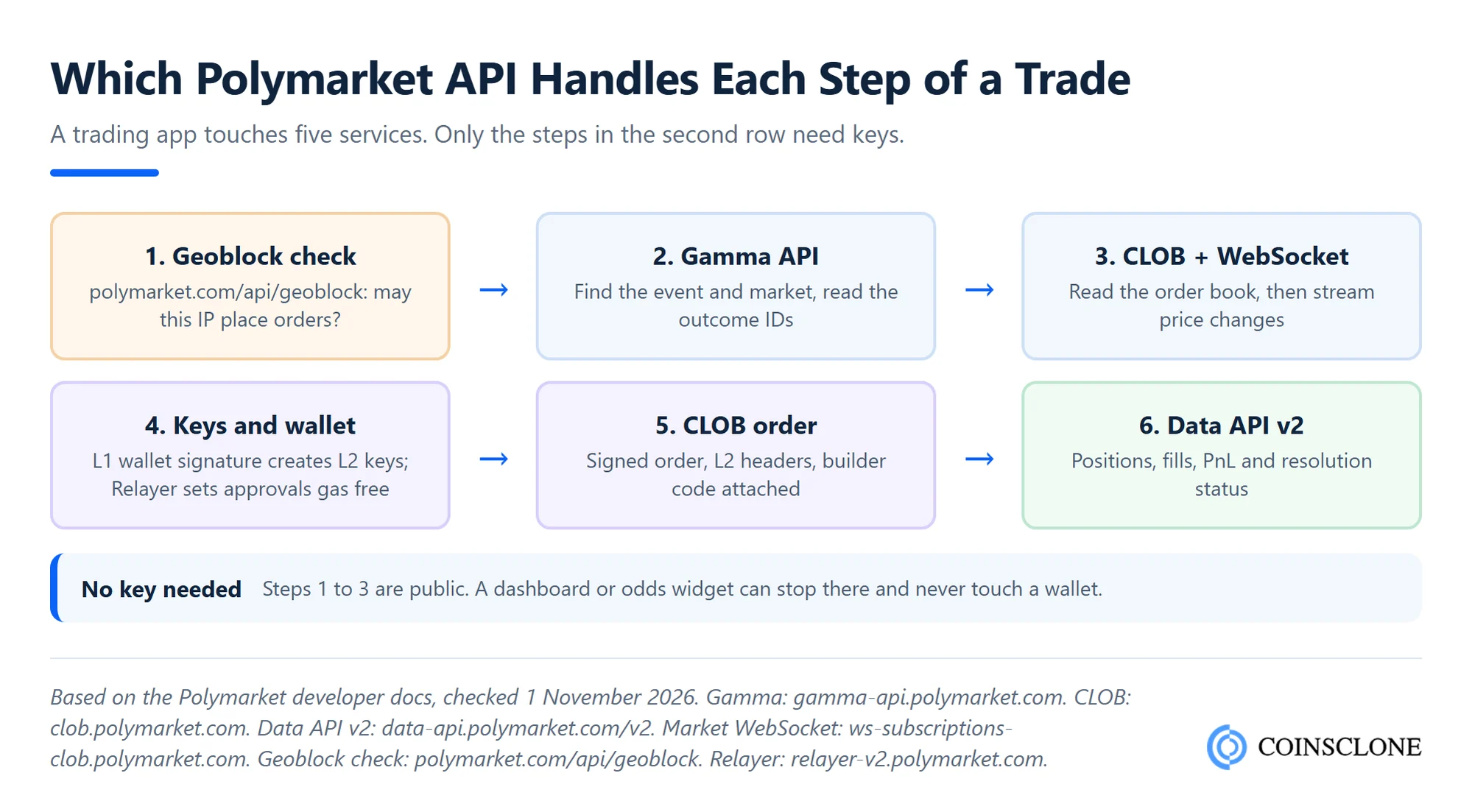
Each service maps to one stage of an app: find a market, read it, trade it, then track the result.
Gamma API: find markets
Gamma is where most projects start. It lists events and markets. An event groups one or more markets. Each market is a Yes or No question, and each outcome has its own ID. You need that outcome ID to read a price or place an order.
Two tips from the Polymarket changelog:
- Closed markets are hidden: Since 9 April 2026, GET /markets leaves out closed markets unless you pass closed=true.
- Use cursor paging: The /markets/keyset and /events/keyset routes page with a cursor instead of an offset. The plain routes will be retired in a future release.
CLOB API: prices, order books and orders
CLOB stands for central limit order book. Polymarket matches buyers and sellers off-chain, then settles each trade on the Polygon network. The CLOB API serves the order book, midpoint, last price and spread for each outcome. All of that is public. The same host takes orders, and orders need keys.
The CLOB moved to version 2 on 28 April 2026. Orders signed with the old version 1 SDKs stopped working that day, and all open orders were wiped. If a tutorial still imports py-clob-client, it is out of date.
Data API v2: positions, trades and analytics
The Data API answers questions about wallets and markets after trading. What does this wallet hold? What did it trade? What is its PnL? Who are the top holders? Version 2 went live on 4 September 2026. It wraps every answer in a “data” field, pages with cursors, and took over price history from the CLOB at /v2/prices-history. Polymarket set version 1 to retire on 24 October 2026, so build on v2 only.
WebSocket streams: live data
Polling burns your rate limit. The market channel pushes book snapshots, price changes, last trade prices and tick size changes for the outcome IDs you pick. The user channel pushes your own order and trade updates, and it needs keys. Sports scores have their own socket. Live crypto and stock reference prices moved to a new socket, PolyBolt, on 15 September 2026.
Relayer and Bridge APIs
The Relayer lets a wallet approve tokens, move funds and redeem winnings without holding POL to pay gas. The Bridge API moves funds in from other chains and back out.
What Changed in the Polymarket API in 2026?
If you built on Polymarket before this year, plan a refresh. These are the big changes from the official changelog:
- CLOB V2 (28 April 2026): New exchange contracts and a new order format. Fee fields left the order. Fees are now set when the trade matches.
- pUSD collateral: Trades now settle in Polymarket USD (pUSD), a token on Polygon fully backed by USDC. It replaced USDC.e as the collateral.
- Deposit Wallets (4 May 2026): All Polymarket account wallets created since that date are Deposit Wallets. Older accounts may still use Proxy or Safe wallets, so your code must handle all three.
- New SDKs: The TypeScript package @polymarket/client and the Python package polymarket-client cover markets, trading, wallets and streams in one client. A Rust SDK is in progress.
- Data API v2 (4 September 2026): New routes for PnL, user stats and market resolutions.
- Order limits per signer (from 24 July 2026): A second rate limit tied to your trading volume, on top of the IP limits.
- Protocol V2 markets: Newer markets use position IDs instead of the older token IDs. Read each market’s version field before you pick an ID.
How Do You Get a Polymarket API Key?
You do not apply for a Polymarket API key. You create it yourself by proving that you control a wallet. Polymarket splits this into two levels:
- L1, the wallet level: Your wallet’s private key signs a standard message (EIP-712) that says you control the wallet. You use it to create or recover your keys.
- L2, the API level: The CLOB gives you an API key, a secret and a passphrase. You sign each private request with the secret (HMAC-SHA256) and send five headers: POLY_ADDRESS, POLY_SIGNATURE, POLY_TIMESTAMP, POLY_API_KEY and POLY_PASSPHRASE.
Here are the steps, as set out in the Polymarket API docs:
- Set up the account: Create a Polymarket account or use one you have, and note its wallet address.
- Sign the L1 message: Sign the “ClobAuth” message with the wallet key on Polygon (chain ID 137).
- Create or derive the key: Send the signature to POST /auth/api-key. If keys already exist for that wallet, GET /auth/derive-api-key returns the same set.
- Store the three values: Keep the secret on your server. Never put it in a browser or a public code repo.
- Sign each private call: Join the timestamp, method, path and body, sign the result with the secret, and send the five headers.
The official SDKs do steps 2 to 5 for you. Note that an order needs two signatures. The L2 headers prove who sent the request. A wallet signature on the order itself approves the trade.
Which Polymarket API key do you need?
There are three kinds of keys, and people often mix them up.
| Key | Where you get it | What it is for |
| CLOB API keys | Created from a wallet signature at /auth/api-key | Private CLOB calls: orders, cancels, your open orders and fills |
| Relayer API key | polymarket.com, then Settings, API Keys, Relayer API Keys | Gas-free actions for your own account, such as token approvals |
| Builder API key | polymarket.com, then Settings, Builders | Apps that create wallets and send orders for other users |
A Deposit Wallet owner can also set up a session key. This is a separate signer that can trade for up to 180 days but can never withdraw funds. It suits a bot that should not hold the owner’s main key. Session keys were still in beta in November 2026.
What Are the Polymarket API Rate Limits?
Polymarket uses two layers of limits.
The first layer is per IP address. When you go over, your requests are slowed and queued rather than rejected right away. Limits use rolling windows. These are the main figures from the official rate limits page, as of 1 November 2026:
| Endpoint | Limit |
| All APIs combined | 15,000 requests per 10 seconds |
| Gamma API, general | 4,000 per 10 seconds |
| Gamma /events | 500 per 10 seconds |
| Gamma /markets | 300 per 10 seconds |
| Data API v2, general | 800 per 10 seconds |
| CLOB, general | 9,000 per 10 seconds |
| CLOB /book and /price | 1,500 per 10 seconds each |
| CLOB API key routes | 100 per 10 seconds |
| POST /order | 5,000 per 10 seconds in a burst; 120,000 per 10 minutes over time |
| POST /orders (batch) | 2,000 per 10 seconds in a burst; 21,000 per 10 minutes over time |
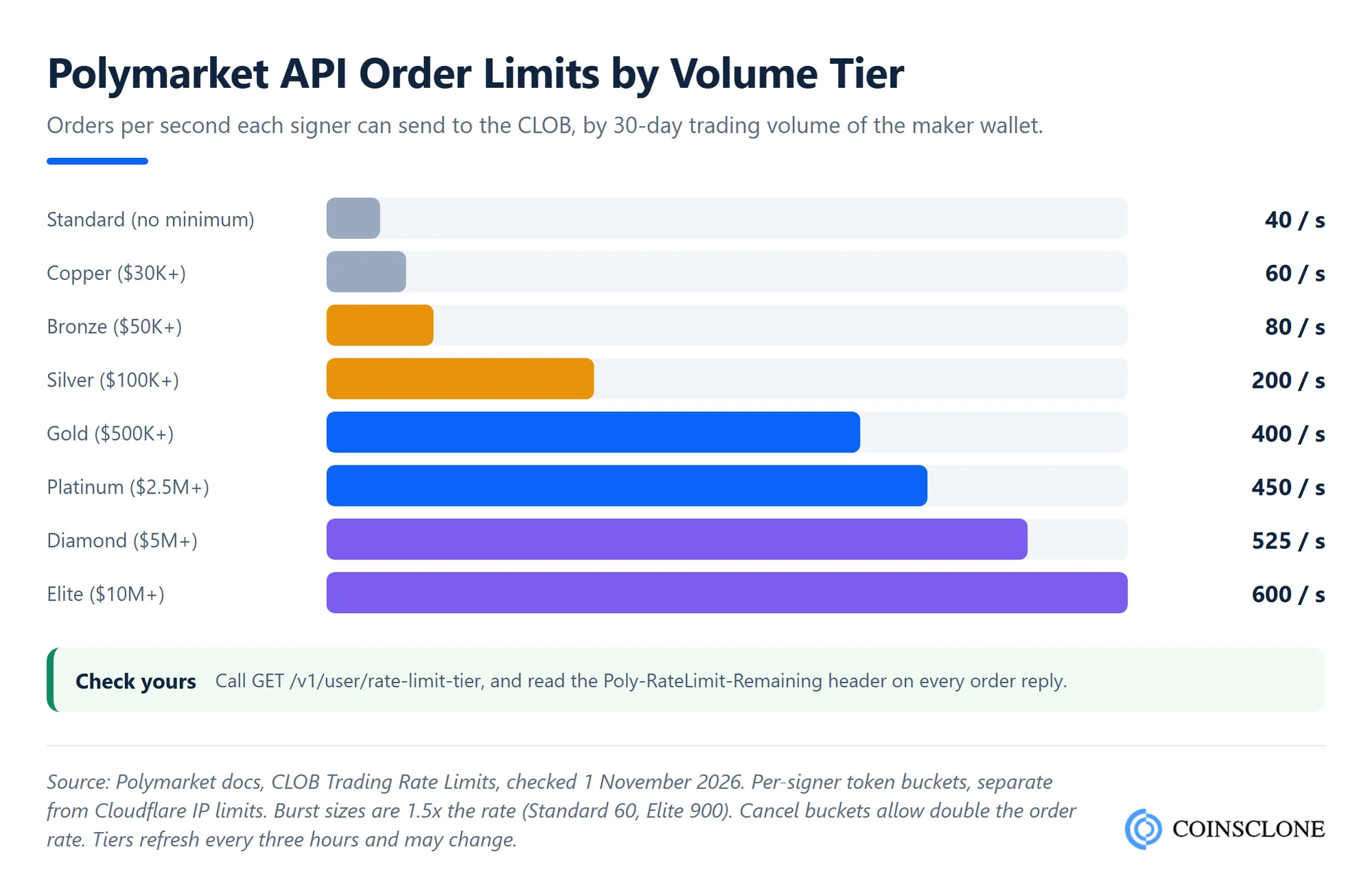
The second layer is per signer, the wallet tied to your API keys. Each signer has an order bucket and a cancel bucket that refill every second. Your tier depends on the maker wallet’s trading volume over the last 30 days. It runs from 40 orders a second on Standard to 600 on Elite. A batch costs one token per order inside it.
Polymarket began these per-signer limits in warning mode on 24 July 2026 and said it would announce live enforcement. So watch for the Poly-RateLimit-Warning header now. When you get a 429 reply, wait for the time in the Retry-After header, then try again.
Take care with numbers you find elsewhere. Some older guides quote hourly caps that do not match Polymarket’s own tables.
How Does the Polymarket Geoblock Endpoint Work?
Polymarket blocks or limits trading from some places. Before you let a user trade, call this endpoint:
GET https://polymarket.com/api/geoblock
It sits on polymarket.com, not on the API hosts. It returns four fields: blocked (true or false), ip, country and region. Orders from blocked places are rejected, so check first and show the user a clear message.
The geographic restrictions page lists three groups:
- Fully blocked: Places under US sanctions, such as Iran, Syria, Cuba, North Korea, and the Crimea, Donetsk and Luhansk regions of Ukraine. No new orders, and no closing old ones.
- Close-only on the website and the API: Users can close positions but not open new ones. The list includes the United States, the United Kingdom, France, Germany, Italy, Australia, Singapore, Taiwan, Thailand and Ontario, among others.
- Close-only on the website only: Ireland, Japan, the Netherlands and South Korea, plus Malta for sports. The API itself is not limited there.
Polymarket’s main servers run in the eu-west-2 cloud region in London. Market makers who pass identity checks can place their servers there for the lowest delay. Apps in the Builder Program that trade for users cannot.
How Is the Polymarket US API Different?
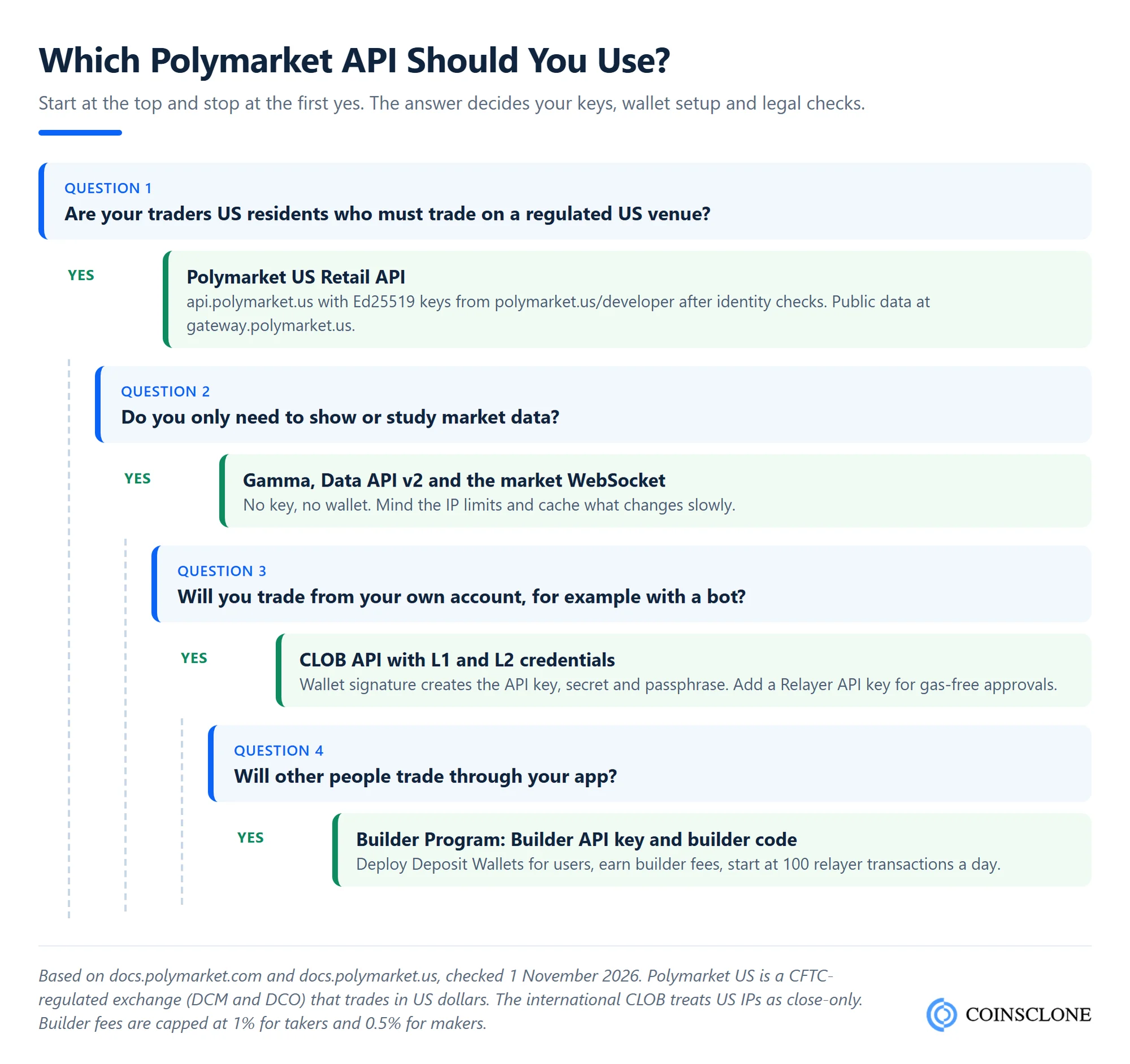
Polymarket US is a separate exchange. The US Commodity Futures Trading Commission (CFTC) regulates it as a designated contract market and clearing house. It trades in US dollars, not crypto, and it has its own API and keys.
| Feature | Polymarket (international) | Polymarket US |
| Status | Crypto-based venue; US IPs are close-only | CFTC-regulated exchange (DCM and DCO) |
| Money | pUSD on Polygon | US dollars |
| Public data | gamma-api, clob and data-api hosts | gateway.polymarket.us |
| Trading host | clob.polymarket.com | api.polymarket.us |
| How you get keys | A wallet signature creates them | App account, identity checks, then polymarket.us/developer |
| Request signing | HMAC-SHA256 with the API secret, plus a signed order | Ed25519 signature in X-PM headers, within 30 seconds of server time |
| Rate limit | Set per endpoint, up to 15,000 per 10 seconds per IP | 25 requests per second per IP, shared |
| SDKs | @polymarket/client and polymarket-client | polymarket-us for TypeScript and Python |
| Taker fee | Rate by category, such as 0.04 for politics | 0.0695 on most markets |
To get US keys, follow the Polymarket US authentication guide. Download the app, open an account and pass identity checks. Then sign in at polymarket.us/developer with the same login method and create a key. The secret shows only once, so save it right away.
One quirk: during slow periods, the US exchange rejects orders not processed within 5 seconds. Those rejects say “Global Rate Limit Exceeded”, but they are not a real rate limit, so you do not need to slow down.
A US build is a separate integration, not a settings switch. Market IDs, order fields and fees all differ.
What Does a Typical Polymarket API Flow Look Like?
Here is how a trading app or bot talks to Polymarket, from the first call to the payout, with no code:
- Check the region: Call the geoblock endpoint and stop if blocked is true.
- Find the market: Search events on Gamma, pick a market and read its version. Take the token IDs for older markets or the position IDs for Protocol V2 markets.
- Read the book: Pull the order book from the CLOB. It also returns the tick size, the minimum order size and whether the market is “neg risk” (one of several linked outcomes).
- Stream changes: Subscribe to the market channel so prices update without polling.
- Set up keys and approvals: Create L2 keys, then let the exchange use your pUSD and outcome tokens. The Relayer can do this with no gas.
- Place the order: Build the order, sign it with the wallet, add your builder code if you have one, and send it with the L2 headers. Pick a type such as fill or kill, fill and kill, or post-only.
- Track fills: Listen on the user channel for fills and status changes.
- Settle: When the oracle settles the market, redeem winning shares for pUSD. Data API v2 shows which positions you can redeem.
Worked example: what one API trade costs
Say your bot buys 100 “Yes” shares at $0.40 in a politics market and takes liquidity from the book. Polymarket’s fee formula is shares x fee rate x price x (1 minus price):
100 x 0.04 x 0.40 x 0.60 = $0.96
The shares cost $40, so the fee is 2.4% of the trade. If an app sent the order with a 0.5% builder fee, that adds $40 x 0.5% = $0.20, for $1.16 in total. A maker, whose order rests on the book, pays no platform fee. Geopolitics markets carry no fee at all.
Speed rules differ by market too. Since 4 September 2026, orders that take liquidity in crypto markets wait 150 ms before they match. That matters for fast bots.
What Can You Build With the Polymarket API?
Most products fall into four groups:
- Odds dashboards and widgets: News sites, newsletters and Discord bots show live odds. Gamma plus the market WebSocket covers this with no key.
- Trading bots: Market makers, arbitrage bots and alert bots run on the CLOB API. The hard parts are risk limits, key safety and recovery after restarts, not the API calls. If you need one built, see our crypto trading bot development service.
- Trading apps and aggregators: Apps can send orders for their users through the Builder Program. A builder code on each order credits the volume to you. You can charge up to 1% on taker orders and 0.5% on maker orders on top of Polymarket’s fees, paid daily. The default tier allows 100 relayer transactions a day, and the verified tier allows 10,000.
- Analytics and research tools: Data API v2 serves wallet PnL, user stats, holders with their PnL, leaderboards and resolution status. Copy trading tools and whale trackers start here.
What Are the Limits of the Polymarket API?
The API is strong, but plan around these gaps:
- History is patchy: The API is best at live state. For full resolved history across many markets, teams index data straight from the Polygon chain.
- The rules keep changing: In 2026 alone, the trading engine, collateral, wallets, SDKs and Data API all changed. Follow the changelog.
- Location limits your users: Close-only status for the US, the UK and much of Europe shapes who your app can serve.
- You do not own the venue: Polymarket can disable a builder code, change fees or change limits. Your product lives by its rules.
Should You Build on the API or Launch Your Own Prediction Market?
The API works well when you want Polymarket’s liquidity and users: a bot, a dashboard or a trading app. It is the wrong tool when you want your own markets, your own fees, a local currency or a licence in your country.
For those goals you need your own platform. That means market creation, an order book or automated market maker, an oracle to settle results, wallets, KYC and an admin panel. Our guide on how to build a prediction market like Polymarket walks through each part. And how Polymarket makes money shows the fee model you would copy.
Build Your Own Prediction Market or Polymarket Trading Tool
Prediction market development, done right.
- Polymarket Clone Platform: Order book trading, market creation, oracle settlement and an admin panel, ready in 5 to 7 weeks
- Polymarket Trading Bots: Market making, arbitrage and alert bots on the CLOB API with risk limits and safe key storage
- Odds Dashboards and Widgets: Live prices, order books and charts streamed from the Gamma API and WebSocket feeds
- Builder Apps and Analytics: Trading front ends with builder fees, wallet tracking and PnL reports from Data API v2
See a live demo of our prediction market platform and Polymarket API tools.
Book a Free Demo to plan your prediction market or Polymarket API build.
How Coinsclone Helps
Coinsclone builds for both paths. We build trading bots and dashboards that run on the Polymarket API, and full prediction market platforms with order books, oracle settlement, wallets and admin tools. Coinsclone has built crypto products since 2018 and delivered 350+ platforms for 200+ clients across 20 industries. Our Polymarket clone script launches in 5 to 7 weeks, and a Kalshi clone in 6 to 8 weeks. For a fully custom build, see our prediction market platform development service.
Frequently Asked Questions
Does Polymarket have an API?
Yes. Polymarket offers the Gamma API for market data, the CLOB API for order books and trading, the Data API for positions and analytics, and WebSocket streams for live updates. Polymarket US, the CFTC-regulated US exchange, has its own separate API.
Is the Polymarket API free to use?
Yes. Polymarket does not sell API plans, and public market data needs no key. You pay only the normal trading fees on orders that fill, and every endpoint has rate limits.
How do I get a Polymarket API key?
Sign a standard EIP-712 message with your wallet, then send it to the CLOB’s /auth/api-key route. You get back an API key, a secret and a passphrase. The official TypeScript and Python SDKs do this for you. Relayer and Builder keys are created in your polymarket.com settings.
Is the Polymarket API available in the USA?
The international API treats US IP addresses as close-only, so US users cannot open new positions there. US residents use Polymarket US instead. Its API keys come from polymarket.us/developer after you open an account in the app and pass identity checks.
What are the Polymarket API rate limits?
Limits are set per IP over 10-second windows, for example 4,000 requests on Gamma and 9,000 on the CLOB. Orders also have per-signer tiers from 40 to 600 a second, based on 30-day volume. The Polymarket US API allows 25 requests per second.
Does Polymarket have a WebSocket API?
Yes. The CLOB market channel streams order books, price changes and last trades for any outcome ID. The user channel streams your own orders and fills once you sign in with your keys. There are also sockets for sports scores and reference prices.
How do I get Polymarket price history from the API?
Call GET /v2/prices-history on the Data API with an outcome token ID. You can ask for a preset interval, a start and end time, or a single point in time. This route replaced the older price history route on the CLOB in September 2026.